API Authentication
Authentication is how an application can Trust that the user or system presenting to the application, is who they claim to be. Not to be confused with Authorization which covers What a user is allowed to do.
Web based SaaS applications which extend beyond the traditional domains of corporate networks or trusted devices has required Authentication mechanisms to respond in kind. The Fenergo SaaS platform uses an OpenID Connect and OAuth 2.0 framework to provide Standard Authentication services to UI Users and API clients. Typically clients elect to use their own SSO providers for their production tenants, thus retaining control for User Authorization within their own technical domains.
API Client Credentials
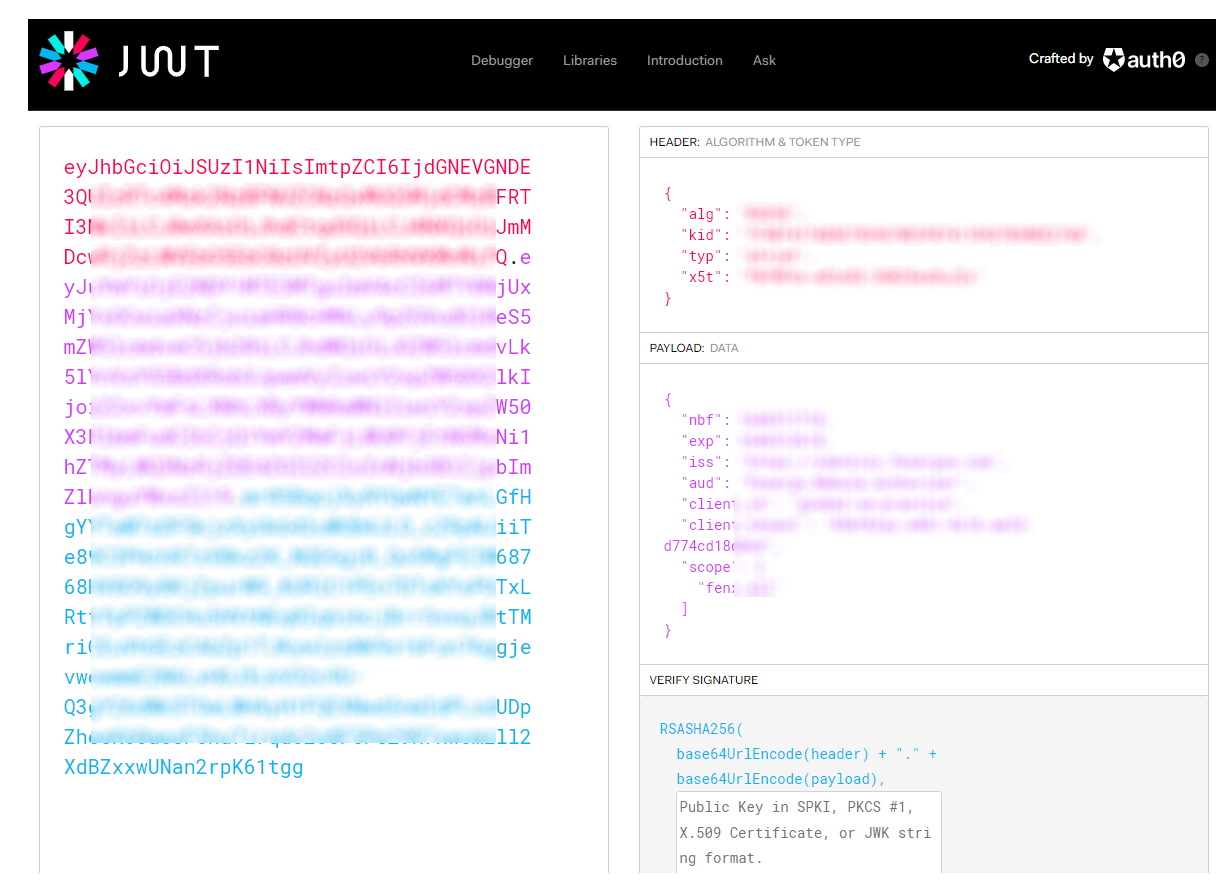
When Authenticating against the Fenergo APIs, we use the Client Credential flow. In this scenario the credentials (which are made up of a client id and secret) are only sent ONCE upon authentication. Once validated, an access token is returned to use in all subsequent calls. This protects the credentials as they are not required for each call and the access token acts as a surrogate for actual credentials. The type of token used by fenergo is called a Bearer Token. It is passed in all API calls as a header x-tenant-id. The Bearer (holder in possession of) the token can assume the permissions assigned to the original Credentials. The value of the access token itself is passed in a header called authorization (appended with the string Bearer).
    "access_token": "eyJhbGciOiJSUzI1NiIsImtpZxxxxxxxXXXXxxxXXXxxxXXXxxxXXXxxxXXXxxxXXXxxxXXXxxxXXXxxxXXXxxxXXXxxxXXXxxxXXXxxxXXXxxxXXXxxxXXXxxxXXXxxxXXXxxxXXXxxxXXXxxxXXXxxxXXXxxxXXXxxxXXXxxxXXXxxxXXXxxxXXXxxxXXXxxxXXXxxxXXXxxxXXXxxxXXXxxxXXXxxxXXXxxxXXXxxn2rpK61tgg",
    "expires_in": 900,
    "token_type": "Bearer",
    "scope": "xxxxxxx"
Common Terms and how they apply to Fenergo
The following list of terms come up frequently when we discuss the topic of Authentication and Security with clients, often getting a little overlapped and sometimes mixed up.
- SAML : is an Authentication and Authorization Protocol, typically found in large enterprises. Typically used on IDPs to provide SSO functionality.
- OAuth : is an Authorization ONLY Protocol used to facilitate access to resources (it is what’s used to protect access to our APIs). Users can gain authorized access to a resource without sending their actual credentials. (credentials have already been sent to a centralized IDP).
- OIDC : Is an extension of OAuth which adds User Id information to the Tokens used. Our default Authentication and Authorization.
- JWT : Is a standard used to securely sign and transmit information as a JSON Object (BASE64 Encoded)
For users of our SaaS UI in a NON-SSO configured tenants: We use OIDC so users can be Authenticated and Authorised against resources. *Important – This will allow the user to provide a username and password to the Fenergo IDP which then issue an access token. This Token is then used as part of the “Authorization Code Flow”
For users of our UI in SSO configured tenants: We use OIDC or if required SAML (Google Auth and also WS Fed) so users can be Authenticated and Authorised against resources. Different Code Flows based on the underlying IDP such as : SAML Bearer Assertion Flow
For API users (Client Credential Flow): Clients use a Fenergo Issued Client Credential which generates Access Tokens (essentially OIDC) – Also can use MTLS for enhanced Security.
For Users of our Portal : IDP with Auth0 (Need to ask a few more questions on this)
Users of other Client Portals: Token Exchange – originally for headless implementations, use our APIs but not the authentication flow. Behind the scenes could be using OIDC && AAD – not commonly used.
Types of users
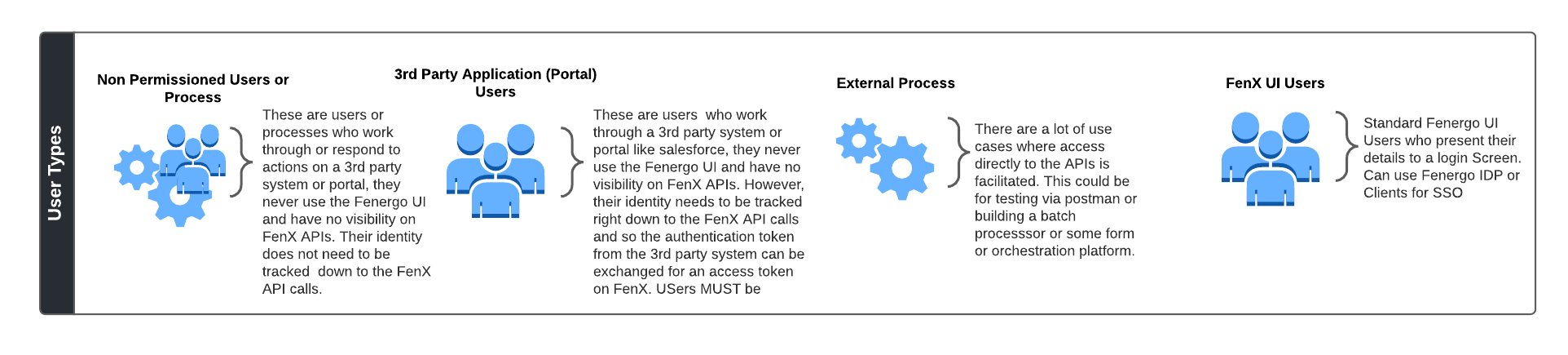
To decide how FenX clients should be configured to Authenticate, the types of user needs to be determined. There are broadly four separate categories of user type who will consume FenX APIs. As Illustrated below.
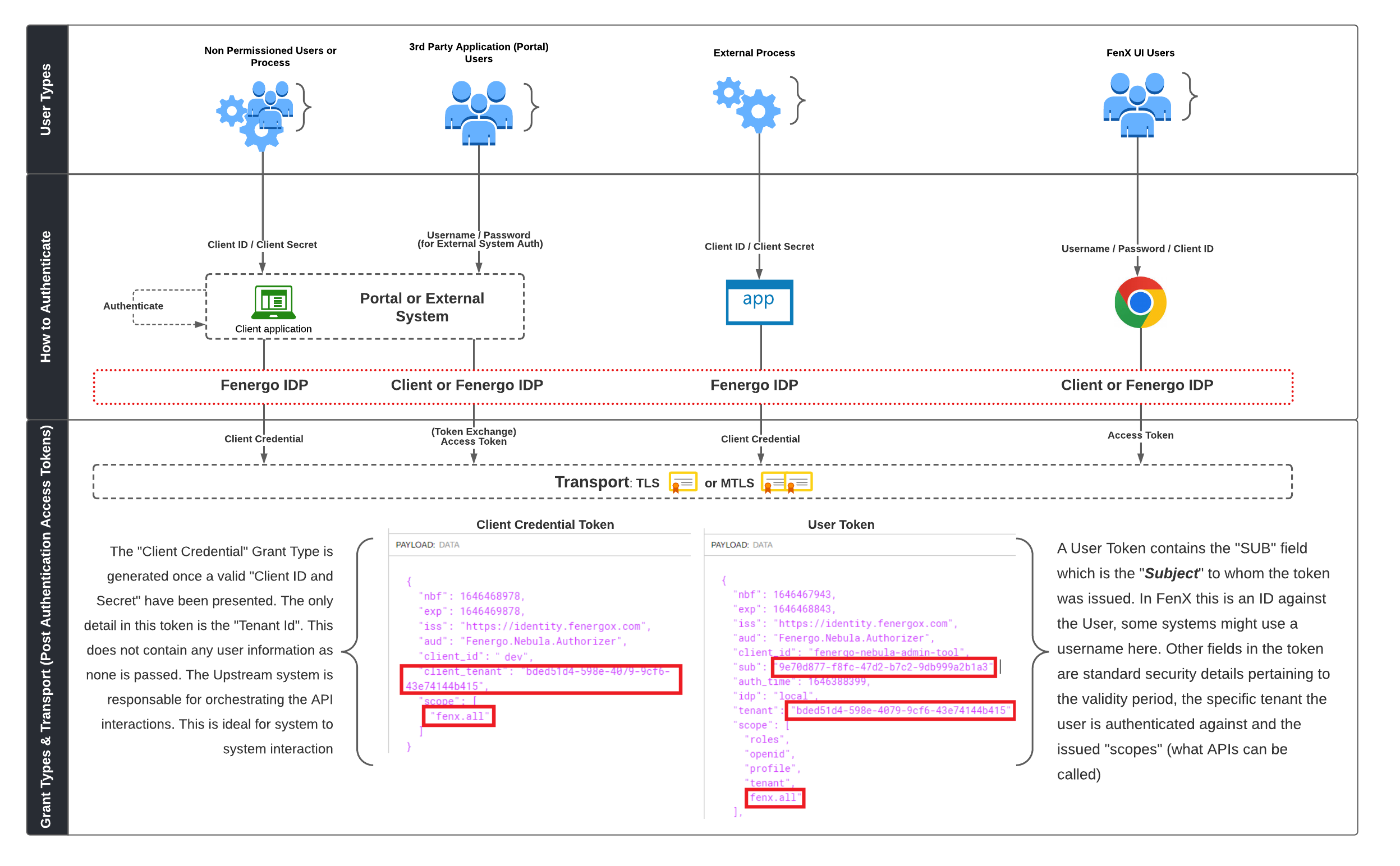
Each of these user types once Authenticated are issued an Access Token. That token is then presented for each subsequent API Call. Across the four user types, there are only two kinds of Access Token. One which identifies the underlying user and one which does not. Click here to learn more about Access Token Best Practice.
SSO and the Role of Client IDP's
The Authentication Mechanisms described here can be extended to include a clients Identity Provider (IPD), however the role of the IDP is to ensure that the credentials provided are correct. Where clients have centralised the activity of managing users and respective passwords with complexity and expiry requirements it makes more sense to integrate the authentication step with that IDP.
This allows clients to operate their FenX Tenant under the umbrella of their Single Sign On Service along with not requiring separate passwords for separate services across their application landscape.
There is an option to enforce the usage of SSO for a tenant. If this option is enabled, the users won't be able to log in without SSO (via user and password) even if those have been created beforehand. Please reach out to your contact at Fenergo if you require this to be enabled.
To inspect what this token is comprised of, simply visit: JWT.io. The token itself is not an encrypted string, it is simply a base64 encoded string and the contents can be viewed by base64 decoding. For security purposes and how the bearer token works, it must only be passed across HTTPS connections.
The Fenergo SaaS UI uses the OAuth 2.0 Authorization Code Flow Read more on OAuth 2.0 flow here
Grant Types
-
client_credentials: Accepts a "Client Id" and "Client Secret". The Bearer Token returned as illustrated below contains no identifiable details which relate to the underlying user or system performing the action. -
authorization_code: Accepts a Username, Password and Client ID. The Bearer Token returned as illustrated does contain an identifier specific to the underlying user who requested the token. This user must exist on the FenX system. -
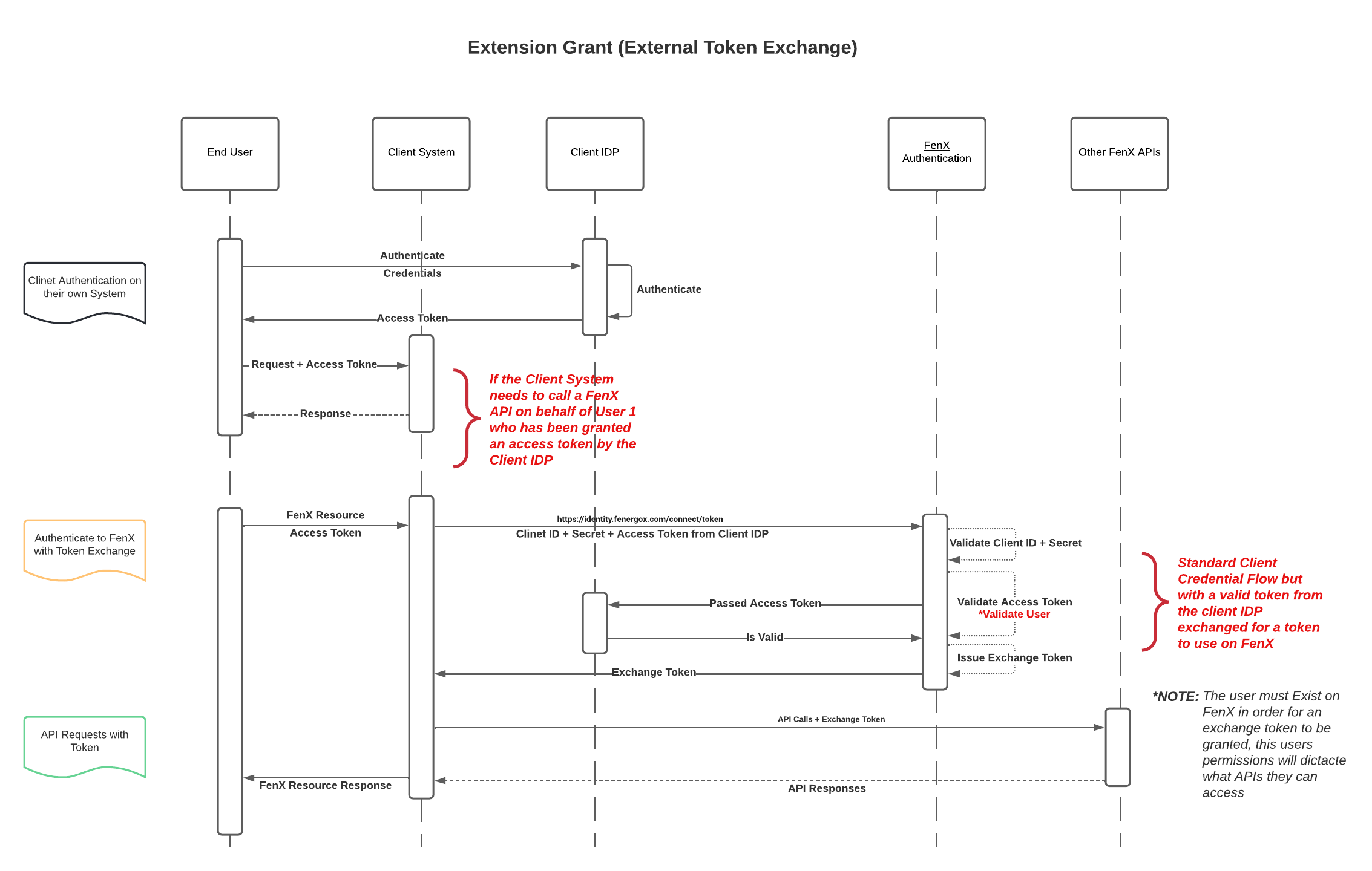
external-token-exchange: Very similar to the Client Credential grant type but also takes an externally issued token from another IDP which is then verified and exchanged for a new token issued by Fenergo.
Client Credential Flow
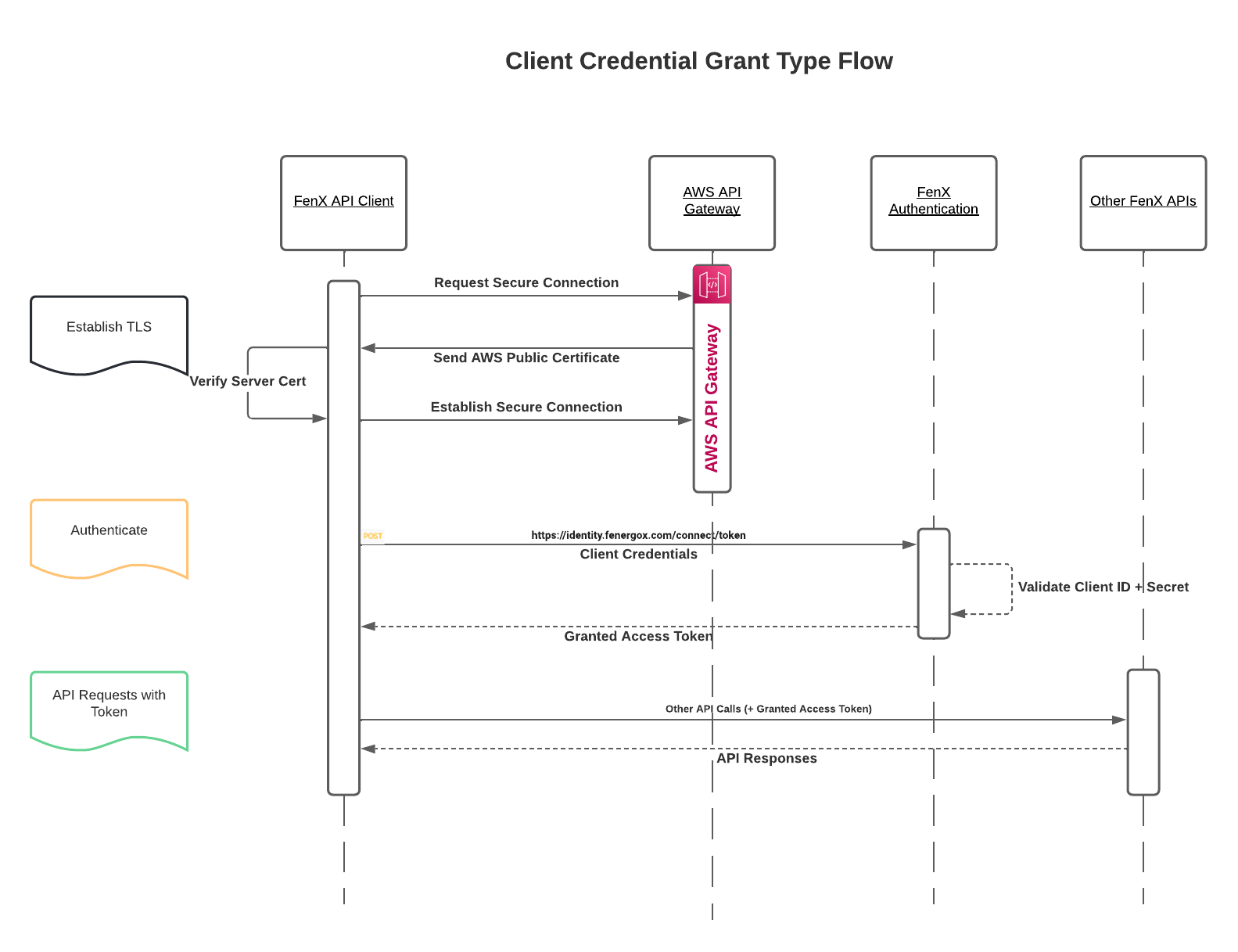
As Illustrated below, the client credentials flow starts with the establishment of a secure connection. The TLS handshake is handled behind the scenes for the most part simply by specifying a https URL.
- Establish the HTTPS secure channel
- A Client ID and Client Secret are sent to the FenX IDP for Authentication.
- If Authenticated, an Access Token is generated and returned which the client can use for subsequent API calls.
Standard Endpoints
| Purpose | Endpoint |
|---|---|
| Token Endpoint | https://identity.{region}.fenergox.com/connect/token |
| API Base URL | https://api.{region}.fenergox.com |
Replace {region} with your tenant's region identifier (e.g. emea1b). For the default EMEA tenant, the region can be omitted (e.g. https://identity.fenergox.com/connect/token).
Client Credential Flow with MTLS
In a situation for further security is required mTLS (Mutual Transport Layer Security) can be used. The key difference here is that both the Client and Server Certificates are validated to establish the secure channel. The rest of the flow for client credential remains the same as can be seen below:
When mTLS is enabled, you must use the dedicated mTLS endpoints instead of the standard endpoints. These endpoints enforce mutual certificate validation on the TLS connection.
MTLS Endpoints
| Purpose | Endpoint |
|---|---|
| Token Endpoint (mTLS) | https://api-mtls.fenergox.com/sts/connect/mtls/token |
| API Base URL (mTLS) | https://api-mtls.fenergox.com |
| Standard (TLS) | MTLS | |
|---|---|---|
| Token | https://identity.fenergox.com/connect/token | https://api-mtls.fenergox.com/sts/connect/mtls/token |
| API | https://api.fenergox.com | https://api-mtls.fenergox.com |
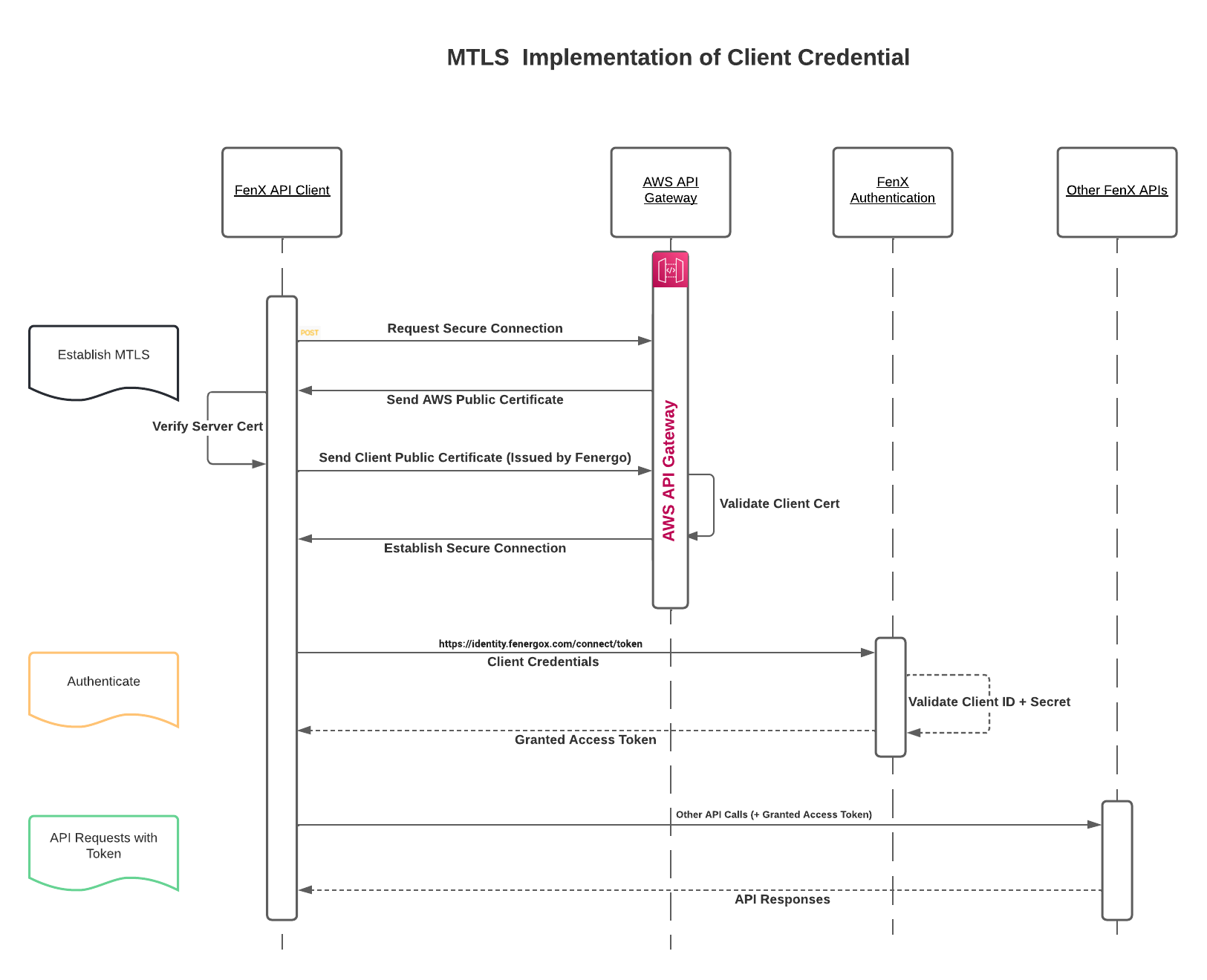
The client certificate must be issued by Fenergo. This is a dependency on the AWS API Gateway so clients cannot bring their own independently issued Certificates.
Authorization Code Flow (with PKCE)
Where a client cannot securely store a Client Secret, such as in a Static React Webapp which is used by multiple tenants or where an APP performs custom redirects, need to protect an Authorization Code to ensure only the code requestor can use it.
To address this, OAuth 2.0 provides a version of the Authorization Code Flow which makes use of a Proof Key for Code Exchange (PKCE) defined in OAuth 2.0 RFC 7636.
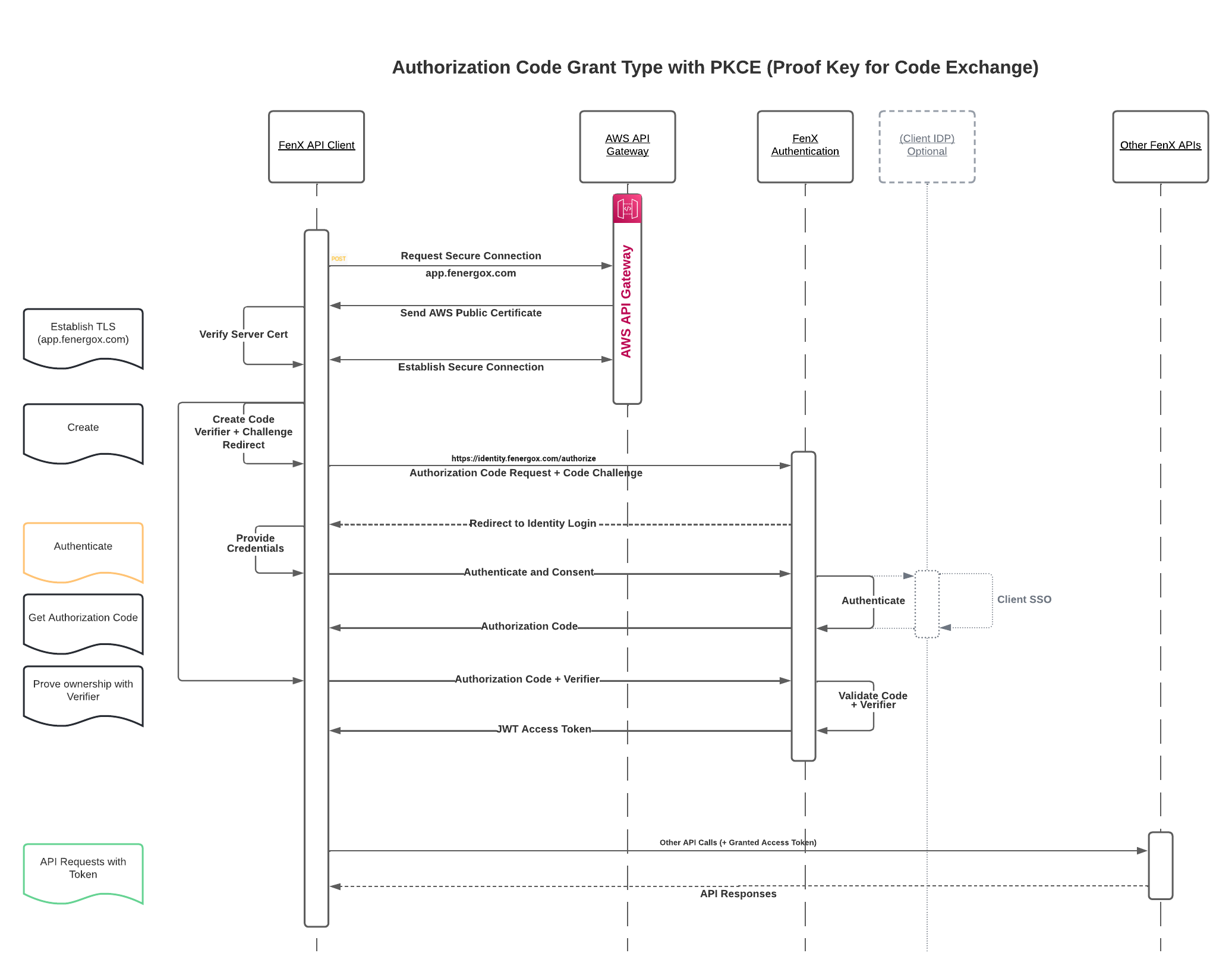
The PKCE-enhanced Authorization Code Flow introduces a secret created by the calling application that can be verified by the authorization server. This works by the webapp first creating a code verifier and using that verifier creates a Code Challenge (which can only be verified with the verifier).
- The
Code Challengeis sent to the/authorizeendpoint to start the request for anAuthorization Token. - The Authentication is performed with the credentials (This can be done with a clients IDP provider if required).
- The Authorization Server saves the
code challenge, and issues anAuthorization Codeback to the Client. - This code is valid ONLY for one time use to allow the client "verify" that they are the original code requestor.
- The Client then sends the
Code + Verifierback to the Authorization server which can now verify that the client originated the initial request (based on the combination of challenge + verifier) - Server responds with an
Access Tokenthat can now be used to access resources.
External Token Exchange Grant Type
To facilitate Identifying the actual user who has authenticated to a 3rd Party Application which needs to call FenX APIs on behalf of that user, we have implemented the external-token-exchange grant type.
The assumption is that the user has already authenticated on the platform which is making the API calls, and the token they were issued is sent along with the preconfigured client-id and client-secret as per the client credential flow. Once the client credential flow is authenticated, the original users token is then "exchanged" for a FenX Token which can be used as if it were created using the Authorization Code Flow.
The user from the 3rd Party App must exist on FenX or else the Token Exchange will fail. The User can be added "On-Demand" as required.