External Policy Provider for single Fields and Data Groups
Clients can configure specific fields or a data group in their policy to connect to Three types of external data sources which can fill those policy requirements. These allow users to Search for Suggestions and Validate a Selection for a single specific field through the FenX User Interface or to fill a Collection of fields in a data group. This document will detail how to configure and test that functionality. The capability is enabled through the Policy Providers Command and Query APIs.
| APIs Referenced |
|---|
| External Policy Provider Query |
| External Policy Provider Command |
| Adapter Implementation Contract |
Policy Fields Architecture
The steps to create and implement the Policy Adapter and explained in detail within this section of the Documentation. The Fenergo platform provides a UI interface to set these up or it can be done via APIs. Once you have created your policy field adapter, it can then be used in the policy policy configuration. The Fenergo UI will make calls to the URL you specified when you start typing (for suggestions) or when you tab-out / leave a field (call for Validation). The Fenergo USer Interface is one way to interact with your adapter, but you can also use the same APIs that our user interface uses to get Suggestions and Validation of single fields as well as Multi-Field Suggestions and Details. Consider the high level architecture illustrated below.
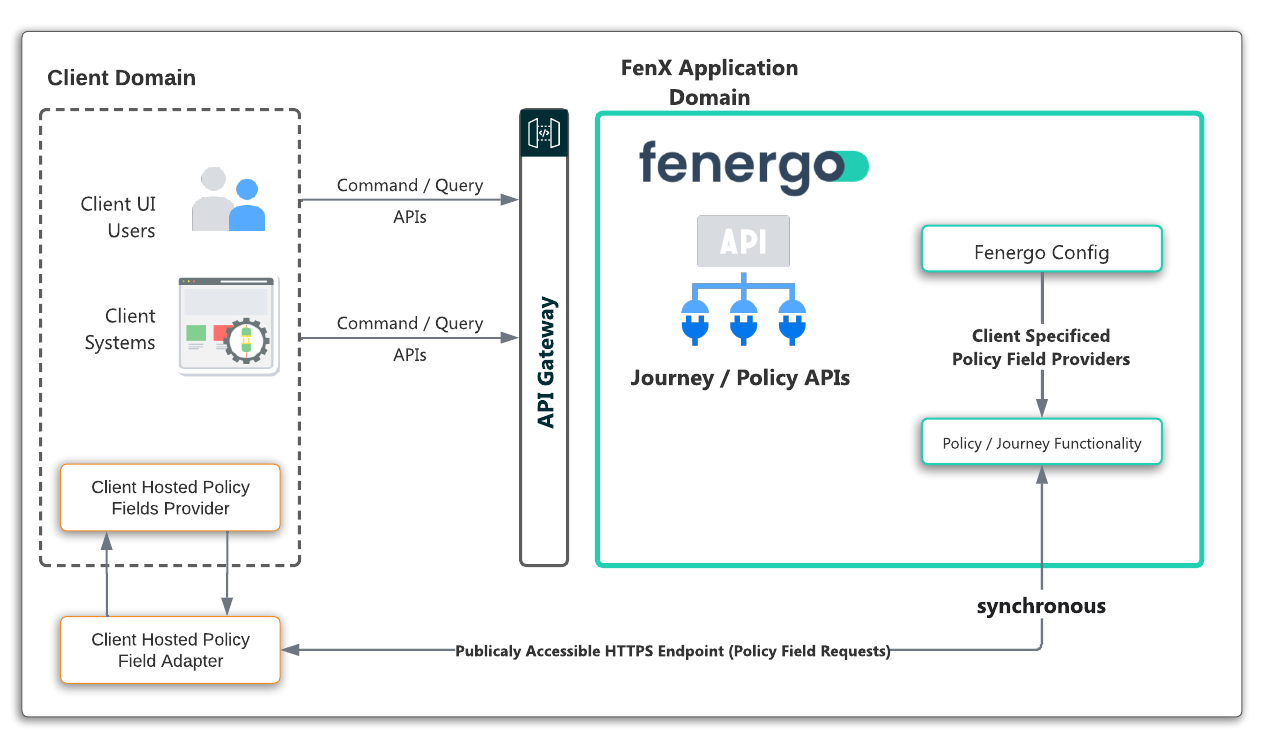
Once the adapter is configured, the pattern of use is as follows:
- A user interacts with Fenergo UI: As the user types in to the designated field (for single field) or selects to add a multi-cardinality Data Group (for Multi-Field), the Fenergo platform will pick up this event and capture the data entered.
- Call your Adapter: The Fenergo platform will create an encrypted & signed request that is sent on to your Adapter.
- Your Adapter Processes the Request: Once you receive the message, you need to decrypt and verify the message, then your logic will need to generate the matching results (for suggestions) or test for accuracy (for validate) or provide formatted suggestions and identifiers plus details for Multi-Field.
- Send the Response: Your Adapter needs to construct a response message, encrypt-sign that response and send it back to Fenergo synchronously.
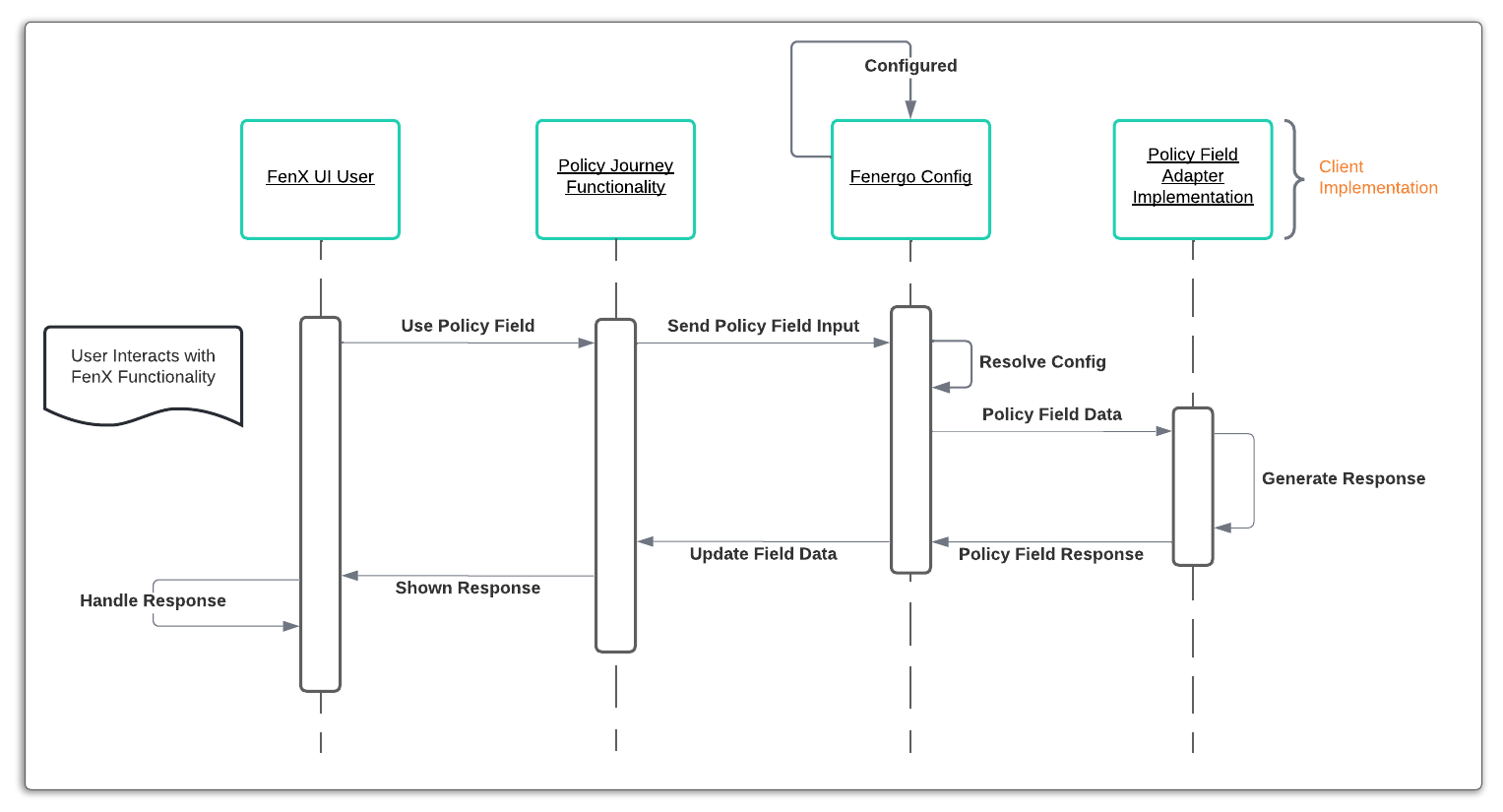
Single Field - Synchronous Pattern
The implementation is designed to work in concert with the User Interface and is required to give immediate feedback to the user. The API calls to perform Suggestions (Search) and Validate happen in real time (synchronously). The pattern of interaction is detailed in the sequence diagram below:
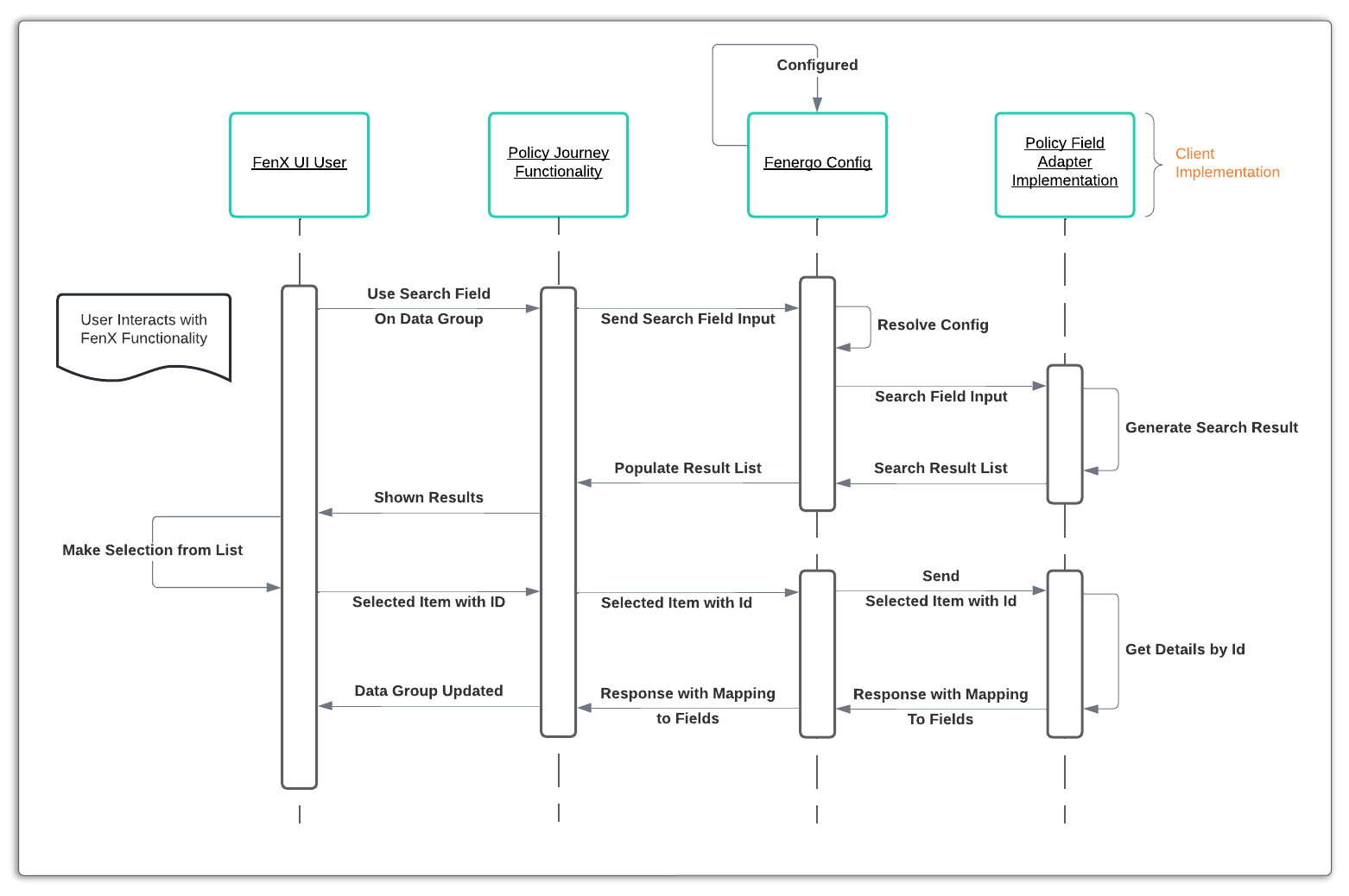
Multi Field - Synchronous Pattern
In much the same was as the single field works synchronously, so too does the multi-field adapter. The difference is that two calls are used. One to retrieve a list of suggestions, which is displayed as the user searches, and then a second call that retrieves a detailed mapping from the selected result set to the fields in the data group.
Using the External Policy Adapter
To use the External Policy Adapter, clients need to complete the following steps:
- Decide The Adapter Type - Can create either a Search, Validate or DataGroupSearch type.
- Create The Adapter - Through the UI (or API as will be shown).
- Make The Adapter Available - Implement your adapter and ensure it available at the URL provided in the config.
- Configure the Policy Field for Single Field - The Policy Field needs to be configured to use the adapter as an external data source.
- Configure the Data Group for Multi- Field - The Data Group needs to be configured to use the adapter as an external data source.
For the multi-field Adapter, the Data Group must be a multi-cardinality type in order to use the external multi-field suggestions and details. You can only set this at the time the data group is created so this functionality cannot be added to existing single-cardinality Data Groups.
Encryption and Decryption
As you can see in the Create request above, you must provide Base64 Encoded encryption and authentication Keys which fenergo will use to secure the content of your message.
Generating the Keys and handling the decryption+validation as well as encryption+signing are clients responsibility. Follow this guide for a walkthrough of creating keys.
Follow this guide for a walkthrough of encryption.