Custom Screening Adapter Implementation
Once the custom screening adapter has been configured in Fenergo (and tested) it can then be used from within Journeys. What this means is that when a Screening Task is configured in a journey, Fenergo will send a Screen Request out to the configured providers. A correctly configured client implemented custom adapter will need to be capable of the following:
- Receive a Screening Search Message: When Initiating Screening, Fenergo will send messages to the client configured custom adapter endpoint. As the pattern is Asynchronous the custom screening adapter only needs to respond with a HTTP 200 OK.
- Process the Screen Request: The Screen Request will contain the configured search criteria (and entity alias, if the entities have them) and the custom screening adapter will need to be able to search a screening repository for Matches against that criteria.
- Compose a correctly Structured Response Message: With matches identified, the custom adapter will have to construct a message to be sent back to Fenergo in the prescribed format. This will involve some mapping and custom JSON message creation. The format for this message is outlined in the Receptor Spec and will be demonstrated below.
- Send the response to the Fenergo Receptor: With the message formed, the adapter will have to send a message back to the Fenergo Receptor endpoint. The match data will be ingested into the Screening task of the Journey and displayed to the users.
The Same pattern of exchange is later initiated after a Fenergo user has updated the screening match results on the Fenergo UI (or via tha Command Query APIs). These next steps return the results to the provider and close the screening batch on the Fenergo platform.
- Receive a Resolve Matches Message: Once matches are resolved, an update for the actions takes on those matches is sent to the client configured custom adapter endpoint. Again as the pattern is Asynchronous, the custom screening adapter only needs to respond with a HTTP 200 OK.
- Process the Resolve Matches Request: The Resolve Matches Request will contain the choices made on the Fenergo Platform. This detail can be used by the downstream screening platform to update its data and not return those same matches again in later searches.
- Compose a Resolve Matches Response Message: With matches resolved, Fenergo needs the response back from the client adapter to close the batch. The format for this message is outlined in the Receptor Spec and will be demonstrated below.
- Send the Resolve Matches Response to the Fenergo Receptor: With the message formed, the adapter will have to send a message back to the Fenergo Receptor endpoint. The match data will be ingested into the Screening task of the Journey and displayed to the users.
All of the above steps are illustrated in the below Sequence Diagram.
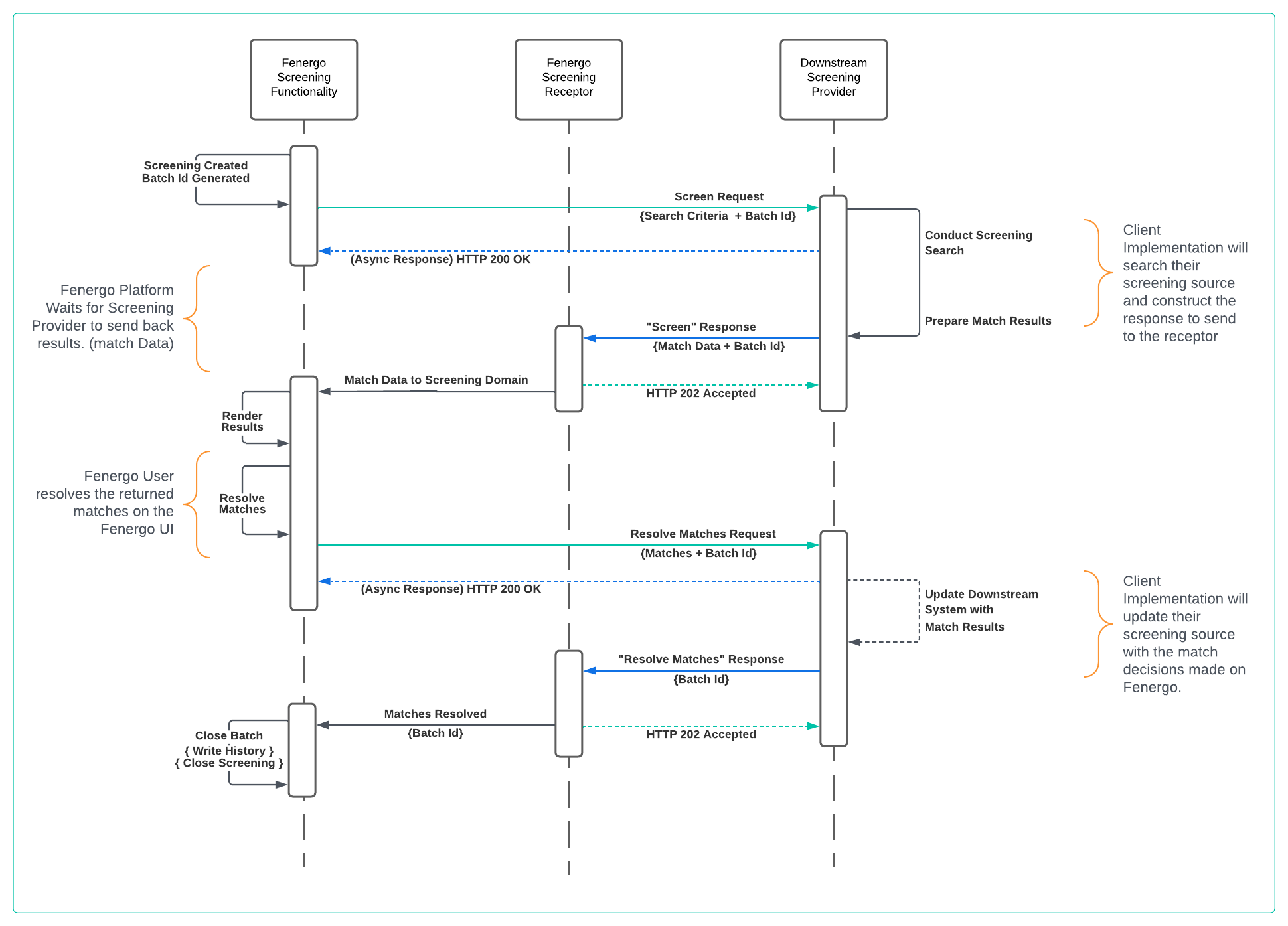
If your custom provider is using Ongoing Screening (and has OGS enabled in the Fenergo Screening provider configuration), some calls to the /api/ongoingscreening and /api/ongoingscreeningupdate will be sent to the adapter in different parts of the journey:
- /api/ongoingscreening: If you have configured the "Subscribe to OGS" task in your journey, this will be sent as part of that task. Otherwise, it will be called as part of the CloseScreening task if everything went correctly. It will also be called when you enable or disable OGS for an entity using the Screening Command API, when an entity is fully removed from the Fenergo system for GDPR, or when an entity is unsubscribed from OGS using the UI task.
- /api/ongoingscreeningupdate: This will be sent as part of the Screening Request task (or batch creation if you're using the APIs), if the Search Criteria for an existing entity already subscribed to OGS has been updated. It will also be called when you update an entity that is already subscribed to OGS using the Screening Command API.
Note that these requests work in the same way as the Screening Request and Resolve matches in the way the asynchronous pattern and encryption work. We'll explain further down the document how the custom provider can trigger Ongoing Screening journeys.
All messages sent to a clients custom screening adapter will be AES Encrypted. AES encryption is performed with the client provided Encryption KEY and signed using the client provided Authentication KEY. The custom adapter will need to be able to perform the decryption and validation of that message. It will also need to Encrypt and Sign messages returned to the Receptor in the same way. For details of the Encryption and Decryption steps click review this guide
Journey to Demonstrate the Screening Adapter Implementation
A simple Journey illustrated below will be used to demonstrate and explain the exchange of messages between Fenergo and a clients custom screening adapter implementation. As a user navigates and completes the steps below a combination of manual and automated tasks will orchestrate the communication and each message in each step will be examined.
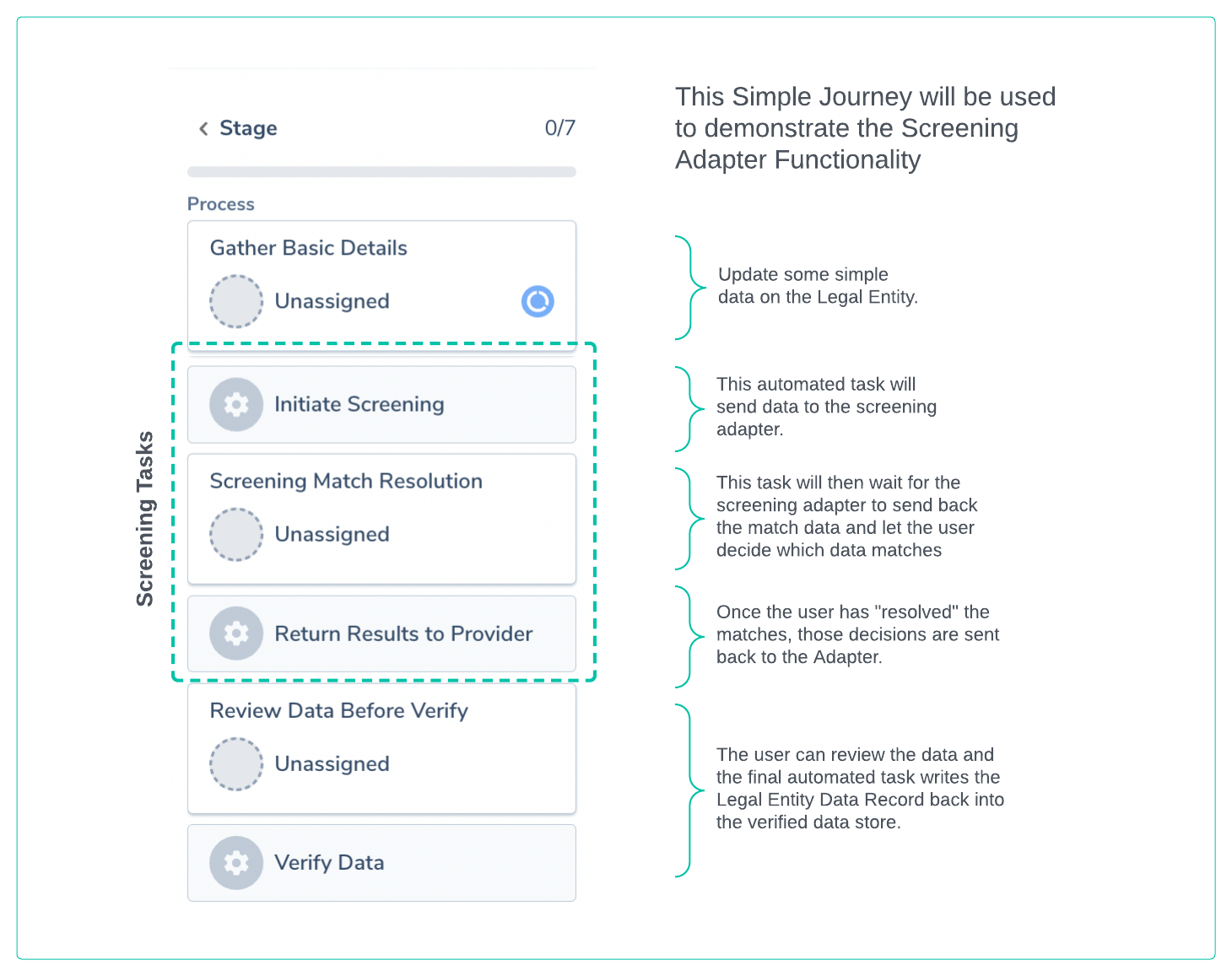
Initiate Screening
The first task is an Automated task on the Fenergo platform. It performs a number of steps including:
- Gathers Search Criteria: The Legal Entities in Scope for screening on the Journey are gathered.
- Creates a Screening Batch: This is logical concept used to describe the screening activity but contains the search criteria and is associated with the Legal Entity and the Journey. It has a Screening Batch ID which is used to orchestrate actions against a specific screening activity.
- Sends the Search Criteria: The Search criteria gathered and the batch details are sent to the configured Screening Providers.
The structure of the Screen Request is a detailed message that clients must understand to extract the data they need to perform a screening action on their downstream system. Object level Details can be found in the Screening Adapter Swagger File.
This will cause the Fenergo SaaS application to send a Screen message to your hosted Adapter at the URL you provided in your configuration. Your adapter implementation needs to respond with a HTTP 200 Ok. Your adapter will then need to Decrypt this message. An example of the Screen message in its encrypted form is below (some content xxxxx'd out):
POST /api/screen HTTP/1.1
Host: {yourSpecifiedURL}
Content-Type: text/plain
X-Encryption-IV: NF/xxxxxx-xxxxxx-xxxxxq5oMzw==
X-Authentication-MAC: DEL/vVxxxxx-xxxxxx-xxxxx-xxxxxxxZRAnw=
X-Provider-Id: TestScreening
X-Tenant-Id: xxxxx-xxxxxx-xxxxx-xxxxxxx

IRIGZHGy4GVllXEA0rpthxjXbMJO4T5xiWUjgfY67S8gQasGjUWAYVacaXEAz1V8PHRoPcdFM9Em0xbAozY3SvqRSEOqVBZ5s1O8PZxo0UcmOmCCyIqKRXFnJXVEUUD/tksUr7Uz0T+vKtE1JPsnl5BPe1ftStnmoMD9wYaR0OdGTZBC9n+VRAg+FP+0TwAW1ZYJIxrucO3tzgCQahgY/LxD5XuVD2TCFsiuRD1eXA4tl8c2tkeTxTt6QHC9x71QLax6bvRh7/gYPNYnuCpP8fJWy+F1oxgTacE7W2TQfsY+bcrjAlEYkv9rjxR9UG/nFhZ+xxxxx-xxxxxx-xxxxx-xxxxxxxxxxxx-xxxxxx-xxxxx-xxxxxxxxxxxx-xxxxxx-xxxxx-xxxxxxxxxxxx-xxxxxx-xxxxx-xxxxxxxxxxxx-xxxxxx-xxxxx-xxxxxxxxxxxx-xxxxxx-xxxxx-xxxxxxxxxxxx-xxxxxx-xxxxx-xxxxxxxxxxxx-xxxxxx-xxxxx-xxxxxxxxxxxx-xxxxxx-xxxxx-xxxxxxxxxxxx-xxxxxx-xxxxx-xxxxxxxxxxxx-xxxxxx-xxxxx-xxxxxxxT2AMwldb5InUhvL07uPc69hoo/ftkM20CjPxwi7+tscpO3/5swkPnN9qjAEdgUoNqbdxjaiIUVoCoFNxlEyGL2rhAgZtMWVfQa/HYG/J+S30nw38PcmCcuEnlT
Fenergo UI after Initiate Screening Task
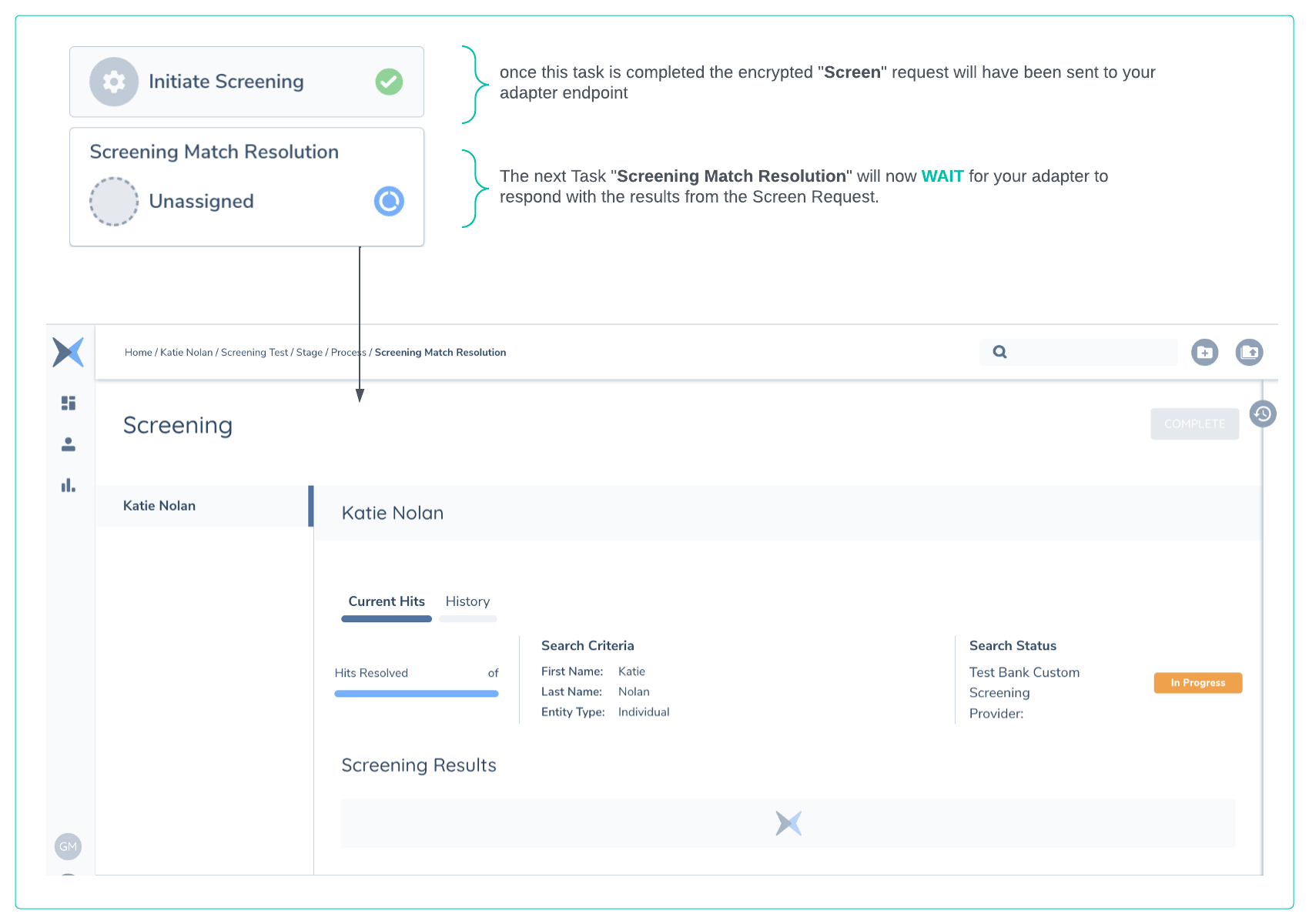
Once the above message has been sent, the task Status in the Journey is updated as below and the Screening Match Resolution task is now available. You can navigate to this task as below but you will not be able to Complete it until the results are returned and all matches resolved. The Search Status is illustrated in the User Interface and labeled with an Icon in orange as In Progress
Understanding the Screen Request Message
The Screen Message (from Fenergo >> to >> Your Custom Adapter), when decrypted, is structured as below and contains all the data needed to execute a Screening on the legal entity(s). The Entities collection in the below message only contains a single Entity in this example but this could contain multiple entries as related parties can also be selected for screening inside a journey. (This is why a screening is referred to as a Batch)
{
    "Data": {
        "Entities": [
            {
                "EntityId": "33692658-7b17-4083-8e09-f69df8345d53",
                "LegalEntityId": "4da2595b-9052-48db-957a-5ff0e66c50e9",
                "SearchCriteria": {
                    "FullName": null,
                    "FirstName": "Katie",
                    "MiddleName": null,
                    "LastName": "Nolan",
                    "DateOfBirth": null,
                    "Gender": null,
                    "LegalEntityName": null,
                    "Type": "Individual",
                    "Address": null,
                    "IDNumber": null,
                    "PhoneNumber": null,
                    "EmailAddress": null,
                    "Nationality": null,
                    "CountryOfResidence": "Ireland",
                    "PlaceOfBirth": null,
                    "Citizenship": null,
                    "RegisteredCountry": null
                },
                "EntityAliases": [
                    {
                        "id": "my-alias-id-xxxx-xxxxxxxxxxxx",
                        "aliasType": "AKA",
                        "fullName": null,
                        "firstName": "Kate",
                        "middleName": "Marie",
                        "lastName": "Nolan",
                        "legalEntityName": null
                    }
                ]
            }
        ],
        "AdditionalSettings": [],
        "OverriddenBatches": [],
        "JourneyId": "3176163e-ef8e-4863-84cd-133f345ddf37",
        "ProcessId": "db1bc131-b9c5-4ba8-ad83-a292575c11be"
    },
    "Id": "bcf3b51f-4478-4966-a9fc-21d4652ed92e",
    "Tenant": "45bf62ac-e4b1-4c16-ae32-d774cd18db6d",
    "ProviderId": "TestScreening",
    "Type": "Screen"
}
In the above Screen example the following fields are important to understand:
- The
"EntityId"is a unique reference for the Legal Entity specific to screening. When Match Data is returned from a provider this is the Id that must be referenced so we can associate the match result to the Legal Entity. This will be required by a clients implementation when sending back the match data for this entity. - The
"LegalEntityId"is the unique identifier used by Fenergo to identify the Legal Entity. This can be used by your provider as a foreign key reference for the Legal Entity. It will ne be needed when responding with Match Data. - The
"SearchCriteria"which is sent to the screening provider. This data is copied from the Legal Entity Record in Fenergo. It will send as much data as is available and can be undated by configuring the Secondary Identifiers tab in the Screening Configuration. - The
"EntityAliases"array contains any aliases that have been added for the Legal Entity (in the alternateNames data group). The alias data can be used by the screening provider to enhance the search criteria and improve the chances of finding matches. The Secondary Identifiers filters will be applied to these fields as well. Since most of the providers don't allow sending multiple aliases in the Search, how this will work for most providers is that, under the hood, the adapter will make a search for the Primary Name of the entity and each of the aliases to the provider and then before sending the response to the receptor, it will merge the matches for the different aliases, making sure that any match that appears for multiple aliases only appears once in the response, linked to the different aliases (by using EntityAliasIds and EntityAliasId in the different externalIds, more details on the new fields will be found bellow). Note that this is an optional feature that providers can decide not to implement if they don't want to support aliases. - The
"Id"at the root of the message"Id": "bcf3b51f-4478-4966-a9fc-21d4652ed92e"is the Batch Id for the screening. This will be required in messages sent back to the Fenergo Receptor and is used to identify this specific screening activity for this provider. - The
"ProviderId"is the string value configured when setting up the provider in Fenergo. This is also required when responding to the Receptor. - The
"OverriddenBatches"is the list of batches that need to be discarded in the provider as part of this screening request. This will only contain data when we are doing a Screening Request after reopening a previous task. In that case, the previous batch (regardless of whether it was completed or not) should be discarded to make sure those matches appear again as part of this Search. - Other Fields:
- The
"Tenant"is sent with the screening request. It will allow clients to identify which of their tenants has sent the Screen request. - The
"Type"in this example is"Type":"Screen"which allows clients to identify what kind of message is being sent. Adapters could use the URL structure which is sent with the requestHTTPS://{yourSpecifiedURL}/api/screenor may have a universal endpoint that receives all requests. This value can direct the message to the correct implementation. - The
"JourneyId"and"ProcessId"are sent, these are not required to be references when responding but may be needed by the downstream system to perform some correlation. Clients do not need to only use the Fenergo UI to work with results but can use the Screening Command Query APIs to interact.
- The
Screen Response to Fenergo Receptor
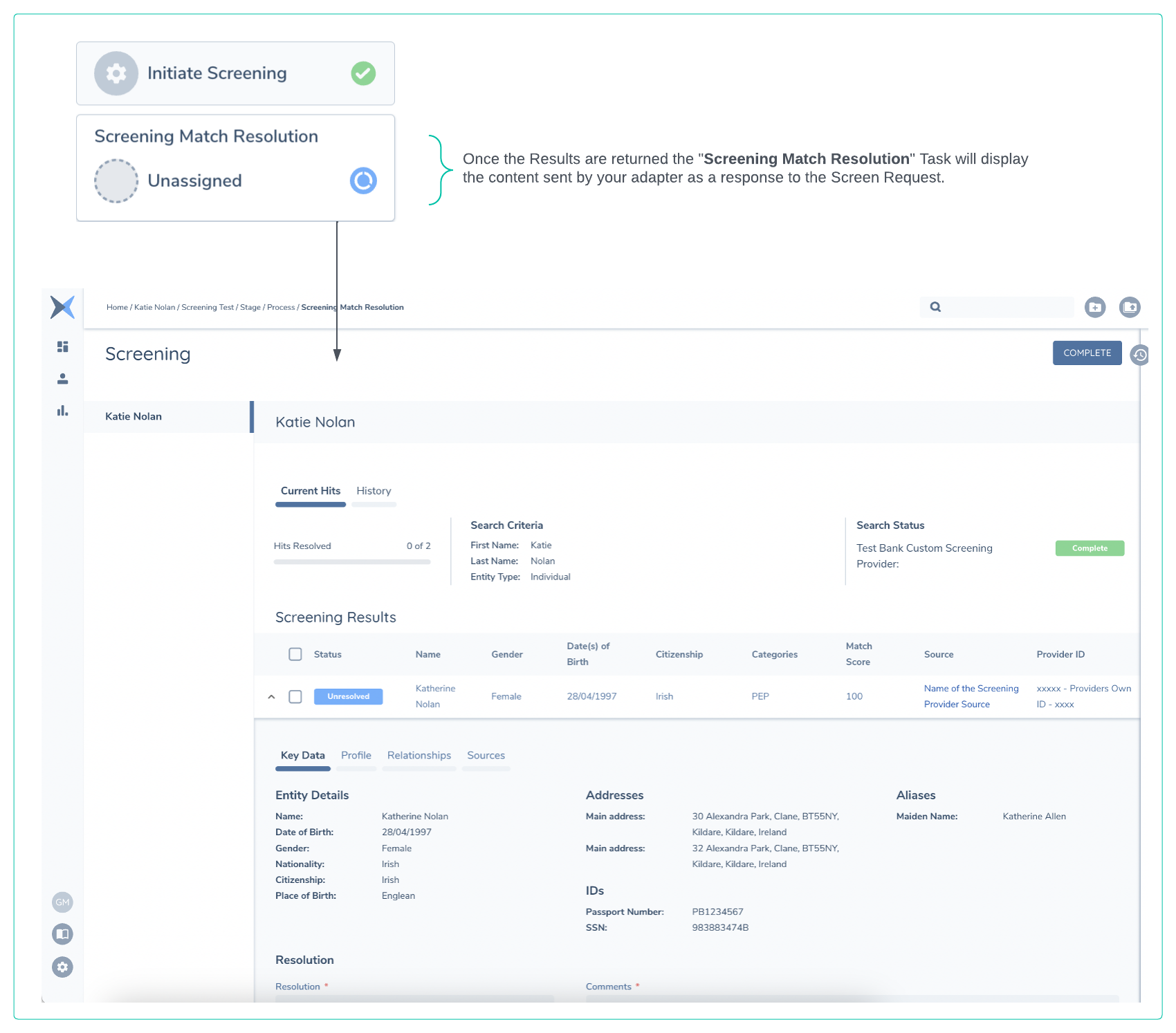
The request to the Custom Screening provider is Asynchronous. The clients provider implementation needs to reply to the above request with a HTTP 200 OK. Every client implementation will be different, in some cases a clients implementation will respond automatically with the match results (close to real time), in other scenarios it may have some manual activity required on a downstream system. The Fenergo UI will remain In Progress until the response is received. Below is an illustration of how the UI will be updated when this response is received. The Match Data (in this example two potential matches, one linked to the main entity and the alias, and the second one linked only to the main entity) is listed for the Fenergo User to update. The state of the Search Status is set to Complete
Understanding the Screen Response Message
The following example of a Screen message that is sent to the Fenergo Receptor contains many different elements, and the Screening Receptor Swagger Spec outlines the full schema so clients can construct this message in their adapters. Some key elements are called out and explained below.
{
    "response": {
        "batchExternalIds": [
            {
                "source": "TestScreening",
                "name": "Name of Batch External Id Field",
                "value": "xxxxx-xxxx-ID-Value-xxxxxxxx"
            }
        ],
        "entities": [
            {
                "entityId": "33692658-7b17-4083-8e09-f69df8345d53",
                "externalIds": [
                    {
                        "source": "TestScreening",
                        "name": "ExternalID_Name",
                        "entityAliasId": "PrimaryName",
                        "value": "xxxxx-xxxx-Entity-Level-ID-Value-xxxxxxxx"
                    },
                    {
                        "source": "TestScreening",
                        "name": "ExternalID_Name",
                        "entityAliasId": "my-alias-id-xxxx-xxxxxxxxxxxx",
                        "value": "yyyyy-yyyy-Entity-Level-ID-Value-yyyyyyyy"
                    }
                ],
                "matchesData": [
                    {
                        "externalId": "xxxxx-1234-xxxx-5678",
                        "externalIds": [
                          {
                            "entityAliasId": "PrimaryName",
                            "value": "xxxxx-1234-xxxx-5678"
                          },
                          {
                            "entityAliasId": "my-alias-id-xxxx-xxxxxxxxxxxx",
                            "value": "yyyyy-5678-yyyy-1234"
                          }
                        ],
                        "entityAliasIds": ["PrimaryName", "my-alias-id-xxxx-xxxxxxxxxxxx"],
                        "providerId": "TestScreening",
                        "name": "Katherine Nolan",
                        "aliasesList": [
                            {
                                "value": "Katherine Allen",
                                "type": "Maiden Name"
                            }
                        ],
                        "gender": "Female",
                        "dateOfBirth": "28/04/1997",
                        "country": "Ireland",
                        "entityType": "Individual",
                        "matchScore": 100,
                        "providerSourceName": "Name of the Screening Provider Source",
                        "providerSourceUrl": "https://urelforscreeningprovidersource.com/match/",
                        "addresses": [
                            {
                                "addressLine1": "30 Alexandra Park",
                                "addressLine2": "Clane",
                                "city": "Kildare",
                                "postalCode": "BT55NY",
                                "country": "Ireland",
                                "stateProvince": "Kildare",
                                "type": "Main address"
                            },
                            {
                                "addressLine1": "32 Alexandra Park",
                                "addressLine2": "Clane",
                                "city": "Kildare",
                                "postalCode": "BT55NY",
                                "country": "Ireland",
                                "stateProvince": "Kildare",
                                "type": "Main address"
                            }
                        ],
                        "citizenship": "Irish",
                        "nationality": "Irish",
                        "placeOfBirth": "England",
                        "countryOfResidence": "Ireland",
                        "additionalInfo": [],
                        "sourcesInfo": [
                            {
                                "title": "Local Business Leader Elected to Office",
                                "content": [
                                    "https://dailynews.com/katherine-nolan-elected.html"
                                ]
                            }
                        ],
                        "categories": [
                            "Pep"
                        ],
                        "registeredCountry": "Ireland",
                        "ids": {
                            "EntityUniqueID": "xxxxx - Providers Own ID - xxxx",
                            "Passport Number": "PB1234567",
                            "SSN": "983883474B"
                        },
                        "associations": [
                            {
                                "category": "Political Affiliations",
                                "fullName": "Katherine Nolan",
                                "relationship": "Elected Representative"
                            }
                        ],
                        "status": "Unresolved",
                        "reason": null,
                        "comments": "some comments returned from the external screening provider",
                        "subsidiaryFields": null
                    },
                    {
                        "externalId": "xxxxx-91011-xxxx-1213",
                        "externalIds": [
                          {
                            "entityAliasId": "PrimaryName",
                            "value": "xxxxx-91011-xxxx-1213"
                          }
                        ],
                        "entityAliasIds": ["PrimaryName"],
                        "providerId": "TestScreening",
                        "name": "Catherine Nolan",
                        "aliasesList": [
                            {
                                "value": "Marie Nolan",
                                "type": "Other Name"
                            }
                        ],
                        "gender": "Female",
                        "dateOfBirth": "28/08/1967",
                        "country": "Ireland",
                        "entityType": "Individual",
                        "matchScore": 80,
                        "providerSourceName": "Name of the Screening Provider Source",
                        "providerSourceUrl": "https://urelforscreeningprovidersource.com/match/",
                        "addresses": [
                            {
                                "addressLine1": "21 The Rise",
                                "addressLine2": "Kilmanham",
                                "city": "Dublin",
                                "postalCode": "32R 5BTY",
                                "country": "Ireland",
                                "stateProvince": "Dublin",
                                "type": "Main address"
                            }
                        ],
                        "citizenship": "Irish",
                        "nationality": "Irish",
                        "placeOfBirth": "Ireland",
                        "countryOfResidence": "Ireland",
                        "additionalInfo": [],
                        "sourcesInfo": [
                            {
                                "title": "Insurance Fraud Claim Prosecuted",
                                "content": [
                                    "https://dailynews.com/Insurance-Claim.html"
                                ]
                            }
                        ],
                        "categories": [
                        ],
                        "registeredCountry": "Ireland",
                        "ids": {
                            "EntityUniqueID": "xxxxx - Providers Own ID - xxxx",
                            "Passport Number": "CV939394",
                            "SSN": "2342344V"
                        },
                        "associations": [
                        ],
                        "status": "Unresolved",
                        "reason": null,
                        "comments": "some comments returned from the external screening provider",
                        "subsidiaryFields": null
                    }
                ]
            }
        ]
    },
    "id": "22752486-6d88-44b9-9684-bf5267c42908",
    "tenant": "45bf62ac-e4b1-4c16-ae32-d774cd18db6d",
    "providerId": "TestScreening",
    "type": "Screen",
    "status": "Success",
    "errorDetails": null
}
-
"response"at the root of the message can be constructed based on this message or the swagger spec and contains all the details from the Screening Provider. -
"batchExternalIds"within the response can be used by the screening provider to send back correlation identifiers that a screening provider might use to collectively identity this batch. If a screening request for one or more entity's collectively were to be thought of like a transaction, then the Fenergo Batch Id could be thought of as a Transaction Id. This field is where a client can store the equivalent for their provider. It will be returned from Fenergo to your provider when resolving the matches later. It must contain the string name of your Provider Id as the source:"source":"TestScreening"or Fenergo will NOT return this data in the resolve matches call. -
"entities"element is an array containing one or more entities in the result. In this example there is only one entity and within will be all the screening matches found for that entity. -
"entityId"within the"entities"element must be the same as the"entityId"sent in the Screen request from earlier. It is a unique reference for the Legal Entity between Fenergo and the Screening domain. This is NOT the same as the Fenergo Legal Entity identifier from the request which is labeled as :"LegalEntityId". -
"externalIds"can be used by the provider to assign an external unique identifier to the entity which it has matched data against. This will be sent back from Fenergo to the provider as part of the Return Results to Provider task. It must contain your provider Id as the source:"source":"TestScreening". It must contain the"entityAliasId"which must match either the"id"of one of the aliases sent in the Screen request or be set to"PrimaryName"if it relates to the main entity name. -
"matchesData"is an array containing all the matches found on the screening provider (for a specific entity) and sent back to Fenergo to display on the UI as part of this batch. -
"matchesData"element schema is available in the Screening Receptor Swagger Spec. Some specific elements are worth calling out are:"providerId"is the id of the provider in the Screening configuration. This needs to be the same as the providerId sent in the Screening request by Fenergo to the adapter (in our case, TestScreening)."externalId"is the external provider unique reference sent to Fenergo as an identifier for a single specific match. This should no longer be used and ExternalIds should be used instead, since now with Alias Screening one match can have different external ids depending on which alias(es) it's matching against."externalIds"is another element not displayed on the UI but can be used by the provider to assign an external unique identifier to the match which it has found. This will be sent back from Fenergo to your provider as part of the Return Results to Provider task. It must contain your provider Id as the source:"source":"TestScreening". It must contain the"entityAliasId"which must match either the"id"of one of the aliases sent in the Screen request or be set to"PrimaryName"if it relates to the main entity name."entityAliasIds"is an array of the alias Ids (from the Screen request) that this match relates to. This can be used by the domain and the provider to understand which alias(es) the match relates to. It must contain either the"id"of one of the aliases sent in the Screen request or be set to"PrimaryName"if it relates to the main entity name."aliasesList"is displayed on the UI under the Key Data tab. It is a simple Key Value pair and whatever is passed will be rendered on screen to help with the matching process."providerSourceName"and the"providerSourceUrl"will be rendered as a link in the list of matches so user can click through to a different system and explore the results in more detail if the system supports this action."sourcesInfo"element will be displayed in the Sources tab and is another simple collection of name value pairs. Note the schema also defines a"sources"array but this has been deprecated and should not be used."addresses"and"ids"and these will also be rendered in the Key Data tab.- Addresses will not be used to update the Legal Entity Record on Fenergo - This is to drive match decision making ONLY.
"ids"element allows clients to provide a key value pair for a field called"EntityUniqueID". This will be rendered in the rightmost column of the match's line item and will be used for the Screening match reuse feature to be able to uniquely identify matches from the provider."associations"will be rendered in the Relationships tab of a match result."status"is typically sent back as"Unresolved"as in our example. Clients can choose to send back items as"Match"if they wish to do so or if their operations and how they use their provider supports this approach.
-
"id"at the bottom of the above example is the Batch Id which will have been sent in the screen request. -
"tenant"is the Tenant Id as clients may need to differentiate which of their tenants is sending the request. -
"providerId"is the string name of the provider, as support for multiple Screening Providers on a single tenant is supported. -
"type"This is response to the Screen request and should be populated as above. -
"status"As an error has not occurred in the provider this should be set as Success -
"errorDetails"Simply set to null as there is no error.
Not all data which is sent is displayed on screen. Some of the data is used by Fenergo later when replying to your Adapter with the Resolve Matches step. This allows clients to place data in the response that they can correlate with later in their downstream system.
Resolve Matches Call to Client Adapter
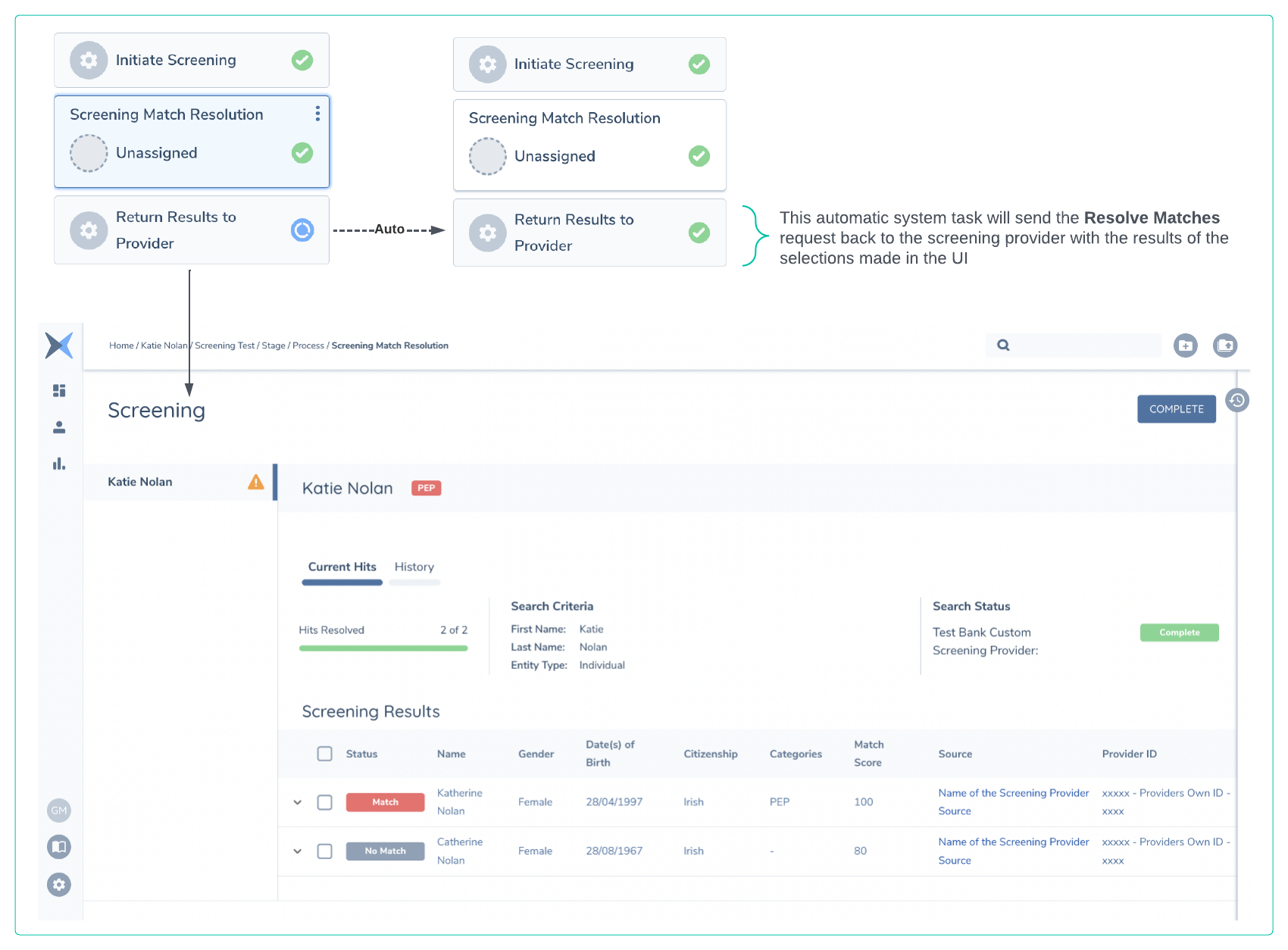
Once the matches have been resolved on the Fenergo UI a few things happen next. The matches need to be resolved before the task is marked as Complete
- Matches Resolved on UI. An event is generated called
"screening:allmatchesresolved"and this will contain a link to the batch as part of the relativeUrl sent with all Event Notifications."screeningquery/api/batch/bcf3b51f-4478-4966-a9fc-21d4652ed92e" - Screening Task is Complete. The automatic task will send a Resolve Matches request to the adapter with the results of the screening activity from Fenergo.
This message is also encrypted and signed (same pattern as the Screen message) and will need to be decrypted and verified by the adapter. The adapter is only required to send a HTTP 200 response. Journey and the UI after the matches are resolved is illustrated below. In our sample we Match one of the responses and No Match the other.
Understanding the Resolve Matches Message
The decisions on the matches made on the Fenergo platform are saved but also sent back to the client screening provider. This is to ensure that the provider can mark those matches as resolved and not return them again for any subsequent searches made against the same entity. The match may be valid against a different entity but all the data needed to support this implementation is send in the below message. What the encrypted message looks like is listed below also.
    //MESSAGE DESTINATION: HTTPS://{yourSpecifiedURL}api/resolvematches

    Request Headers
    content-type          text/plain
    x-encryption-iv         NF/xxxxxx-xxxxxx-xxxxxq5oMzw==
    x-authentication-mac    DEL/vVxxxxx-xxxxxx-xxxxx-xxxxxxxZRAnw=
    x-provider-id           TestScreening
    x-tenant-id             xxxxx-xxxxxx-xxxxx-xxxxxxx

    REQUEST BODY:
    mp5fvFTNsUYnBg+iD7lA0/JK6pz+zW8ZT/b3y71zLfdt70hgI8MIl24EnaWWXu8ZrdPdTiaaQxlZzafdxVy4dXPFHnCyldrRefAsEv4MDN39Vht7v8rbS03J1ACd2bwg2ba11vNfNJizd4YnCnbdoqgJ9Bx76TnmAA0flXMeNC9SoiA9h7lPCV3DPO3sv9Wcg+bKot+ylAkId/dHAISGAyLTSiZ2v3J2hMoHw9/ZoVuF+ssIm3meSrCeD+3BLREWVUYlHRgrm6aPobwcr0bS9DRZpMg4E2bWX53egHvXw2rvZxfMoyyuRCXc4VnUhy1UoXqxy1aJ7MuQO82X3J7iVF4CD8lf5AJUtfuMHuH9aJtlx/fkXJkAFEQuFsTZ+oGEogowNpfa5xMUcmmRCKI4yNvr5aIu7w7+zikEw1UPmwjN+gWu3+Pc26n/G6YCApUinxTUOk+Y/1mQWb22jfTw2TCV5PbmjZs1JFXAHR2E3FeAfsntBs6CghgVT9v/NWAT9Q9JyPiYgMTOv2MtkIyWtr2zl4cSIKWoNUNCGjIzwPHDLjPUFCLjSEYbt2dlWv6HCNiJw7LqMq9Sc4Ei+fAEj4KqUMalul/AKuDA4Yc1jCpeMcZAnZxGk2I356FkuQ1yJwR32xEn4HODRCkiwP5bRB1/RmQZeg57mGTbXRTNoqwjhoHbFwYlRaawoHtyYQ23jz6Ufi9kBPULKdZqsHeQ2LGvi6JmdfO1fSYVxeLKKNyaLHR7Ljd4u5GUuAknAyXqq8hZbgb+GJjaA82Tl26A4DvxuCRFQ9CuITZq68A9g/WHzA3E/RUz6Xrn5l7isrmYWTyfirZ59ICs0gMYxjZ4YVvYVatQC8bwiAZU1GijF1F/KBJlCk0b/HZHqgXs0mgjYHGgGN5r2eFBd9AEij8P5wlkwZCfEv0KIUG+i9JdbpPhq5K3BLOMBL/XbLSZ+x0+lpeCrRMwLcrccY6fLgEsQyb5HyZX7Y1tFKuB4I+E4sNxeKGQdTlmJ8hpLrR7sNLdF6eFLWQF+u2Q+MGxI51Bu8nS48CL1hI6GdCZOjH3Z4u/AQP6d94sDWIsauWEGwNU3Z196h+OZcuEd0u4CvKKL3tjQ0TFPBqOV891Rd0CZaXKyKTxt7GWmuUglNmRQGmOHpbxSb2Qhgtt+UL1toqbJGwbvjJhjP09BgsVAgvNTOPYKYsD4/57sFS+QetuHqrAQGc299GY28Opp0573I1LZmJek
{
    "Data": {
        "BatchExternalIds": [
            {
                "Source": "TestScreening",
                "Name": "Name of Batch External Id Field",
                "Value": "xxxxx-xxxx-ID-Value-xxxxxxxx"
            }
        ],
        "Entities": [
            {
                "EntityId": "33692658-7b17-4083-8e09-f69df8345d53",
                "LegalEntityId": "4da2595b-9052-48db-957a-5ff0e66c50e9",
                "ExternalIds": [
                    {
                        "Source": "TestScreening",
                        "Name": "ExternalID_Name",
                        "EntityAliasId": "PrimaryName",
                        "Value": "xxxxx-xxxx-Entity-Level-ID-Value-xxxxxxxx"
                    },
                    {
                        "Source": "TestScreening",
                        "Name": "ExternalID_Name",
                        "EntityAliasId": "my-alias-id-xxxx-xxxxxxxxxxxx",
                        "Value": "yyyyy-yyyy-Entity-Level-ID-Value-yyyyyyyy"
                    }
                ],
                "MatchesData": [
                    {
                        "MatchId": "9fe109bd-0da8-4fb7-bdb9-a4ac5e56bee1",
                        "EntityAliasIds": ["PrimaryName", "my-alias-id-xxxx-xxxxxxxxxxxx"],
                        "ExternalId": "xxxxx-1234-xxxx-5678",
                        "ExternalIds": [
                            {
                                "entityAliasId": "PrimaryName",
                                "value": "xxxxx-1234-xxxx-5678"
                            },
                            {
                                "entityAliasId": "my-alias-id-xxxx-xxxxxxxxxxxx",
                                "value": "yyyyy-5678-yyyy-1234"
                            }
                        ],
                        "ProviderId": "TestScreening",
                        "Status": "Match",
                        "Reason": "Matched Entity",
                        "Comments": "some comments returned from the external screening provider",
                        "SubsidiaryFields": null
                    },
                    {
                        "MatchId": "1409d99a-cdeb-4312-a639-690d8266ce39",
                        "EntityAliasIds": ["PrimaryName"],
                        "ExternalId": "xxxxx-91011-xxxx-1213",
                        "ExternalIds": [
                          {
                            "entityAliasId": "PrimaryName",
                            "value": "xxxxx-91011-xxxx-1213"
                          }
                        ],
                        "ProviderId": "TestScreening",
                        "Status": "No Match",
                        "Reason": "No DOB Match",
                        "Comments": "Not the same person - DOB is too old",
                        "SubsidiaryFields": null
                    }
                ]
            }
        ],
        "AdditionalSettings": []
    },
    "Id": "22752486-6d88-44b9-9684-bf5267c42908",
    "Tenant": "45bf62ac-e4b1-4c16-ae32-d774cd18db6d",
    "ProviderId": "TestScreening",
    "Type": "ResolveMatches"
}
-
"BatchExternalIds"is returned as part of the Resolve Matches message so the client provider can orchestrate the response against its data store. -
"Entities"element is an array containing the detail per entity which had screening matches. In this example there is only one entity -
"EntityId"is the unique reference for the Legal Entity between Fenergo and this specific Screening Provider. -
"LegalEntityId"is the Fenergo unique reference for this Entity. -
"ExternalIds"is another element that can be used by the provider to assign an external unique identifier to the entity which it has matched data against. This will be sent back from Fenergo to your provider as part of the Resolve Matches message. It must contain your provider Id as the source:"source":"TestScreening". It must contain the"entityAliasId"which must match either the"id"of one of the aliases sent in the Screen request or be set to"PrimaryName"if it relates to the main entity name. -
"MatchesData"is an array containing the decisions for the matches sent from the provider. This can contain multiple matches depending on what the provider sent as a result to the Screen Request."MatchId"is the Fenergo unique reference returned as an identifier for a single specific match."ExternalId"is the external provider unique reference sent to Fenergo as an identifier for a single specific match. This should no longer be used and ExternalIds should be used instead, since now with Alias Screening one match can have different external ids depending on which alias(es) it's matching against."ExternalIds"can be used by the provider to assign an external unique identifier to the match which it has found. This will be sent back from Fenergo to your provider as part of the Resolve Matches message. It must contain the"entityAliasId"which must match either the"id"of one of the aliases sent in the Screen request or be set to"PrimaryName"if it relates to the main entity name."ProviderId"is the string name for your screening adapter, used in multiple places in the document."EntityAliasIds"is an array of the alias Ids (from the Screen request) that this match relates to. This can be used by the provider to understand which alias(es) the match relates to. It must contain either the"id"of one of the aliases sent in the Screen request and/or be set to"PrimaryName"if it relates to the main entity name."Status"is the decision that was made on Fenergo for the specific Match. This could beMatchorNo Match"Reason"is the reason selected from the resolve matches UI in Fenergo."Comments"any comments added in the Fenergo UI that influenced the decision on the outcome.
-
"Id"is the Batch Id -
"Tenant"is the Tenant Id your provider is receiving these messages from. -
"ProviderId"must be the same as the configured ProviderId used to configure your External Screening Adapter. -
"Type"in this message the response type is"ResolveMatches". Describes what kind of message this is.
Resolve Matches Response to Fenergo Receptor
The last step in the process is for the clients custom screening provider to respond back to the Resolve Matches Request. This will close the open batch on the Fenergo platform.
{
  "response": {},
  "id": "22ca8cf3-67c4-4fed-b854-2286094a0516",
  "tenant": "45bf62ac-e4b1-4c16-ae32-d774cd18db6d",
  "providerId": "TestScreening",
  "type": "ResolveMatches",
  "status": "Success",
  "errorDetails": null
}
"id"is the Fenergo Batch Id used to identify the batch."tenant"is the Tenant which sent the screening request."providerId"is the name of your configured Adapter in this case"TestScreening""type"is the Resolve Matches"status"in this case is"Success"
How the Adapter sends requests to create OGS Journeys
If the custom adapter has OGS configured, it is explained above when it will receive requests to subscribe entities to Ongoing Screening or update the subscription. When the adapter wants to trigger an Ongoing Screening batch and journey, it has to call the Screening Receptor using the OngoingScreeningGetResults operation.
The following example of an OngoingScreeningGetResults message that is sent to the Fenergo Receptor contains many different elements, and the Screening Receptor Swagger Spec outlines the full schema so clients can construct this message in their adapters. Some key elements are called out and explained below.
{
  "response": {
    "batchExternalIds": [
        {
            "source": "TestScreening",
            "name": "Name of Batch External Id Field",
            "value": "xxxxx-xxxx-ID-Value-xxxxxxxx"
        }
    ],
    "entities": [
        {
            "entityId": null,
            "legalEntityId": "bb8cd902-1aa8-456e-a22d-a4fc470e8386",
            "externalIds": [
                {
                    "source": "TestScreening",
                    "name": "FieldInProvider",
                    "entityAliasId": "PrimaryName",
                    "value": "1234"
                },
                {
                    "source": "TestScreening",
                    "name": "FieldInProvider",
                    "entityAliasId": "my-alias-id-xxxx-xxxxxxxxxxxx",
                    "value": "5678"
                }
            ],
            "matchesData": [
                {
                    "externalId": "xxxxx-1234-xxxx-5678",
                    "externalIds": [
                      {
                        "entityAliasId": "PrimaryName",
                        "value": "xxxxx-1234-xxxx-5678"
                      },
                      {
                        "entityAliasId": "my-alias-id-xxxx-xxxxxxxxxxxx",
                        "value": "yyyyy-5678-yyyy-1234"
                      }
                    ],
                    "entityAliasIds": ["PrimaryName", "my-alias-id-xxxx-xxxxxxxxxxxx"],
                    "providerId": "TestScreening",
                    "name": "Katherine Nolan",
                    "aliasesList": [
                        {
                            "value": "Katherine Allen",
                            "type": "Maiden Name"
                        }
                    ],
                    "gender": "Female",
                    "dateOfBirth": "28/04/1997",
                    "country": "Ireland",
                    "entityType": "Individual",
                    "matchScore": 100,
                    "providerSourceName": "Name of the Screening Provider Source",
                    "providerSourceUrl": "https://urelforscreeningprovidersource.com/match/",
                    "addresses": [
                        {
                            "addressLine1": "30 Alexandra Park",
                            "addressLine2": "Clane",
                            "city": "Kildare",
                            "postalCode": "BT55NY",
                            "country": "Ireland",
                            "stateProvince": "Kildare",
                            "type": "Main address"
                        },
                        {
                            "addressLine1": "32 Alexandra Park",
                            "addressLine2": "Clane",
                            "city": "Kildare",
                            "postalCode": "BT55NY",
                            "country": "Ireland",
                            "stateProvince": "Kildare",
                            "type": "Main address"
                        }
                    ],
                    "citizenship": "Irish",
                    "nationality": "Irish",
                    "placeOfBirth": "England",
                    "countryOfResidence": "Ireland",
                    "additionalInfo": [],
                    "sourcesInfo": [
                        {
                            "title": "Local Business Leader Elected to Office",
                            "content": [
                                "https://dailynews.com/katherine-nolan-elected.html"
                            ]
                        }
                    ],
                    "categories": [
                        "Pep"
                    ],
                    "registeredCountry": "Ireland",
                    "ids": {
                        "EntityUniqueID": "xxxxx - Providers Own ID - xxxx",
                        "Passport Number": "PB1234567",
                        "SSN": "983883474B"
                    },
                    "associations": [
                        {
                            "category": "Political Affiliations",
                            "fullName": "Katherine Nolan",
                            "relationship": "Elected Representative"
                        }
                    ],
                    "status": "Unresolved",
                    "reason": null,
                    "comments": "some comments returned from the external screening provider",
                    "subsidiaryFields": null
                },
                {
                    "externalId": "xxxxx-91011-xxxx-1213",
                    "externalIds": [
                      {
                        "entityAliasId": "PrimaryName",
                        "value": "xxxxx-91011-xxxx-1213"
                      }
                    ],
                    "entityAliasIds": ["PrimaryName"],
                    "providerId": "TestScreening",
                    "name": "Catherine Nolan",
                    "aliasesList": [
                        {
                            "value": "Marie Nolan",
                            "type": "Other Name"
                        }
                    ],
                    "gender": "Female",
                    "dateOfBirth": "28/08/1967",
                    "country": "Ireland",
                    "entityType": "Individual",
                    "matchScore": 80,
                    "providerSourceName": "Name of the Screening Provider Source",
                    "providerSourceUrl": "https://urelforscreeningprovidersource.com/match/",
                    "addresses": [
                        {
                            "addressLine1": "21 The Rise",
                            "addressLine2": "Kilmanham",
                            "city": "Dublin",
                            "postalCode": "32R 5BTY",
                            "country": "Ireland",
                            "stateProvince": "Dublin",
                            "type": "Main address"
                        }
                    ],
                    "citizenship": "Irish",
                    "nationality": "Irish",
                    "placeOfBirth": "Ireland",
                    "countryOfResidence": "Ireland",
                    "additionalInfo": [],
                    "sourcesInfo": [
                        {
                            "title": "Insurance Fraud Claim Prosecuted",
                            "content": [
                                "https://dailynews.com/Insurance-Claim.html"
                            ]
                        }
                    ],
                    "categories": [
                    ],
                    "registeredCountry": "Ireland",
                    "ids": {
                        "EntityUniqueID": "xxxxx - Providers Own ID - xxxx",
                        "Passport Number": "CV939394",
                        "SSN": "2342344V"
                    },
                    "associations": [
                    ],
                    "status": "Unresolved",
                    "reason": null,
                    "comments": "some comments returned from the external screening provider",
                    "subsidiaryFields": null
                }
            ]
        }
    ]
  },
  "id": "fd23f474-eff9-425f-a776-78e2176b36e4",
  "tenant": "45bf62ac-e4b1-4c16-ae32-d774cd18db6d",
  "providerId": "TestScreening",
  "type": "OngoingScreeningGetResults",
  "status": "Success",
  "errorDetails": null
}
-
"response"at the root of the message can be constructed based on this message or the swagger spec and contains all the details from the Screening Provider. -
"batchExternalIds"within the response can be used by the screening provider to send back correlation identifiers that a screening provider might use to collectively identity this batch. If a screening request for one or more entity's collectively were to be thought of like a transaction, then the Fenergo Batch Id could be thought of as a Transaction Id. This field is where a client can store the equivalent for their provider. It will be returned from Fenergo to your provider when resolving the matches later. It must contain the string name of your Provider Id as the source:"source":"TestScreening"or Fenergo will NOT return this data in the resolve matches call. -
"entities"element is an array containing one or more entities in the result. In this example there is only one entity and within will be all the screening matches found for that entity. -
"entityId"is no longer required and doesn't need to be sent anymore. It will be removed soon. -
"legalEntityId"within the"entities"element must be the same as the"legalEntityId"sent in the OngoingScreening request that was used to subscribe the entity. This is the same as the Fenergo Legal Entity identifier from the request. -
"externalIds"is another element not displayed on the UI and can be used by the provider to assign an external unique identifier to the entity which it has matched data against. This will be sent back from Fenergo to the provider as part of the Return Results to Provider task. It must contain your provider Id as the source:"source":"TestScreening". It must contain the"entityAliasId"which must match either the"id"of one of the aliases sent in the Screen request or be set to"PrimaryName"if it relates to the main entity name. If you send an id that does not exist the Screening domain, the entity will be ignored. -
"matchesData"is an array containing all the matches found on the screening provider (for a specific entity) and sent back to Fenergo to display on the UI as part of this batch. -
"matchesData"element schema is available in the Screening Receptor Swagger Spec. Some specific elements are worth calling out are:"providerId"is the id of the provider in the Screening configuration. This needs to be the same as the providerId sent in the Screening request by Fenergo to the adapter (in our case, TestScreening)."ExternalId"is the external provider unique reference sent to Fenergo as an identifier for a single specific match. This should no longer be used and ExternalIds should be used instead, since now with Alias Screening one match can have different external ids depending on which alias(es) it's matching against."ExternalIds"within each match can be used by the provider to assign an external unique identifier to the match which it has found. This will be sent back from Fenergo to your provider as part of the Resolve Matches message. It must contain the"entityAliasId"which must match either the"id"of one of the aliases sent in the Screen request or be set to"PrimaryName"if it relates to the main entity name. The provider should resolve the match for each alias it relates to."EntityAliasIds"is an array of the alias Ids (from the Screen request) that this match relates to. This can be used by the provider to understand which alias(es) the match relates to. It must contain either the"id"of one of the aliases sent in the Screen request and/or be set to"PrimaryName"if it relates to the main entity name. The provider should resolve the match for each alias it relates to."aliasesList"is displayed on the UI under the Key Data tab. It is a simple Key Value pair and whatever is passed will be rendered on screen to help with the matching process."providerSourceName"and the"providerSourceUrl"will be rendered as a link in the list of matches so user can click through to a different system and explore the results in more detail if the system supports this action."sourcesInfo"element will be displayed in the Sources tab and is another simple collection of name value pairs. Note the schema also defines a"sources"array but this has been deprecated and should not be used."addresses"and"ids"and these will also be rendered in the Key Data tab.- Addresses will not be used to update the Legal Entity Record on Fenergo - This is to drive match decision making ONLY.
"ids"element allows clients to provide a key value pair for a field called"EntityUniqueID". This will be rendered in the rightmost column of the match's line item and will be used for the Screening match reuse feature to be able to uniquely identify matches from the provider."associations"will be rendered in the Relationships tab of a match result."status"is typically sent back as"Unresolved"as in our example. Clients can choose to send back items as"Match"if they wish to do so or if their operations and how they use their provider supports this approach.
-
"id"at the bottom of the above example is the Ongoing Screening Request Id which the adapter needs to randomly generate to ensure it will be different for each request. -
"tenant"is the Tenant Id as clients may need to differentiate which of their tenants is sending the request. -
"providerId"is the string name of the provider, as support for multiple Screening Providers on a single tenant is supported. -
"type"This is response to create OGS batches, and should be populated as above. -
"status"This should always be set as Success -
"errorDetails"Simply set to null as there is no error.
When this request is processed by the Screening domain, it will create a new batch with type Ongoing Screening for each entity that is sent in this request. Once the batch has been created, the system will find and trigger the journey schemas of type "Ongoing Screening" that match the journey policy scope and entity access layers requirements. This must be configured so there is only one journey matching the criteria. If there is more than one journey that matches, different journeys will be created, but the batch will only be linked to one of them, meaning that the rest of them will display an error when you try to access them in the UI.