Data Extraction on the Fenergo SaaS Platform
Typically all the fenergo SaaS Platform clients have reporting requirements which depend on extracting the data managed by our SaaS platform. AS a multi-tenant SaaS solution, we do not provide direct access to underlying data sources. As per standard SaaS principals, Fenergo take on the responsibility on managing and securing the data sources for all clients. That data is securely distributed across domain specific data stores in line with the Domain Driven Design pattern and the platform offers its functionality with features which interact across all of these domains.
Types of Data Stores on Fenergo
This strategy has allowed Fenergo to select best fit technology choices where appropriate, so the fenergo SaaS Platform utilizes NoSQL Document Stores, Indexing for near real time key data retrieval, Graph DBs for relational details such as associations and documents and standard file storage data services. Fenergo uses AWS as our cloud provider and where possible we have selected Cloud Native solutions which are SaaS offerings themselves. This allows us to offer solutions to our clients which are Highly Scalable and Resilient. Whilst we do not share specific details about our physical implementation, but you can read some more about these data services from AWS below:
- Amazon DynamoDB NoSQL Database
- Amazon Neptune Graph DB
- Amazon S3 (Simple Storage Service)
- Amazon Open Search
- Amazon Athena Query Service
The result of engaging such a range of capable platforms is that Fenergo can offer a platform which supports flexible scalable demands across a multi-tenant Enterprise Application. What this means for data extraction from a client perspective is that your data has been placed across different data stores with the intent to offer the best level of performance for various specific functional use cases. We do not support the ability to Retrieve ALL data in a single action. This blunt approach does not align to a cloud SaaS platform for a number of reasons.
- 24x7 availability: the fenergo SaaS Platform is designed for full availability and there would be performance and transactional issues if clients frequently (in an unplanned fashion) performed a full data retrieval.
- Cost Optimization: Typically the costings for data retrieval are high for data coming OUT of the cloud as opposed to data going in. Not significant where data volumes are low, but as data volumes get into the millions of records, cloud economics do not make sense to support such a function, especially if such an action was being executed on a frequent basis.
- Shared responsibility: Fenergo is a custodian of Clients Data and can react to a client request to retrieve their data from the platform, but this is from a contractual perspective and not operational.
- Better Approach's: There are more efficient & real-time options supported by both the APIs and the Event Notification functionality.
Event Sourced CQRS
Fenergo is implemented using an Event Sourced CQRS Pattern (Command Query Responsibility Segregation). Across all the functional Domains we offer Command and Query APIs, where one API is used to create and update data, and a separate API is used to retrieve data. When a client Creates or changes any data on the fenergo SaaS Platform, an Entity, Journey etc... it will always return an identifier.
Some of the identifiers returned by Command APIs include:
- the fenergo SaaS Platform Legal Entity ID used for Clients and Related Parties.
- Legal Entity Draft ID when a Draft Record is created.
- Journey Instance ID when a journey is created.
- Screening Batch ID when screening is requested.
- Team ID when a Team is created.
- A Document ID when a document is uploaded.
- A Webhook ID when a new webhook is created.
You can browse our API Catalogue of Command and Query APIs for a list of all the across all the domains.
Understand Identifiers and GUIDs
Every action a user takes to create and interact with data on the Fenergo SaaS platform will reference or return an Identifier. These provide clients a data point which can be used to correlate against. Clients can use these identifiers to orchestrate a lot of activity against the platform including:
- Use a Legal Entity ID to retrieve a specific Legal Entity Record and add a foreign key to a downstream MDM.
- Use a Legal Entity Draft ID to retrieve or update a draft record.
- Use Journey Instance ID to retrieve the status or update a specific journey.
- Use a Screening Batch ID to get the results of a screening request.
- Use a Team ID to add or list the members of a Team.
- Use A Document ID to replace or retrieve a document.
- Use A Webhook ID to check the status or update a webhook.
The identifiers facilitate specific activities if clients save and correlate these internally in a meaningful way. Meaningful in this case would be some form of intelligent caching or structured Table Style store that can be used to get fast internal access to a relevant identifier and rapidly perform targeted specific interactions with the fenergo SaaS Platform from a within the clients own domain.
Searching for Data
the fenergo SaaS Platform provides some facilities for users to find Journeys, Legal Entity's and identify the work they need to do. This can be accessed via the following URL {baseURL}/reporting
- UI Dashboard - Highlights relevant summary data and links to journeys.
- LE Search functionality allows users to quickly access recently added entities.
- Duplicate Check & LE Name search is available to ensure clients don't adversely create un-required data.
- Advanced Search allows clients to create Indexable fields from their policy which can help search for specific Legal Entities.
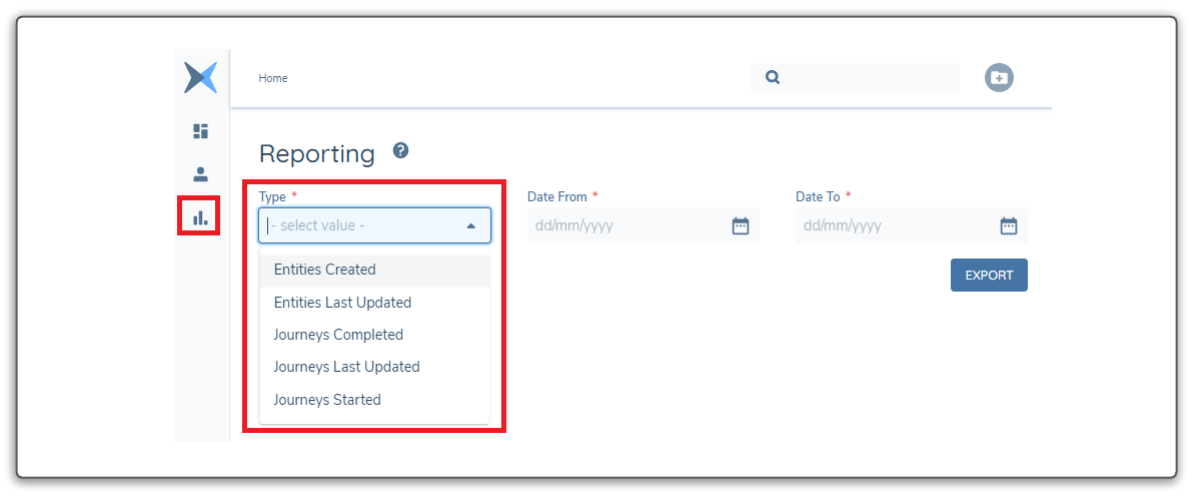
- Out of the Box Reports which can be downloaded in CSV format via the UI (See Below)
Syncing Against Legal Entity and Journey Data
A client may have a requirement to have ALL information from the fenergo SaaS Platform to query and aggregate with other data sources inside their own technical landscape. We do not provide a mechanism to download a full copy of data therefore it is advisable to focus on syncing against events which allow all the Legal Entity and Journey information to be retrieved in near real time as it is updated. Lets examine a simple use case below:
  AS: an API consumer:

     GIVEN: I want to store Data in a Table Style Schema

      WHEN: I can run SQL Queries to satisfy broad undefined management information Queries

  THEN: I want to update that data so reports reflect near real-time accuracy.
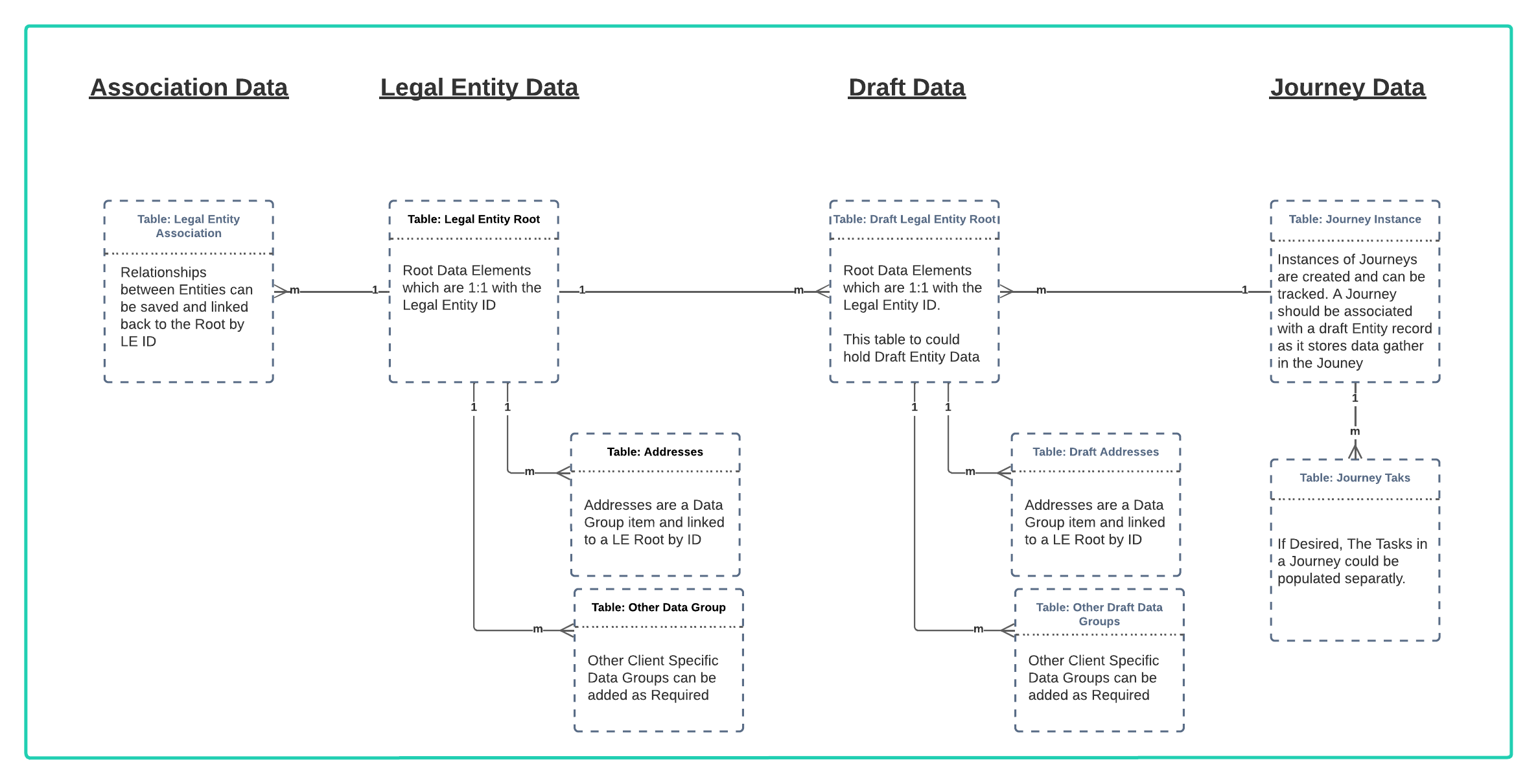
Suggested Sample Schema
A Table schema is the structure used to store data in a Database. Because clients configure the the fenergo SaaS Platform Policies to their own requirements there is no single schema which covers the full relational structure, as this would be dependant on that configuration. However there are some generic structures which hold true in terms of a standard data model. This is illustrated below. To then populate that schema, a client using polling or webhooks to monitor data changes can use JSON object responses from API calls and translate them into SQL Style Insert queries, then execute them in real time against their own local DB Schema to maintain an offline sync with the data on the Fenergo platform.
Consider our Data Migration functionality but in the opposite direction. A Client could use the Data Migration APIs, reference all the Jurisdictions available and this would create a template that could be followed for a data schema for the configured policies. It would include all the Entity Data and Data Groups (Sub entities / link tables) along with all the lookup types and inter-relations required between tables.
Using Events to populate Sample Schema
A schema can be as simple or complicated as needed, some data modelling is for clients to ensure required use cases are catered for but this exercise would be done as part of policy configuration and that effort could contribute to an exercise of creating an offline data store. If a client does choose to maintain a data schema as suggested above, It could be kept in sync in Real Time by listening to the following EVENTS:
Journey Events:
- journey:instancestarted
- journey:instancecompleted
- journey:instancecancelled
- journey:instancepaused
- journey:instanceunpaused
- journey:stagepaused
- journey:stageunpaused
- journey:taskstarted
- journey:taskcompleted
- journey:taskerror
- journey:taskreassigned
- journey:taskreopened
- journey:taskpaused
- journey:taskunpaused
- journey:slaapproachingdue
- journey:slapastdue
Entity Data Events:
- entitydata:created (Verified Data)
- entitydata:draftcreated (Draft Data)
- entitydata:draftupdated (Draft Data)
- entitydata:draftverified (Verified Data)
- entitydata:draftrejected (Draft Data)
- entitydata:dataPublished (Verified Data)
Association Events:
- association:associationverified (Saving Verified Associations)
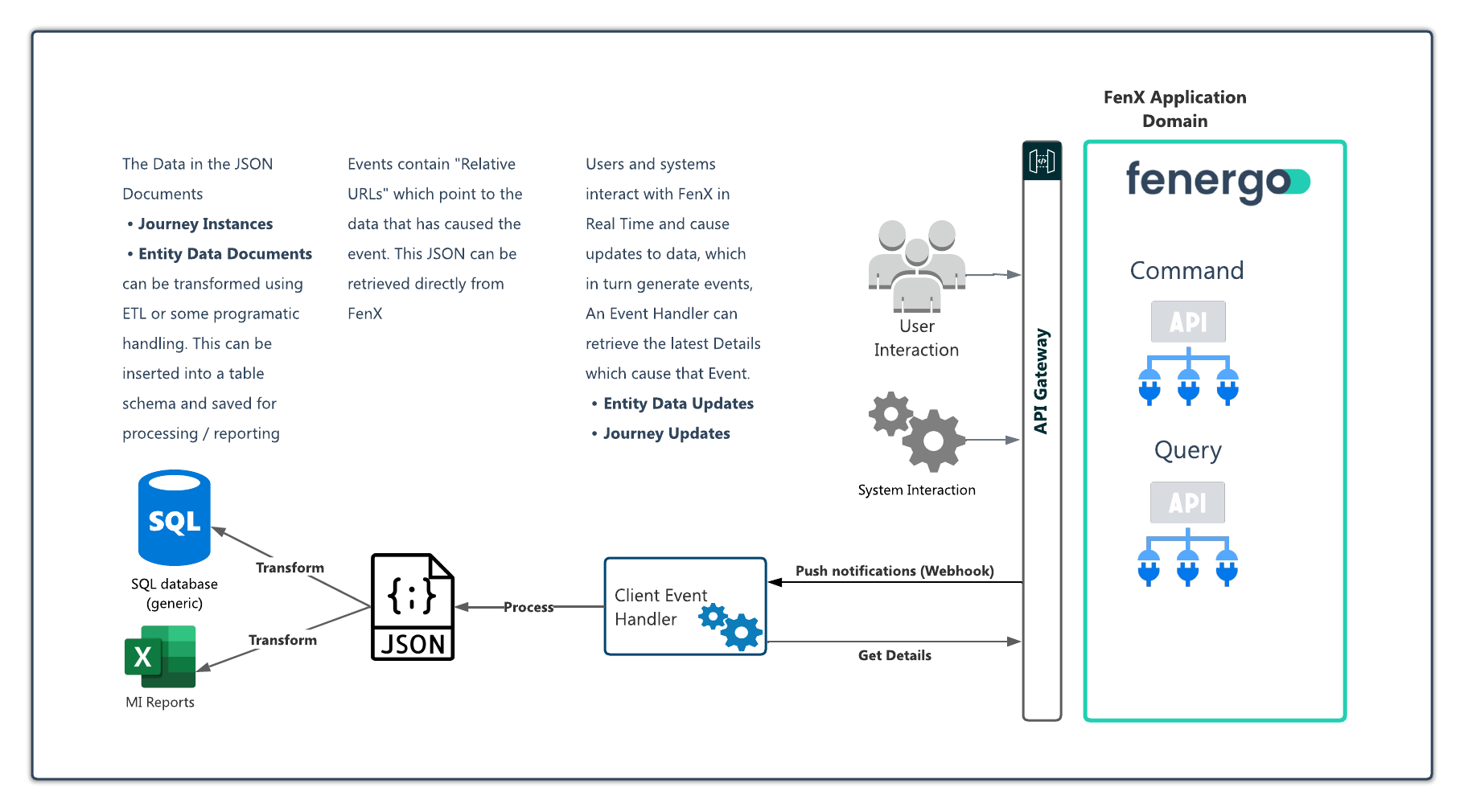
In practice how this would look is illustrated below. As the system is used, it constantly generates events. Clients can implement an integration to poll for these events of listen to real-time webhook notifications and then handle those by retrieving the data which caused the event. This can then be used to