Supergraph Query API Advanced Overview
Sample Use Case forSupergraph Query
Within this document the objective is not to teach how to use GraphQL but instead to illustrate power of a Supergraph (The Fenergo GraphyQL Implementation) to make a single cross domain API call and get to the data points which exist across multiple domains. Traditionally clients would need to Chain REST API calls together to achieve the same outcome along with retrieving more data than is actually needed. The below use case explains this target outcome.
  AS: a fenergo SaaS Platform API consumer:

      GIVEN: I want to retrieve information about a Journey

      AND: I want to retrieve some of the Verified Legal Entity Data

      AND: I want to retrieve some of the Draft Legal Entity Data

     WHEN:  I have designed a query based on the Supergraph Schema

  THEN: I want to send a single API call that retrieves only the data I want in a single step.
Traditional approach to Solving the Use Case
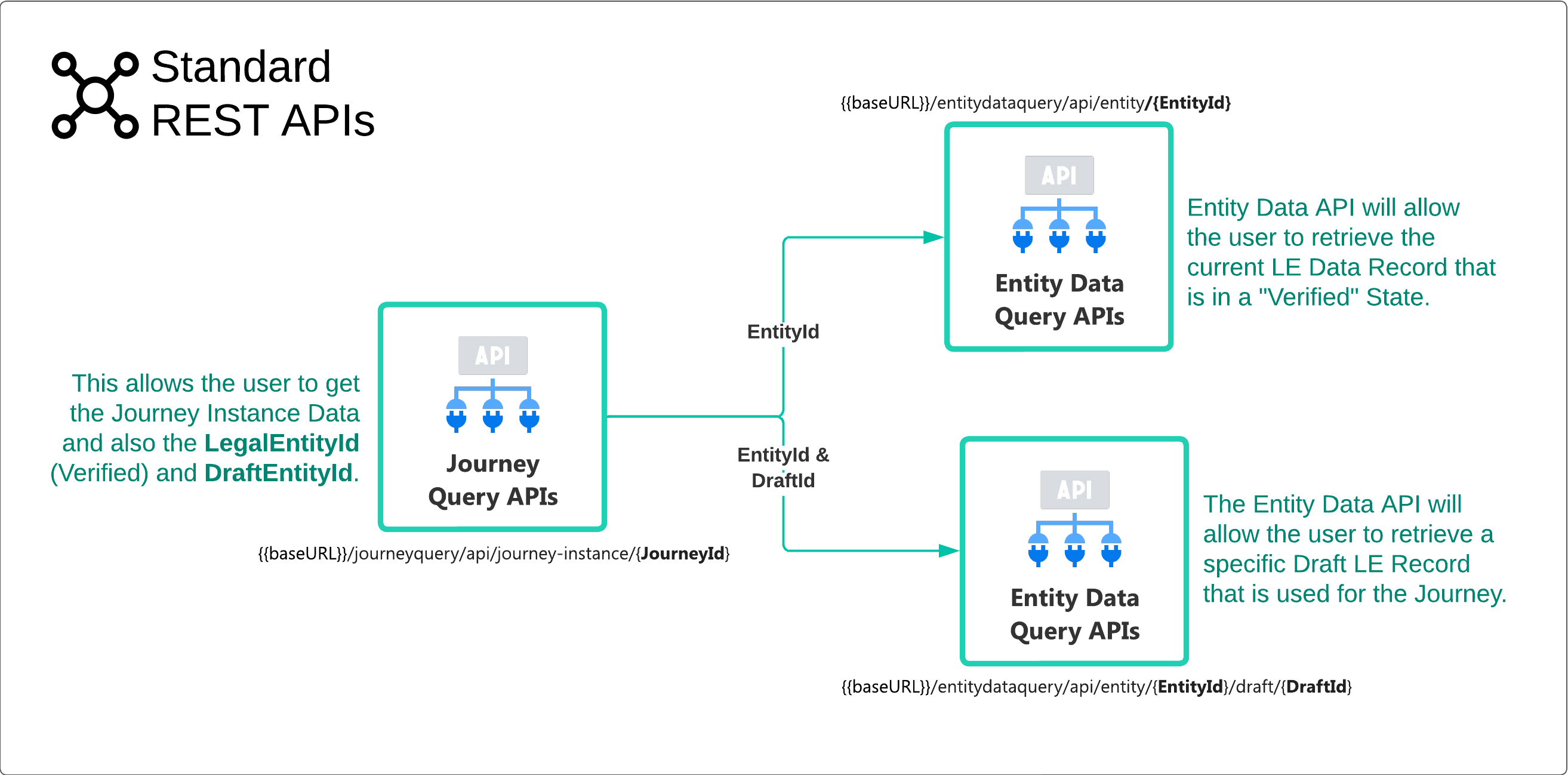
As illustrated below, using the standard REST APIs would require the following steps:
- First, using the Journey Instance Query Response, retrieve the
"entityId"and the"entityDraftId". - Next using the Entity Data API, retrieve the Verified Record using the
"entityId". - Lastly using the Entity Data API, retrieve the Draft Record using the
"entityId"and the"entityDraftId".
Solving the Requirement using Supergraph API
Revising the simple query example used on the Supergraph Query Overview. This can now be expanded to solve the use case above. The first Query Type as has been seen is against the JourneyInstance.
query TESTQUERY {
  journeyInstance(id: "db7e643e-a94d-4a0f-b9bc-c7bd29c8672f") {
    id
    entityId
    entityDraftId
    name
    type
    identifier
    status
  }
}
The response from the above query contains only the data points which have been requested and not ALL of the data which is returned from the standard REST call for a Journey Instance.
{
    "data": {
        "journeyInstance": {
            "id": "db7e643e-a94d-4a0f-b9bc-c7bd29c8672f",
            "entityId": "2d506f95-b15b-4506-85f9-f4fc2b773e92",
            "entityDraftId": "72c88a7a-7e0d-40f6-8823-2f363d577129",
            "name": "Company Ingress Screening and Ext Data Test George",
            "type": "Client Onboarding",
            "identifier": "CompanyIngressExtDataScreeningTestJourneyGeorge",
            "status": "In Progress"
        }
    }
}
Adding a second data source to the Query
Both the "entityId" and the "entityDraftId" are present in the response but within the JourneyInstance Query are Connections to other Type Objects. These give access directly to the data for specified "entityId" and the "entityDraftId".
The "Entiy" Type (which is called just "entity" in lower case) contains the data for the Entity Record Id "2d506f95-b15b-4506-85f9-f4fc2b773e92"
query JourneyInstance($id: UUID!) {
  journeyInstance(id: $id) {
    id
    entityId
    entityDraftId
    name
    type
    identifier
    status
    **entity**  <-- The Entity Connection inside the JourneyInstance Query
        {
            created
            type
        }
    }
}
As can be seen in the response below, data from the "entity" connection is now listed in the response to a single API call.
{
    "data": {
        "journeyInstance": {
            "id": "db7e643e-a94d-4a0f-b9bc-c7bd29c8672f",
            "entityId": "2d506f95-b15b-4506-85f9-f4fc2b773e92",
            "entityDraftId": "72c88a7a-7e0d-40f6-8823-2f363d577129",
            "name": "Company Ingress Screening and Ext Data Test George",
            "type": "Client Onboarding",
            "identifier": "CompanyIngressExtDataScreeningTestJourneyGeorge",
            "status": "In Progress",
            "entity": {
                "created": "2024-01-09T14:18:45.081Z",
                "type": "Company"
            }
        }
    }
}
Adding a third data source to the Query
Within the JourneyInstance Query there is another connection called "entityDraft" which is a connection to the "entityDraftId":"72c88a7a-7e0d-40f6-8823-2f363d577129". In the same way a reference to the "entity" connection was made, a connection to the "entityDraft" can be added.
An Entity and Draft Entity are standard items within the Fenergo SaaS platform. However, clients will also know that they can configure their own Policy and add as many custom data points as required to meet these requirements. These custom policy items are stored in a collection called "Properties" and using GraphyQL specific Syntax, those properties can be accessed.
query JourneyInstance($id: UUID!) {
  journeyInstance(id: $id) {
    id
    entityId
    entityDraftId
    name
    type
    identifier
    status
    entity
        {
            id
            created
            type
        }
    entityDraft
        {
            id
            properties
            {
                __typename
                name
                ... on SingleProperty {
                    value
                    valueId
                }
                ... on CollectionProperty {
                    name
                    collections {
                        properties {
                            name
                            value
                            valueId
                        }
                    }
                }
            }
        }
    }
}
As can be seen in the response below, data from the properties within the "entityDraft" connection is now listed in the response to a single API call. Thats one API call accessing data across three separate data sources. The syntax for GraphQL will require some practice and learning but the schema prompt notation within the Postman UI or the test harness will help with this.
{
    "data": {
        "journeyInstance": {
            "id": "db7e643e-a94d-4a0f-b9bc-c7bd29c8672f",
            "entityId": "2d506f95-b15b-4506-85f9-f4fc2b773e92",
            "entityDraftId": "72c88a7a-7e0d-40f6-8823-2f363d577129",
            "name": "Company Ingress Screening and Ext Data Test George",
            "type": "Client Onboarding",
            "identifier": "CompanyIngressExtDataScreeningTestJourneyGeorge",
            "status": "In Progress",
            "entity": {
                "id": "2d506f95-b15b-4506-85f9-f4fc2b773e92",
                "created": "2024-01-09T14:18:45.081Z",
                "type": "Company"
            },
            "entityDraft": {
                "id": "72c88a7a-7e0d-40f6-8823-2f363d577129",
                "properties": [
                    {
                        "__typename": "SingleProperty",
                        "name": "legalEntityName",
                        "value": "George Mechanics Limited",
                        "valueId": null
                    },
                    {
                        "__typename": "SingleProperty",
                        "name": "externalid",
                        "value": "External ID 1099",
                        "valueId": null
                    },
                    {
                        "__typename": "SingleProperty",
                        "name": "industry",
                        "value": "415  Manufacturing",
                        "valueId": null
                    },
                    {
                        "__typename": "SingleProperty",
                        "name": "countryOfIncorporation",
                        "value": "Ireland",
                        "valueId": "203170f1-fb31-43bb-86c7-7a5494fa2431"
                    },
                    {
                        "__typename": "SingleProperty",
                        "name": "category",
                        "value": "Corporation",
                        "valueId": null
                    },
                    {
                        "__typename": "SingleProperty",
                        "name": "companyType",
                        "value": "Bank",
                        "valueId": null
                    }
                ]
            }
        }
    }
}
Using Variables and Fragments
As a convenience, GraphQL allows you to parameterize queries and also define fragments which can be re-used within your query. These keeps the query clean and neat but also make queries easier to read and reuse. Look at the below illustration on postman, which uses a parameter for the JourneyInstanceId on line 2. Also a fragment to iterate the generic properties is defined. This helps as many Types will return a collection of properties.
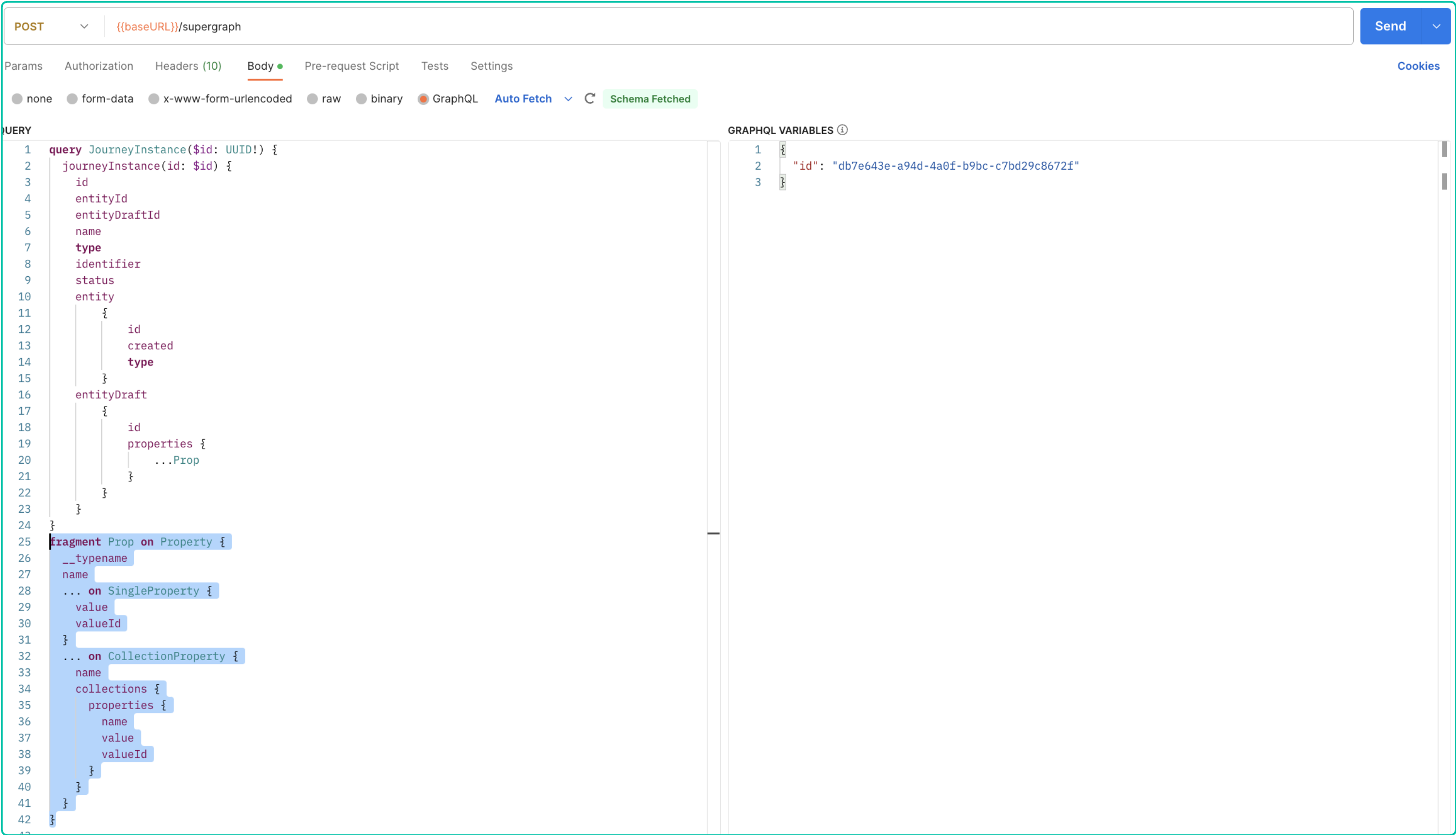
Behind the scenes if you examine the Console from Postman you can see the RAW `HTTP, Request looks as below with all the elements from Postman brought together.
query: "query JourneyInstance($id: UUID!) {
  journeyInstance(id: $id) {
    id
    entityId
    entityDraftId
    name
    type
    identifier
    status
    entity
        {
            id
            created
            type
        }
    entityDraft
        {
            id
            properties {
                ...Prop
            }
        }
    }
}
fragment Prop on Property {
  __typename
  name
  ... on SingleProperty {
    value
    valueId
  }
  ... on CollectionProperty {
    name
    collections {
      properties {
        name
        value
        valueId
      }
    }
  }
}↵"
variables: "{
  "id": "db7e643e-a94d-4a0f-b9bc-c7bd29c8672f"
}"