Bulk Load API
The Bulk Load API is used for clients to upload an Excel file with legal entity data to the Fenergo platform. The Legal Entities will be created on the system and have appropriately scoped journeys launched for each entity. Currently Bulk Load supports Create Only.
| APIs Referenced |
|---|
| Bulk Load Command API |
| Bulk Load Query API |
Sample Use Case for Bulk Load
  AS a FenX Consumer

    GIVEN: I have a collection of Legal Entity Data for an external or downstream system (or process)

    AND:  I want send all of those Legal Entity records to Fenergo in one go

    WHEN:  I upload that data to an API

 THEN: I want Fenergo to Validate & Create the Legal Entities plus initiate an appropriately scoped Journey.
The Bulk Load API Methods
The Bulk Load API methods for the Command and Query APIs are listed below. With these methods Bulk Load Jobs can be created, updated and have the details retrieved where required.
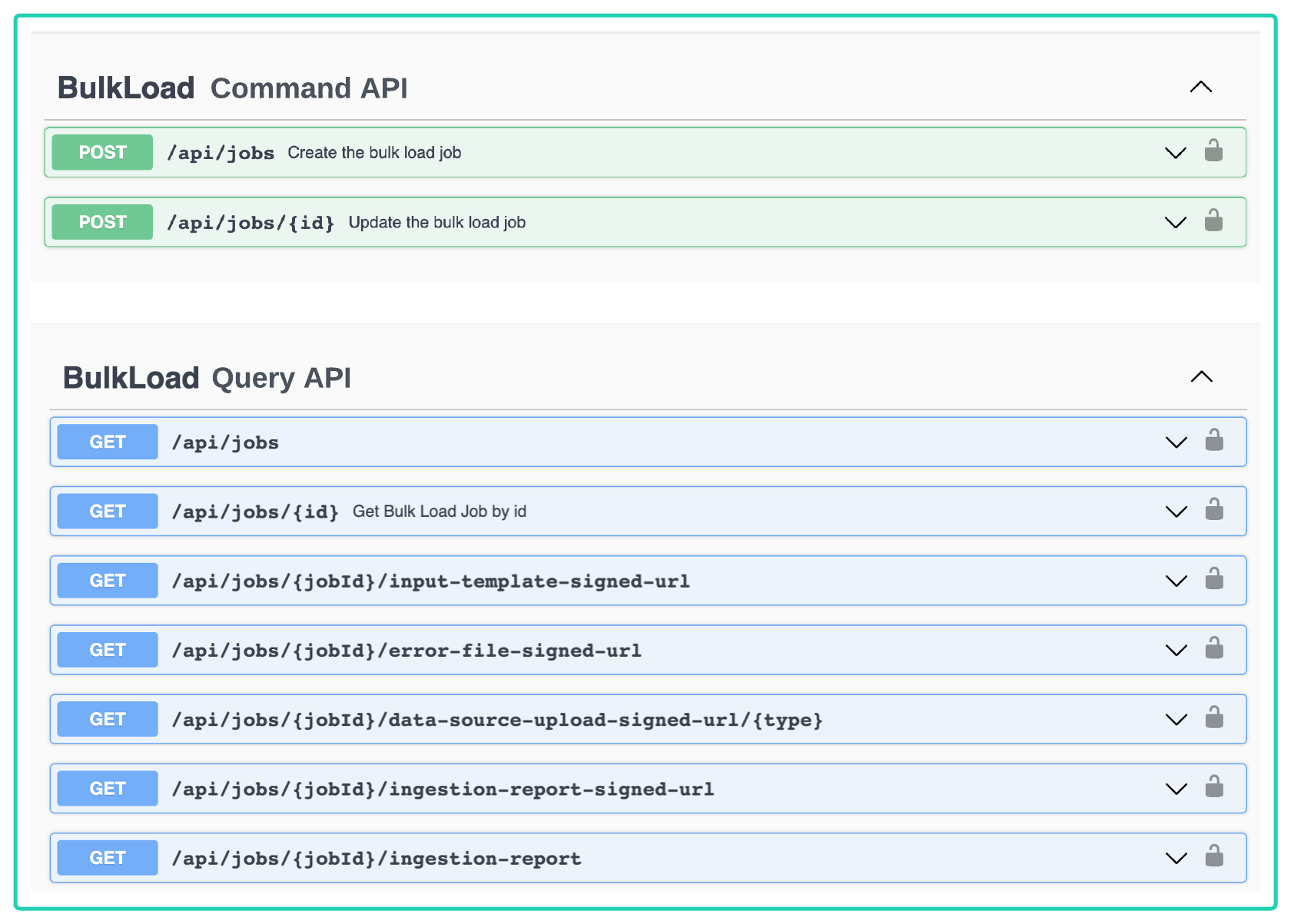
The APIs are all asynchronous, so when a Bulk Job is Created, or Data Submitted for example, the system will respond to the call and then process the request in the background. API clients can use the api/jobs/{id} call to determine the status of a job and then interact accordingly.
Get All Bulk Load Jobs
{baseURL}/bulkloadquery/api/jobs the API behind the Bulk Load Dashboard and allows users to retrieve all the Bulk Load Jobs which have been submitted along with their status and details. The results are listed in the order they were created.
{
    "data": [
        {
            "id": "1840064b-0841-4ff8-af86-9800b169ca47",
            "name": "Another Test",
            "createdDate": "2023-04-19T11:27:43.189241",
            "completedDate": null,
            "sourcePolicyId": "4fd0a87d-70c5-4bcd-add8-69d5a9e7ffcc",
            "uploadedBy": "9e70d877-f8fc-47d2-b7c2-9db999a2b1a3",
            "stateKey": "AwaitingInputData",
            "stateExecutionStatusKey": "RUNNING"
        },
        .
        .
        .
        .
        . . . . { More Jobs listed if available}. . . .
    ]
}
"id"is the identifier of the Bulk Load Job."name"is the free text name given to the Bulk Load Job."sourcePolicyId"is the identifier for the policy that was selected. In the UI this is selected via a dropdown but API clients will need to pass the ID of the policy.
Get Specific Bulk Load Job
This API {baseURL}/bulkloadquery/api/jobs/{{BulkUploadJobId}} is behind the Bulk Load Dashboard and allows users to retrieve all the Bulk Load Jobs which have been submitted along with their status and details. The results are listed in the order they were created.
{
    "data": {
        "id": "1840064b-0841-4ff8-af86-9800b169ca47",
        "name": "Another Test",
        "createdDate": "2023-04-19T11:27:43.189241",
        "completedDate": null,
        "sourcePolicyId": "4fd0a87d-70c5-4bcd-add8-69d5a9e7ffcc",
        "uploadedBy": null,
        "stateKey": "AwaitingInputData",
        "stateExecutionStatusKey": "RUNNING"
    },
    "messages": null
}
There are no further details in this API call from the Get All Jobs call. However, this is a call that API clients can use to test the status of the Bulk Job which may trigger different interactions. The status is the stateExecutionStatusKey" field in the response. All the possible responses and what they mean are:
"stateExecutionStatusKey:RUNNING"Bulk Load Job has been submitted and is awaiting Upload, is validating or processing data.."stateExecutionStatusKey:SUCCEEDED"Bulk Load Job has completed successfully.stateExecutionStatusKey:FAILED"Bulk Load Job has Failed.
A more granular state detail is available from the "stateKey" Field. The possible values are listed below and this may inform how an API client should interact with the Bulk Load Job.
- Initializing This is displayed on the UI as Creating Template and that is was the platform is doing in the background.
- AwaitingInputData The job has created the template which can be downloaded by the user or API client and the Job is waiting for the data to be uploaded.
- GeneratingUpserts This is a validation step where the submitted data is being validated against the policy conditions.
- ValidatingUpserts As Above
- IngestingUpserts This is displayed on the UI as Processing and is where the LE data from the file is being created and Journeys initialized.
- Closing This is where the Bulk Job is finished up. It may be successful or failed at this point.
- JobSucceeded The job has completed successfully.
Create New Bulk Load Job API
To create a new Bulk Load Job via the API a POST command can be sent to this API Endpoint {baseURL}/bulkloadcommand/api/jobs with the following body.
HTTP POST REQUEST
=================
{
    "data": {
        "name": "Another Test",
        "sourcePolicyId": "4fd0a87d-70c5-4bcd-add8-69d5a9e7ffcc"
    }
}

HTTP POST RESPONSE
=================
{
    "data": "1840064b-0841-4ff8-af86-9800b169ca47",
    "messages": null
}
"name"is the freetext name to be sent to the Create Bulk Load Job Request."sourcePolicyId"is the Policy Id for the Policy that is to be used to create the Template.- In the response the
"data"element contains the Bulk Load Job Id returned from the APi.
To retrieve a list of the available Policy Ids, the Policy Query API can be used {baseURL}/policyquery/api/v2/requirement-set.
Working with Bulk Load Files
The Bulk Load API requires the API user to work with files which are generated by the Bulk Job Template File and also upload a completed Data File. These are not sent directly through the API but instead sourced and sent to a document store location which is secured using the Secure Presigned URL approach used elsewhere within the platform.There are 3 scenarios where an API call will return a SecureURL as below:
HTTP GET REQUEST - TEMPLATE FILE (To be downloaded and filled in with Data)
============================================================================================================
{baseURL}/bulkloadquery/api/jobs/{jobid}/input-template-signed-url

HTTP GET REQUEST - DATA FILE (Use The returned URL to Upload the Filled in Template File)
============================================================================================================
{baseURL}/bulkloadquery/api/jobs/{jobid}/data-source-upload-signed-url/xlsx

HTTP GET REQUEST - ERROR FILE (Use The returned URL to download an error file)
============================================================================================================
{baseURL}/bulkloadquery/api/jobs/{jobid}/error-file-signed-url

HTTP GET REQUEST - RECONCILIATION FILE (Use The returned URL to download an report file on the LE's created)
============================================================================================================
{baseURL}/bulkloadquery/api/jobs/{jobid}/ingestion-report-signed-url

HTTP GET RESPONSE - All files which return a Secure URL will contain a response as follows:
============================================================================================================
{
    "data": {
        "url": "https://docmanagement-production-45bf62ac-e4b1-4c16-ae32-d774cd18db6d.s3.eu-west-1.sdf.com/xxxxxxxx/xxxx/1840064vvvvxxxxxxxvvvvv00b169ca47/xxxxxx/template/xxxx/data.xxx?X-Amz-Expires=60&X-Amz-Security-Token=FwoGZXIvYXdzEKX%2F%2F%2F%2%2FwEaDP31RYUBePr%2F1Su73CLIAeigVGOe1aavP5ObzqlpHVq%2FrAC%2F8NiiNhzmlpHxjYDnz7ZpaBLfnGiSJIHTxuhl2N1pENig22EB7Ei8ffOHNot3M%2FUyI%2BWm82rFdSEfrU5WUH2jbD1%2FjPHq7tDEJ9H1XX6qcJkptrmd2VAS2tdbuAfh656e7ijvpx1Ctp%2FCJede2A3TglT7T1wkx6DGCF65DatodcRzkEGxUXTsM7U1ecQ5b9wAUkmOVz85CCqyFmVKfAhR51lPUqKMHEhKIGMi3%2FZU44zYMLU3t4HDSaF24%2FB5zsF3Gkuc8pOKAAztN939gfnOPAyg2CxiINA3c%3D&response-content-disposition=inline%3B%20filename%3DBulkLoad%252Fjobs%252F1840064b-0841-4ff8-af86-9800b169ca47%252Fartifacts%252Ftemplate%252Fxlsx%252Fdata.xlsx&X-Amz-Algorithm=AWS4-HMAC-SHA256&X-Amz-Credential=ASIAX26ODGH82"
    },
    "messages": null
}
The Reconciliation file can also be retrieved directly as an API response by sending a GET request to the following URL : {baseURL}/bulkloadquery/api/jobs/{jobid} ingestion-report