Event Ingress APIs
The Event Ingress API is offered as a standard REST endpoint. It is not a Command / Query implementation as this pattern does not suit the functionality. It is intended to allow clients configure custom event types and then perform a Fire and Forget interaction and have Fenergo perform all the required internal orchestration.
| APIs Referenced |
|---|
| Event Ingress API |
The Event Ingress API Methods
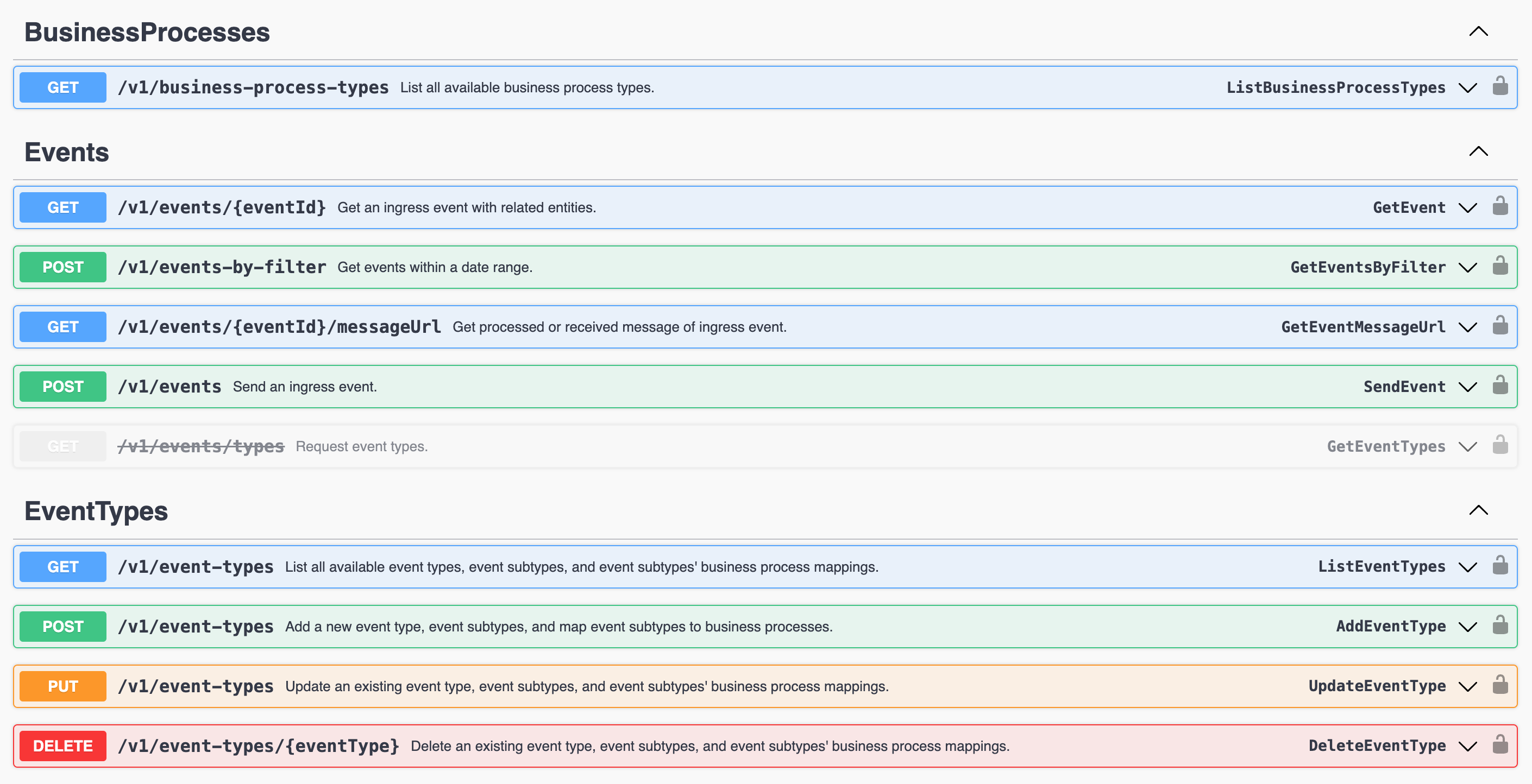
Event Ingress API provides the following methods
-
HTTP GET - ListBusinessProcessTypes: Returns a list of the supported Internal Orchestrated Processes. -
HTTP POST - sendEvent: The API interface where clients SEND their event messages -
The following methods are related to Integration Hub and allow for fetching event processing details
HTTP GET - GetEvent: Returns an Ingress Event based on eventIdHTTP POST - GetEventsByFilter: Returns events received between provided datesHTTP GET - GetEventMessageUrl: Returns the processed event details - useful when troubleshooting - only applicable to DataImport events
-
The following methods are related to Legacy Events
HTTP GET - ListEventTypes: Returns a list of all the System and Custom Event TypesHTTP POST - AddEventType: API Interface that allows clients to ADD a new Event Type and SubTypesHTTP PUT - UpdateEventType: API Interface that allows clients to Update existing Event Type and SubTypesHTTP DELETE - DeleteEventType: API Interface that allows clients to Delete an existing Event Type and SubTypes
HTTP Post - GetEventMessageUrl method should not to be used in any integrations. It's purpose is to facilitate manual investigations via Integration Hub. The file contents/schema is expected to change overtime as new functionality is released.
Raising Events to Event Ingress
As an Fenergo consumer:

      GIVEN: Our organization has events occur across other platforms within our technical landscape.

      AND: I want to notify the Fenergo SaaS Platform of those events

      WHEN: I send a message specifying the event type, sub type and relevant data payload

THEN: Fenergo should accept that message & perform a business process without requiring any further interaction from the Client.
Send Ingress Message API
The SendEvent method on the Ingress API is generic and provides a single interface for consumers to send messages. The correct business process will be selected internally based on the parameters passed in for the Event Type and Sub Type body parameters.
Using the URL {{baseURL}}/eventingress/v1/events a POST API endpoint will return a HTTP 202 Accepted message along with an Event Id. This Event Id is generated synchronously but the business process execution is asynchronous. The Event Id will be referenced in the notification that updates consumers on the status of the business process invoked.
{
    //EventType and EventSubType identify the business process to process the event
    "eventType": "externaldata",
    "eventSubtype": "dataimport",
    //Clients can provide a CorrelationId
    "correlationId": "9ac40487-83ff-4a82-95a9-91835ab6325d",
    //Upstream system where event originated
    "source": "Salesforce",
    //Event-specific payload
    "payload":
    { }
}
{
    "data": {
        "eventId": "f83fece9-f964-46fd-b115-3652284fcbee",
        "timeStamp": "2023-02-09T17:11:29.5888302+00:00"
    },
    "messages": null
}
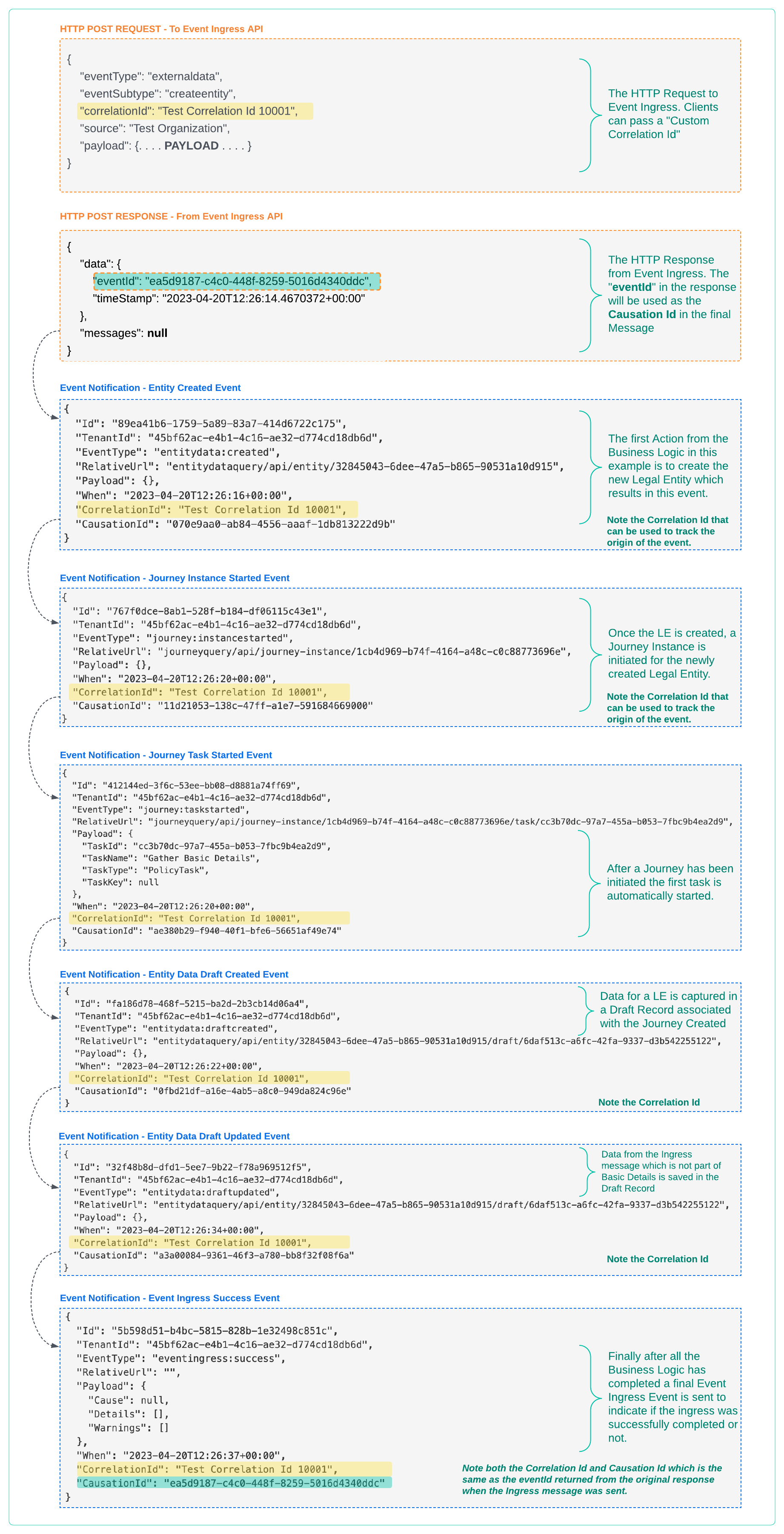
In the response above, the "eventId" and "timeStamp" are returned once a message is called. The "eventId" will be used as the CausationId and will be referenced in any Event Notifications generated by the event processing.
The request bodies are different depending on the targeted business process and these are detailed below. Drill into one of the Event types to see a sample payload.
Correlation and Causation IDs for Event Ingress
When a call to Event Ingress is made, the business logic in the platform orchestrates a number of internal tasks based on the event type. For any task (unit of execution) in the Fenergo platform, typically an event is generated.
So when a new legal entity is created, the "entitydata:created" event is generated and sent to configured webhook endpoints (or can be polled for). In the below example which looks at the Event Ingress Request and Response, ALL of the Generated Events are identified and it can be see how the Correlation Id and Causation Id can be used for clients to track the origin of the Events. This could be used to differentiate between Ingress activity and normal system usage or whatever the client requirements are.