Event Notifications Overview
Push and Pull Notifications (Polling and Webhooks)
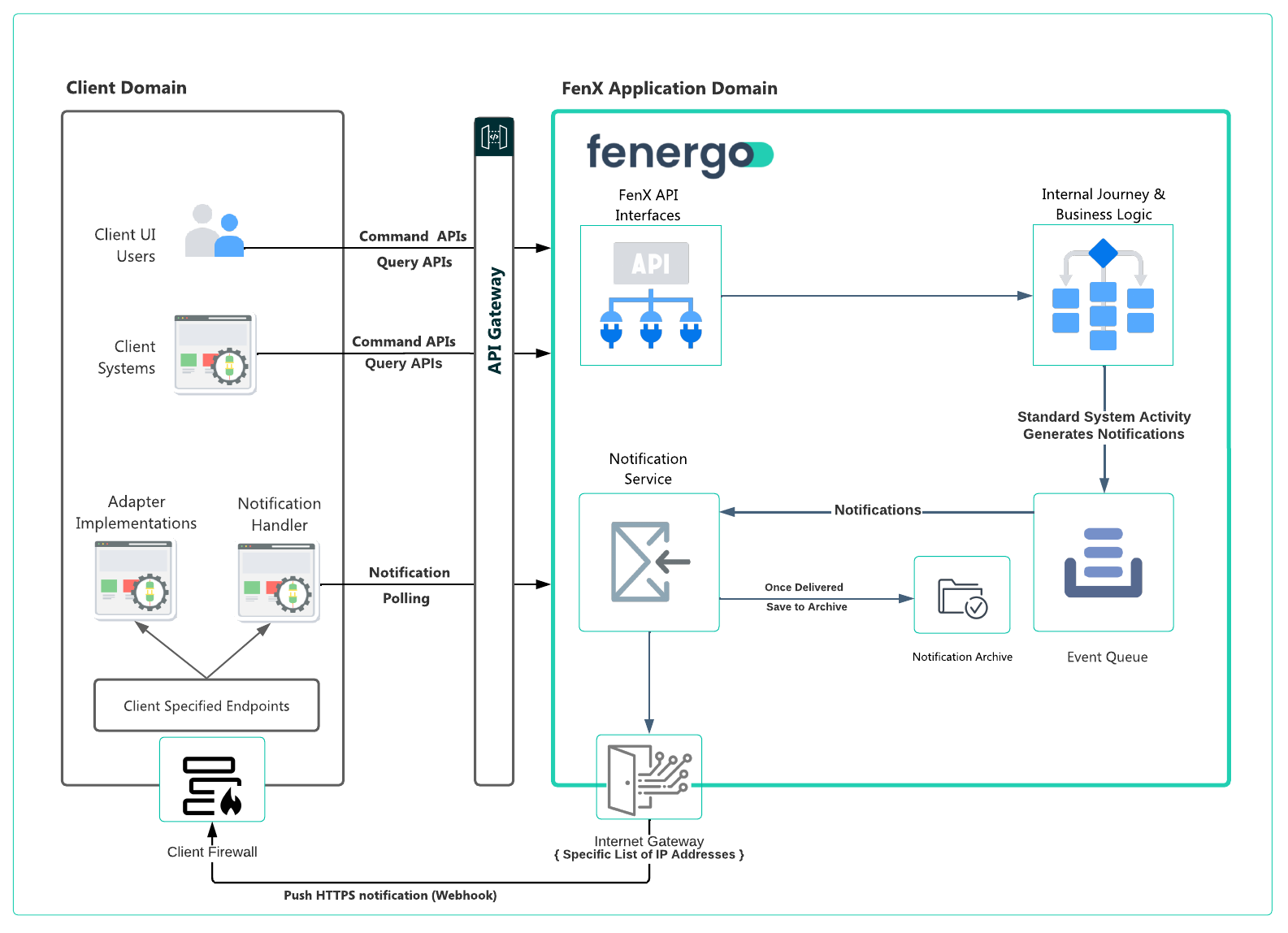
To facilitate the integrations clients want to build, FenX supports two types of Notifications. Notifications are messages which clients can reach out and grab or listen for. They indicate that an Event has occurred on the platform which might be of interest. These notifications can be used as a trigger to implement additional logic in other systems or automate steps within a clients broader technical landscape.
There are two types of Notifications which clients can select to work with, depending on the use case being solved for. Each has their own advantages. The main difference is who is responsible for delivering the notification, Client to pull via polling or FenX to push to a specified webhook.
- Polling - Where Notifications are stored in batches as events occur and clients can call into FenX and retrieve them.
- Webhooks - Where Notifications are pushed in real-time by FenX as events occur to a client designated endpoint.
Events and Notifications
An Event is a data change which has occurred on the Fenergo SaaS Platform as a result of User or API interaction with the platform. Entity data creation or updates cause events to be raised, as do updates to Journeys or tasks inside Journeys.
In addition to event-driven notifications raised by user or API interaction, the platform also publishes scheduled SLA notifications (SLA Approaching Due and SLA Past Due) for Journeys, Stages, and Tasks where an SLA has been configured and the parent Journey Schema has opted in.
A full list of the available events and details can be seen here: Notifications Event Registry.
In keeping with the Architectural Principal of CQRS / Domain Driven Design, each domain within manages its own notifications, and instead of building complex end to end cross domain logic, domains instead "Fan Out" events, essentially "Broadcasting" that something happened. That "something" is the event and the message that describing the event is the notification.
Especially within the SaaS space where clients are considered "Tenants" working on a common product, customization at a "per client" basis is not done beyond configuration, a rich suite of notifications gives clients the ability to react to what "they" are interested in and implement their own logic as part of that reaction. The only choice clients need to make is if they wish to use "Polling" or "Webhooks" or both.
Event notification messages generated by Fenergo have a TTL (Time to Live) of 30 days. After this time our internal cleanup operation will delete these notifications.
Using Polling
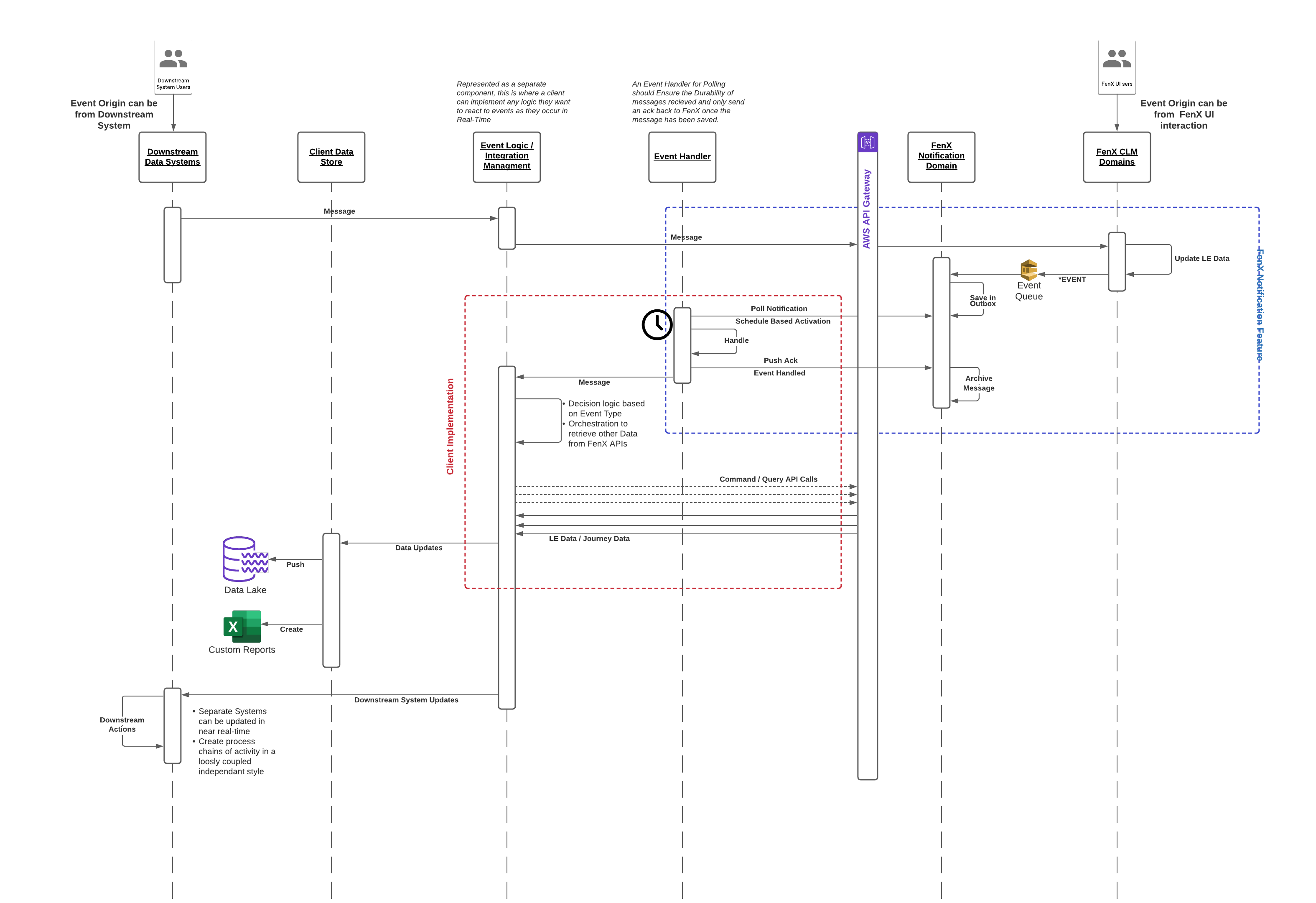
In Polling, events that occur on the platform pass through the Notification Queue in a FIFO order (first in first out). These notifications are saved to a Notification Batch Outbox. Each collection of messages is given a batch ID and the batches are saved with a status of unread in an Outbox for the client to retrieve.
A batch can contain between 1 - 10 messages, does not wait to be filled in order to be placed in the Outbox & will contain however many notification messages are available at the time of processing.
The pattern used for polling is Request / Acknowledge. Once there are messages on the queue (grouped into a batch), a client requests the next batch and then acknowledge back to FenX that they have received it:
- 1 - Clients configure their Polling Interval in line with their own requirements.
- 2 - When their polling interval is triggered, the client calls the Event Notification Polling API to get the next batch of messages.
- 3 - Clients then Handle the messages.
- 4 - Clients call the API again to mark a batch as complete.
- 5 - FenX will then move the batch into an archive folder as per the above diagram.
- 6 - The batch format is as below and contains a property called "moreAvailable" which clients can use to decide if they want to make an immediate call for more batches.
{
  "batchId": "3e6195b4-3246-483f-83a8-f1725bd20c1c",
  "notifications": [
      {
        "id": "f2a609e5-3f1d-467b-93ff-8839777c3026",
        "eventType": "entitydata:created",
        "when": "2021-05-05T10:19:17.3157953+00:00",
        "tenantId": "501339c8-89a4-4021-b1d9-b23ed0257fa5",
        "causationId": "string",
        "correlationId": "string",
        "url": "entitydataquery/api/entity/{id}",
        "payload": null
      },
      {
          .....
      },
      {
          .....
      }
  ],
  "moreAvailable": true
}
When this last step occurs, FenX will move the batch from the clients "Outbox" to an archived folder.
There is currently no functionality to replay batches or retrieve messages from the Archived Folder. Clients need to ensure their handling of batches is done in a durable and reliable fashion. Once a batch has been marked as complete FenX assumes the client has handled the notification.
Polling Pattern
Advantages of Polling
- For client use cases with no real-time dependency reaching out for notifications on their schedule can made for a simpler implementation.
- Polling intervals can be set by clients to meet their requirements and do not need to be running 24*7.
- If an error occurs in proceeding a batch, clients can request the "next batch" from the API and will be continuously given the same set of notifications until they send an acknowledgement indicating that they have processed it.
Using Webhooks
The major technical difference between Polling and Webhooks is where responsibility lies for delivery of a message. The style of integration is also influenced by the user story a client is trying to deliver. If the user story requires Real Time responsiveness from a downstream system or dependant action, then Webhooks are likely to be a good choice for implementing such an integration.
Clients can use the Event Notification Webhook API to create and configure the delivery of notifications for specified Event Types to a https web location of their choosing.
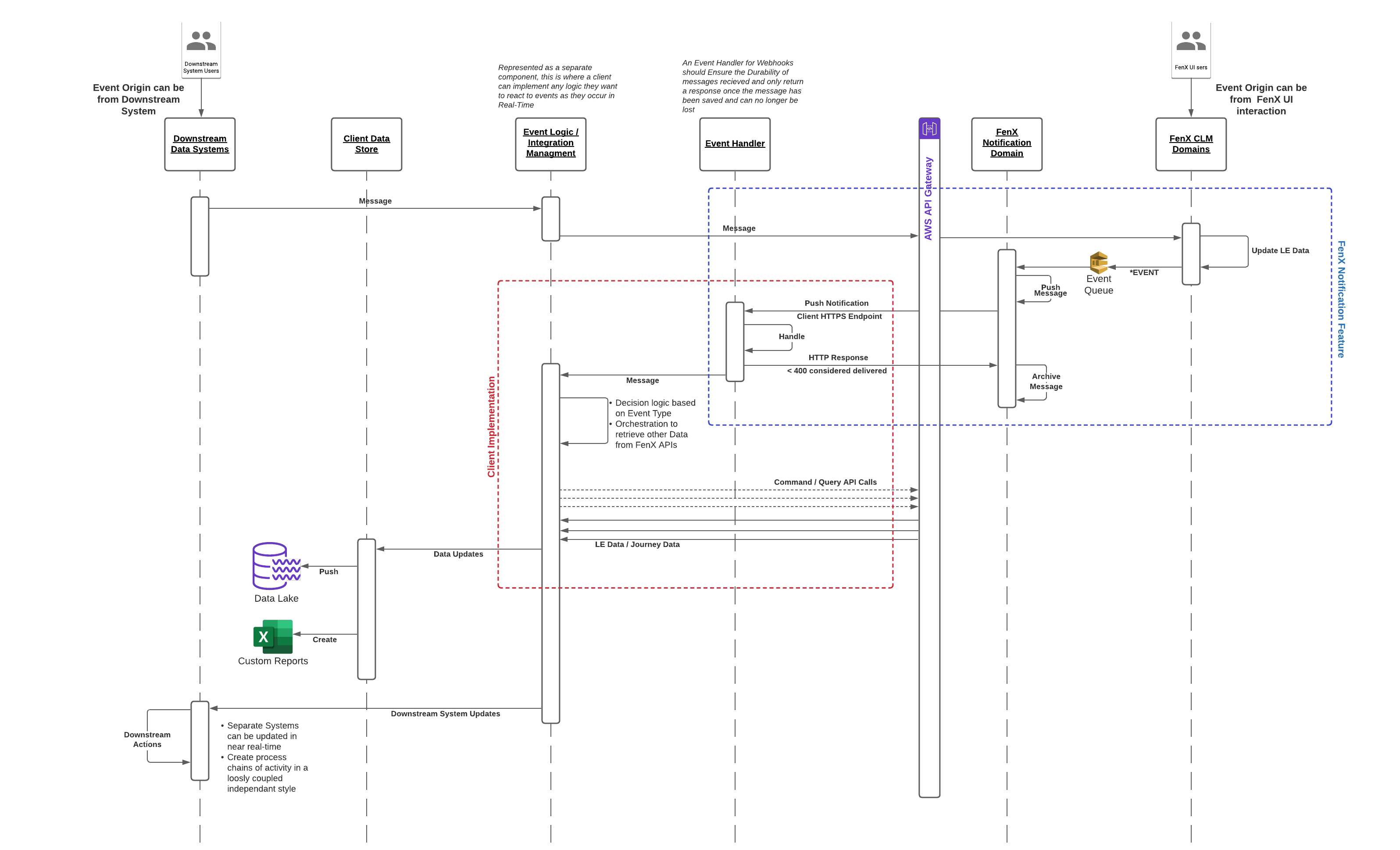
The pattern is Event / Push from the fenergo SaaS side. Once an Event occurs, that event is sent to a clients https endpoint in Real Time and any HTTP response code below HTTP 400 is considered a successful delivery. Clients need to ensure their endpoint is available to accept messages and are responsible for the durability and handling of messages once they are received.
- Clients can configure up to 10 webhooks using the API.
- For each webhook, clients can specify the Events they wish to have delivered.
- Clients provide a "Secret" string in the creation of the webhook which is used to calculate a hash and the signature included in the header of the Webhook HTTP message.
- Clients are responsible for the durability and resilience of the message, once received it is automatically archived by FenX and cannot be replayed.
- If the clients HTTP endpoint times out or returns an error, FenX will use a step back and retry approach, 4 retry attempts will be made at 2, 4, 8 and 16 minutes consecutively.
- If all retries fail, the webhook is automatically disabled (no delivery attempts will be made until it's manually enabled via the API).
- Disabled webhooks are still queuing events so as soon the endpoint is up and webhook is enabled, all of the notifications will be delivered in proper order (actual delivery process will start as soon as webhook receives next event).
The mechanism of delivery aside, the actual messages themselves are identical regardless if a client uses polling or webhooks.
Webhook Pattern
The flow for how webhooks operate is illustrated below. The starting trigger for an event comes from interaction from other systems or usage of the FenX UI. The raised event is handled by the event notification domain which pushes the details to a client designated
Advantages of Webhooks
- For client use cases with a real-time dependency the notifications are pushed as they happen to a client designated endpoint.
- Webhook notifications are sent 24*7 and client endpoints need to be available to receive and process the notifications.
- Clients do not need to send a separate acknowledgement message, just the HTTP response code from their webhook endpoint is enough for FenX to assume successful delivery.(any HTTP code < 400).
- If an error does occur the automatically enabled step-back and retry mechanism ensures messages are durably delivered.