Webhook API Walkthrough
Using the APIs to Configure Webhook Notifications
Unlike Polling where clients create their own schedule and retrieve event notifications, Webhooks are a mechanism where clients can designate a publicly assessable endpoint(or multiple endpoints) and the fenergo SaaS platform can deliver events in real time for clients to handle.
| APIs Referenced |
|---|
| Event Notifications Webhooks |
- Clients can add up to a maximum of 10 Webhook configurations per the fenergo SaaS platform Tenant.
- Each Webhook can be configured to receive as MANY event types as required, just one specific event or ALL the available events.
- Webhooks can use the same or different URL endpoints / arguably there is no advantage to having multiple webhooks delivering to the same endpoint.
- Webhook endpoints need only to return a HTTP 200 OK but any response below HTTP 400 is considered successful delivery by the fenergo SaaS platform.
- The HMAC signature which the client can verify, serves as both Authentication and Message Validation for all webhook messages and is applied to the header of the webhook request.
- Webhooks have a back off / retry mechanism and the API can be used to update, enable disable and delete webhooks.
Some consideration should be given to what "decisions / actions" webhook notifications will drive downstream as scenarios can exist where schedule style processing makes more sense. The events are delivered in a FIFO (First In First Out) pattern but events come from multiple domains and aggregate into the same queue for forwarding to the client endpoint. The strict ordering can only be enforced as a best effort and It is advisable that clients strongly consider what patterns make most sense for their requirements. Depending on the event some delay or retry accommodation may be needed to ensure the data which caused the event is retrievable.
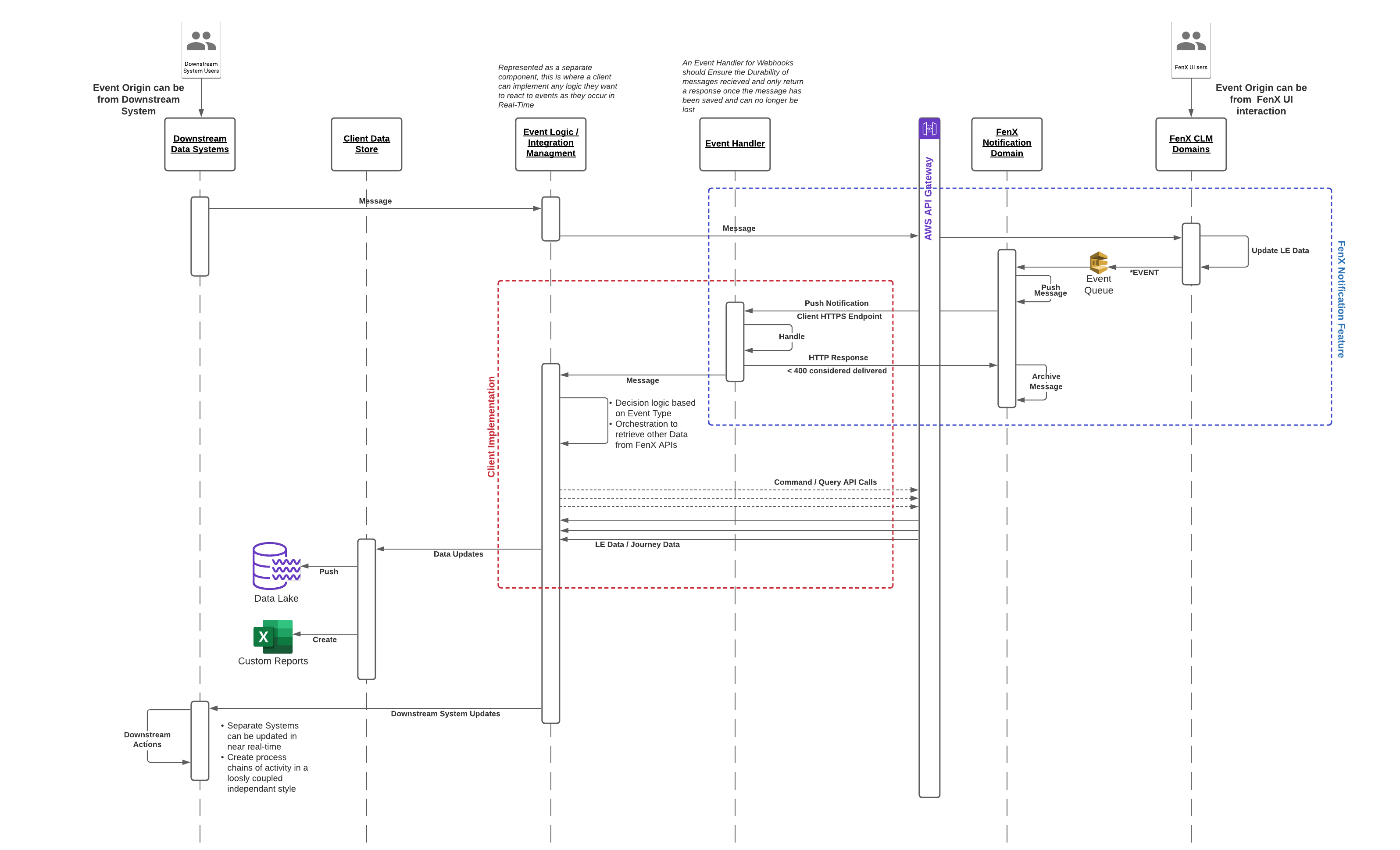
Sample Use Case to receive Webhook Notifications
  AS an API Consumer

    GIVEN:  I have downstream activities I want to update based on Activity on the Fenergo SaaS Platform.

    AND: I have built the capability to handle those events in real-time

    AND: I have an available public facing endpoint which fenergo can reach

     WHEN: any event I have specified in my webhook is created

  THEN: I want to receive that event notification in real time.
Creating and managing Webhooks is more involved than polling as the fenergo SaaS platform needs to be configured to create the webhook. To achieve this use case, a the fenergo SaaS platform technical specialist with appropriate permission should follow the below steps:
- List all current webhooks configured to determine if a new webhook is required or if an existing one can be extended.
- Issue the command to create a new webhook.
- Test the webhook and verify the security.
- If a webhook needs to be deleted - use the API to remove the webhook. (Deleting a webhook will delete any events in the queue not yet delivered).
If more than 10 webhooks are required, please discuss with Fenergo or your SI partner and the specifics will be examined to determine if this is the best approach.
Listing All Webhooks
GET https://{{baseURL}}/webhooks/v1/webhooks HTTP/1.1
{
  "webHooks": [
    {
      "url": "Client Specified URL where webhooks are sent",
      "id": "UID of a webhook",
      "enabled": true or false,
      "eventTypes": [
        "comma separated list of specific event types"
      ]
    }
  ]
}
{
    "webHooks": [
        {
            "url": "https://webhook.site/dc062998-c1eb-4b71-a37b-912e7c68a6d4",
            "id": "10fa7c6d-386d-4059-a40a-da23c9486f8b",
            "enabled": true,
            "eventTypes": [
                "entitydata:created"
            ]
        },
        ...
        ...
        {.... Other Webhooks ....}
    ]
}
- The destination where the webhook messages will be sent is :
"url":"https://{..client endpoint..}" - The identifier for the webhook above is :
"id":"10fa7c6d-386d-4059-a40a-da23c9486f8b" - The collection called
"eventTypes"lists all the events which will be sent to this webhook endpoint.
Creating a new Webhook
To create a new Webhook POST the following to the Webhook api
POST https://{{baseURL}}/webhooks/v1/webhooks HTTP/1.1
{
    "url": "Webhook Destination URL",
    "secret": "client provided secret",
    "enabled": true or false,
    "eventTypes": [
          "comma separated list of specific event types"
    ],
    "emailAddresses": [
      "comma separated list of email address to be notified when whebhook gets disabled"
    ]
}
{
    "url": "https://webhook.site/4226040e-850e-4149-9ac4-045139c2d502",
    "secret": "Client Provided Secret",
    "enabled": true,
    "eventTypes": [
        "journey:taskcompleted", "entitydata:created"
    ],
    "emailAddresses": [
      "testuser@fenergo.com"
    ]
}
{
    "webhookId": "511e99aa-3ffc-4d44-a946-5ef8a8a32da8"
}
With the above example, a webhook is configured to send the journey:taskcompleted and entitydata:created events.
The are being sent to the following URL https://webhook.site/4226040e-850e-4149-9ac4-045139c2d502.
The response returns the Id for the created webHook. "webhookId": "511e99aa-3ffc-4d44-a946-5ef8a8a32da8"
Get Webhook Configuration
Using the Webhook ID returned from the creation or the listing of webhooks, a specific webhook can be retrieved by calling the below api. This detail could be used programmatically to work with webhooks when checking their status or config before making a change. There is also an array called "lastDeliveries" which lists the last 20 attempted deliveries of notifications to that specific endpoint.
The intention for this array is to give visibility into the webhook operation. Each entry in the list contains a timestamp (when) the notification attempt happened, the notificationId so clients can corelate against messages they received. It also contains the httpStatusCode returned from the client endpoint when the notification was sent and finally a status string to illustrate what has occurred at the webhook which will be one of the following:
- Successful
- Failed
- TimedOut
The listings in the lastDeliveries array are not actual notifications, they are attempts, so there could be three entries for the same notification if it failed twice and then succeeded a third time.
GET https://{{baseURL}}/webhooks/v1/webhooks/{webhookId} HTTP/1.1
GET https://{{baseURL}}/webhooks/v1/webhooks/7c98579e-6fb4-47e1-961b-89a6da0cf32a HTTP/1.1
{
    "webhook": {
        "url": "https://webhook.site/dc062998-c1eb-4b71-a37b-912e7c68a6d4",
        "id": "7c98579e-6fb4-47e1-961b-89a6da0cf32a",
        "enabled": false,
        "eventTypes": [
            "entitydata:draftcreated"
        ],
        "lastDeliveries": [
          {
            "when": "2023-02-02T01:14:17+00:00",
            "notificationId": "99a3feb0-8ecf-5c79-afba-86b2580e940b",
            "status": "Successful",
            "httpStatusCode": 200
          },
          {
            "when": "2023-02-02T01:14:16+00:00",
            "notificationId": "94c67271-43dd-50c5-a64f-0bbd8a1a0779",
            "status": "Successful",
            "httpStatusCode": 200
          },
          .
          .
          .
          {  . . . 18 more entries if available . . .}
          .
          .
          .
        ],
        "emailAddresses": [
          "testuser@fenergo.com"
        ],
    }
}
Editing an Existing Webhook
An existing webhook can be updated / changed, using the following HTTP PUT API. The body is the same schema and format used in the create request. The changes can be applied in real time and the updates are immediate.
PUT https://{{baseURL}}/webhooks/v1/webhooks/{webhookId} HTTP/1.1
PUT https://{{baseURL}}/webhooks/v1/webhooks/7c98579e-6fb4-47e1-961b-89a6da0cf32a HTTP/1.1
{
    "url": "new or updated Webhook Destination URL",
    "secret": "new or updated client provided secret",
    "enabled": change true or false,
    "eventTypes": [
          "update the comma separated list of specific event types"
    ],
    "emailAddresses": [
      "comma separated list of email address to be notified when whebhook gets disabled"
    ]
}
{
    "url": "https://webhook.site/4226040e-850e-4149-9ac4-045139c2d502",
    "secret": "Client Provided Secret",
    "enabled": true,
    "eventTypes": [
        "journey:taskcompleted", "entitydata:created", . . . . { . . Other Selected Events . . } . .
    ],
    "emailAddresses": [
      "testuser@fenergo.com"
    ]
}
HTTP/1.1 200 OK
Deleting a Webhook
If a webhook is no longer required, it can be deleted by calling the following API:
DELETE https://{{baseURL}}/webhooks/v1/webhooks/{webhookId} HTTP/1.1
DELETE https://{{baseURL}}/webhooks/v1/webhooks/f5d7ea65-05da-4a97-9fdf-0c0b73aa92d1 HTTP/1.1
HTTP/1.1 200 OK
HTTP/1.1 404 Not Found

"Webhook configuration for specific tenant not found!"
Testing your Webhook
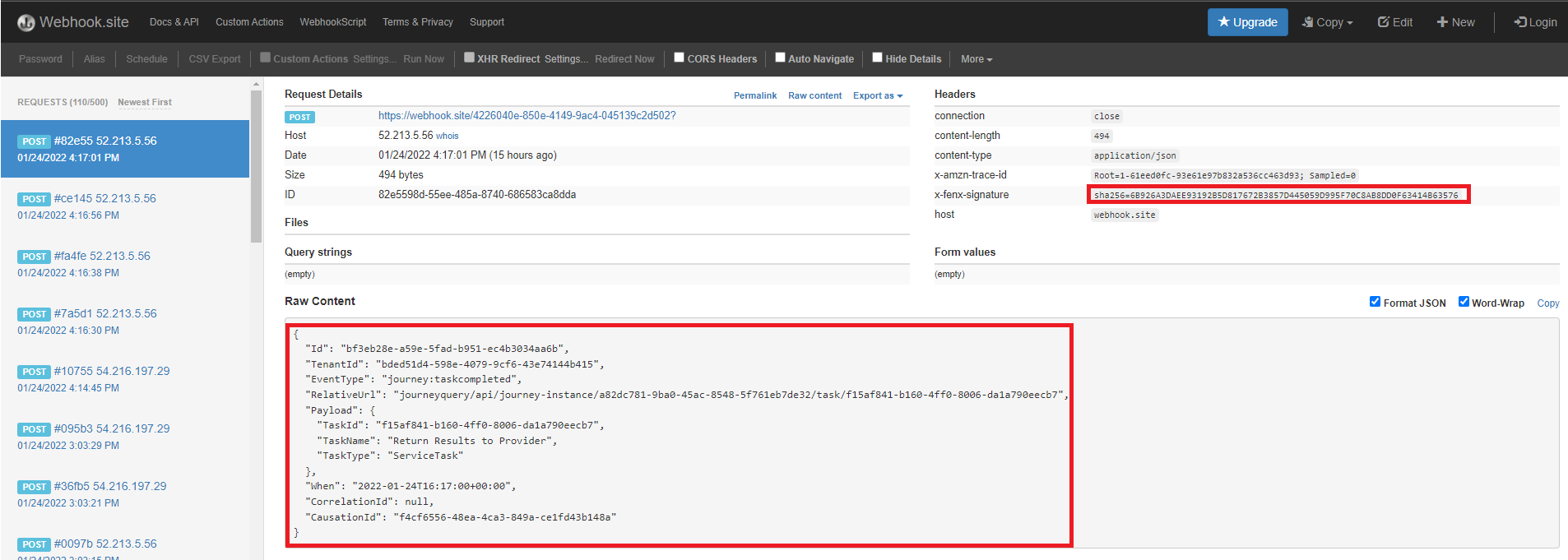
Once created webhooks are created and active immediately. The will start to send out events to the destination. One of the easiest approaches to testing a webhook is to use https://webhook.site which is an online test harness for testing webhooks. You can use one of the URLs it provides as your destination and then start examining the content of the notifications. In the below screenshot the event details can be seen. As can the x-fenx-signature with the calculated hash that clients can recreate on their side.
Troubleshooting your Webhook
if you are having issues receiving messages to your webhook, it is likely to be one of the following:
- Availability: Your endpoint is not accessible from the internet (internal URLs, firewalls etc.)
- Private DNS: You are using an API Gateway endpoint with a private DNS (more info can be found on this here https://aws.amazon.com/premiumsupport/knowledge-center/api-gateway-vpc-connections/)
- Disabled: Your endpoint was offline and the automatic stepback has disabled your webhook. Use the APIs to re-enable your webhook, any undelivered messages will will immediately be sent.