Flow Scheduler
The Flow Scheduler enables you to design integrations to be triggered automatically on a set schedule, either one-time or recurring.
This adds support for for new use cases such as:
- Periodic synchronization with external data sources
- Routine compliance or quality checks
- Automated batch exports or data updates
Configuration
Schedules can be managed within Flow Studio via the 'Schedule' tab. Each schedule definition allows for the following configuration. Please be sure to create your schedule-initiated Flow design first.
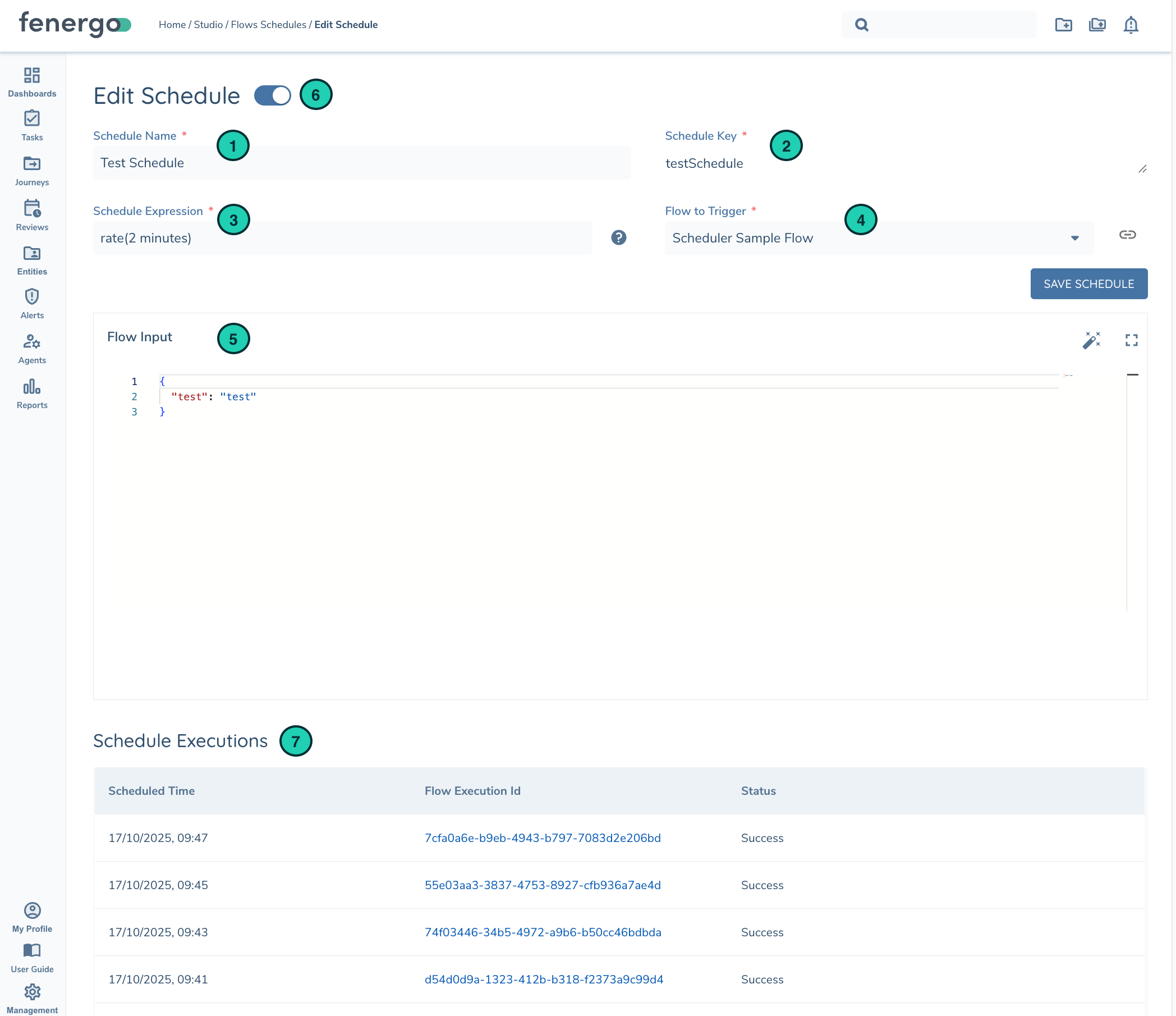
| Definition | |
|---|---|
| 1 | Schedule Name is a friendly name for the schedule |
| 2 | Schedule Key is a unique identifier for the schedule in your tenant |
| 3 | Schedule Expression defines when and how often a schedule should run. See next section for more details |
| 4 | Flow to Trigger displays a list of scheduler-based flows. The link button will open the Flow's design page once selected |
| 5 | Flow Input allows you to provide custom details to your Flow when triggered. Useful when a single Flow is designed to be triggered by multiple schedules |
| 6 | Active Indicator when toggled on the schedule is active and will trigger your flow when the schedule expression is met |
| 7 | Schedule Executions shows a list of past flow executions triggered by this schedule and their status (Success or Failed) |
Schedules can be manually turned on/off via the active indicator toggle and saving your configuration.
If a repeating schedule results in a failed Flow Execution 5 times in a row the schedule will automatically disable and need to be re-enabled once the fault is repaired. Fenergo publishes a Flow Execution Failure event for each failure but there is currently no separate event to monitor when the schedule is disabled.
Schedule Expressions
A schedule expression defines when and how often a Flow should be executed. There are three types of schedules that can be created:
| Schedule Type | Syntax | Description |
|---|---|---|
| One-Time | at(yyyy-mm-ddThh:mm:ss) | A one-time schedule will trigger a Flow only once at the date and time that you specify. at(2025-12-25T10:00:00) — runs once at 2025-12-25 10:00 UTC |
| Rate-based | rate(value unit) | A rate-based schedule triggers your Flow repeatedly at a regular rate that you define rate(5 minutes) — every 5 minutes rate(2 hours) — every 2 hours rate(1 day) — every 24 hours |
| Cron-based | cron(min hour day month day-of-week year) | A cron expression creates a fine-grained recurring schedule that will trigger a Flow at a specific time of your choosing. All times will be based on UTC timezone and therefore do not observe Daylight Saving Time. cron(0 8 * * ? *) — every day at 08:00 UTC cron(15 12 ? * MON-FRI *) — 12:15 UTC, Monday through Friday cron(0 0 1 * ? *) — midnight first day of every month |
For more advanced options see AWS Schedule Expressions.
Runtime Details
When a Flow Execution is triggered by a schedule the following details will be available at runtime via the Execution.Request object.
| Execution Variables | Description and Data Type |
|---|---|
| executionTime | string. UTC date time the schedule triggered |
| scheduleKey | string. The Schedule Key of the schedule that triggered this Flow Execution |
| input | json. Custom Flow Input as defined in schedule definition |