Flow Limits
The technical limits in Integration Flows.
Limits are defaulted to “Development” levels to allow users to experiment with Flow functionality. For any active projects please raise a request with Fenergo Support to increase them before Production once you've sized your workloads.
Supergraph Task Limits
The following limits apply to the Supergraph Task.
| Type | Value | Description |
|---|---|---|
| Max nodes per collection | 500 | Maximum number of nodes returned per paginated collection (Related Parties, Product Drafts, Product Associations). Results are fetched 10 nodes per page up to 50 pages. Collections exceeding this limit will be truncated to the first 500 nodes. |
Designer Limits
The following limits apply when configuring Flows.
| Type | Value | Description |
|---|---|---|
| Max # of Schemas | 100 | The total number of Schemas that can be configured in a Tenant. |
| Max # of Mappings | 100 | The total number of Mappings (mapping fields between source and target schemas) that can be configured in a tenant. |
| Max # of Custom Authentications per Flow | 5 | This applies to API-initiated Flows or Flows which use the HTTP Callback task where you want to use a custom authentication scheme instead of relying on a Fenergo token. You can configure a maximum of 5 unique custom authentication schemes per Flow |
| Max # of Flows | 100 | The total number of Flows that can be created in a Tenant |
| Max # of Tasks per Flow | 30 | Flows can be configured to use a maximum of 30 tasks. If your Flow is too large, consider dividing it into smaller ones or speak with Support to increase the limit |
| Max Flow Definition | 400kb | Physical limit for size of a Flow Configuration is 400kb |
Secret Limits
The following limits apply to Secret Variables.
| Type | Value | Description |
|---|---|---|
| Max Global Variables | 20 | Maximum number of global variables of type = secret. |
| Max Flow Variables | 10 | Maximum number of Flow Variables of type = Secret within a given Flow. |
| Max Secret Variables | 30 | Total maximum number of secret type variables in a tenant (Global and Flow variables). |
Storage Limits
The following limits apply to Persisted Storage.
| Type | Value | Description |
|---|---|---|
| Max record size | 10MB | Maximum size of disk of a single file created/updated by the Storage Task |
| Total files per tenant | 10,000 | Total number of files that can be stored at one time. Files are automatically purged overtime according the the Time To Live (TTL) setting in the Storage Task |
| Total “long lived” files (TTL = one month) | 100 | Total number of long-lived files (TTL with one month or more) that can be stored at one time. |
| Total storage per tenant | 500MB | Maximum space on disk of all files created by Storage Task |
Execution Limits
The following limits apply to your Flows during runtime.
| Type | Value | Description |
|---|---|---|
| Flow Execution Timeout | 12 min | The maximum amount of time that a flow execution can run sequentially. This does not include time where the execution is paused during async operations like the Wait Task and HTTP Callback. |
| Max Number of Transitions (Tasks Executions) | 1000 | The total tasks that can be performed in a single Flow Execution. e.g. Supergraph task, followed by transformer task, followed by HTTP Invoker task would be 3 transitions. When using a router to loop across a series of tasks each time a task runs counts as a new transition. |
| Transformer Task Timeout | 3 s | Maximum amount of time your custom code can run for. |
| Max input / output size of Transformer | 1 MB | Transformer receives your script (code) and reference data. This package is compressed so the actual input is much higher. |
| HTTP Invoker Task Timeout | 110 s | HTTP Request timeout (not configurable) |
| Max request/response size to HTTP Invoker | 6 MB | Maximum amount of data the HTTP Invoker can receive from an outside API |
| HTTP Callback Timeout | 7 days | Max length of time the HTTP Invoker task will wait for a callback response. |
| Max Execution Retry Attempts | 100 | Maximum number of times a single execution can be retried. |
| Max Flow Inputs | These are the maximum data a Flow can receive when initiated for each initiator... | |
| API Initiator Payload | 6 MB | Maximum HTTP Request size API Initiator can receive (including headers, path, body, etc) |
| API Initiator Callback Payload | 6 MB | Maximum HTTP Request size API Callback can receive (including headers, path, body, etc) |
| Journey | -- | |
| ExternalData | 6 MB | |
| Policy | 6 MB | |
| Max Flow Outputs | The maximum amount of data a Flow can return at the end of execution (using End Task). | |
| Triggered via Flow Invoker | 6 MB | When using Flow Invoker to run another Flow in synchronous (wait mode), that flow can return up to 6MB of data. |
| Triggered by ExternalData | 6 MB | |
| Triggered via Policy Adapter | 256 KB |
Tenant Execution Limits
The following limits are tenant-wide on previous executions.
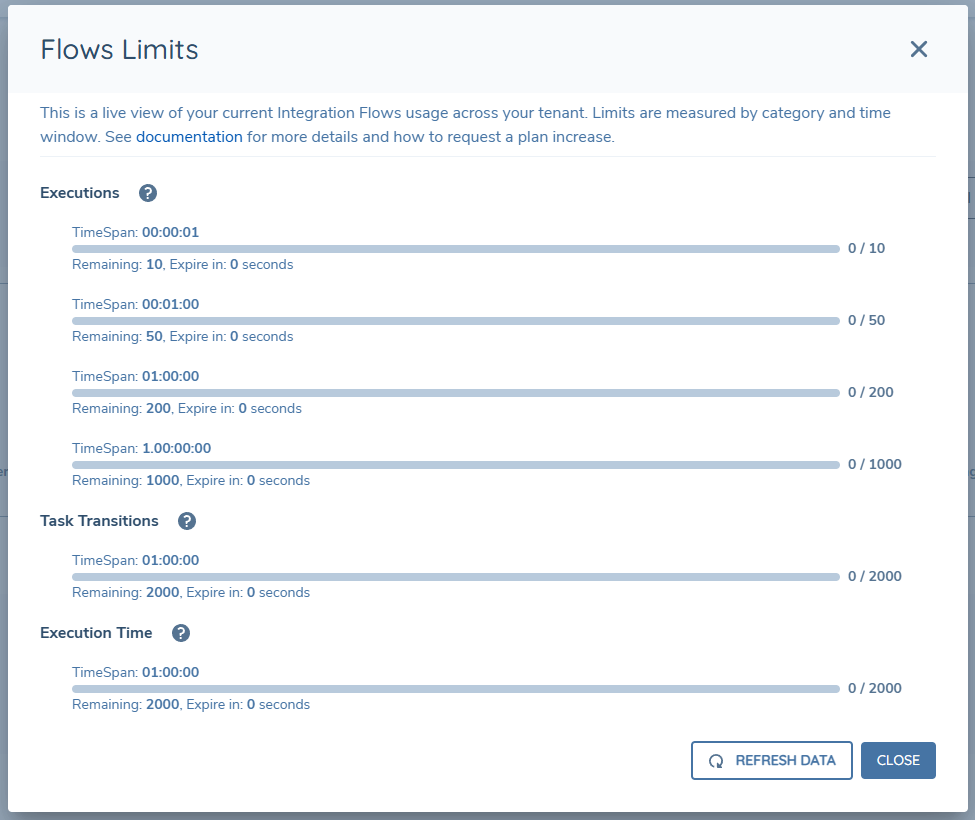
| Type | Second | Minute | Hour | Day | Description |
|---|---|---|---|---|---|
| Flow Executions | 10 | 50 | 200 | 1000 | Total # of Executions that can be initiated within the given time span |
| Execution Time | -- | -- | 2,000 | 10,000 | Total processing time across all executions |
| Task Transitions | -- | -- | 2,000 | 10,000 | Total number of task transitions across all executions. This boundary is primarily to prevent infinite loops... The 'START' task at the beginning of all Flow Executions contributes to your total number of Task Transitions. |
Live View
Integration Hub can show a live view of current Integration Flow activity in your tenant and your status against the Tenant Execution limits. To access this view open the Flows tab and click on the Live View button at the top.