ForEach
The ForEach Task enables parallel execution of a set of tasks for each item in an array. It works similar to the Parallel Task by treating each item as a new branch of execution. This enables faster processing than using a basic Procedural Loop pattern.
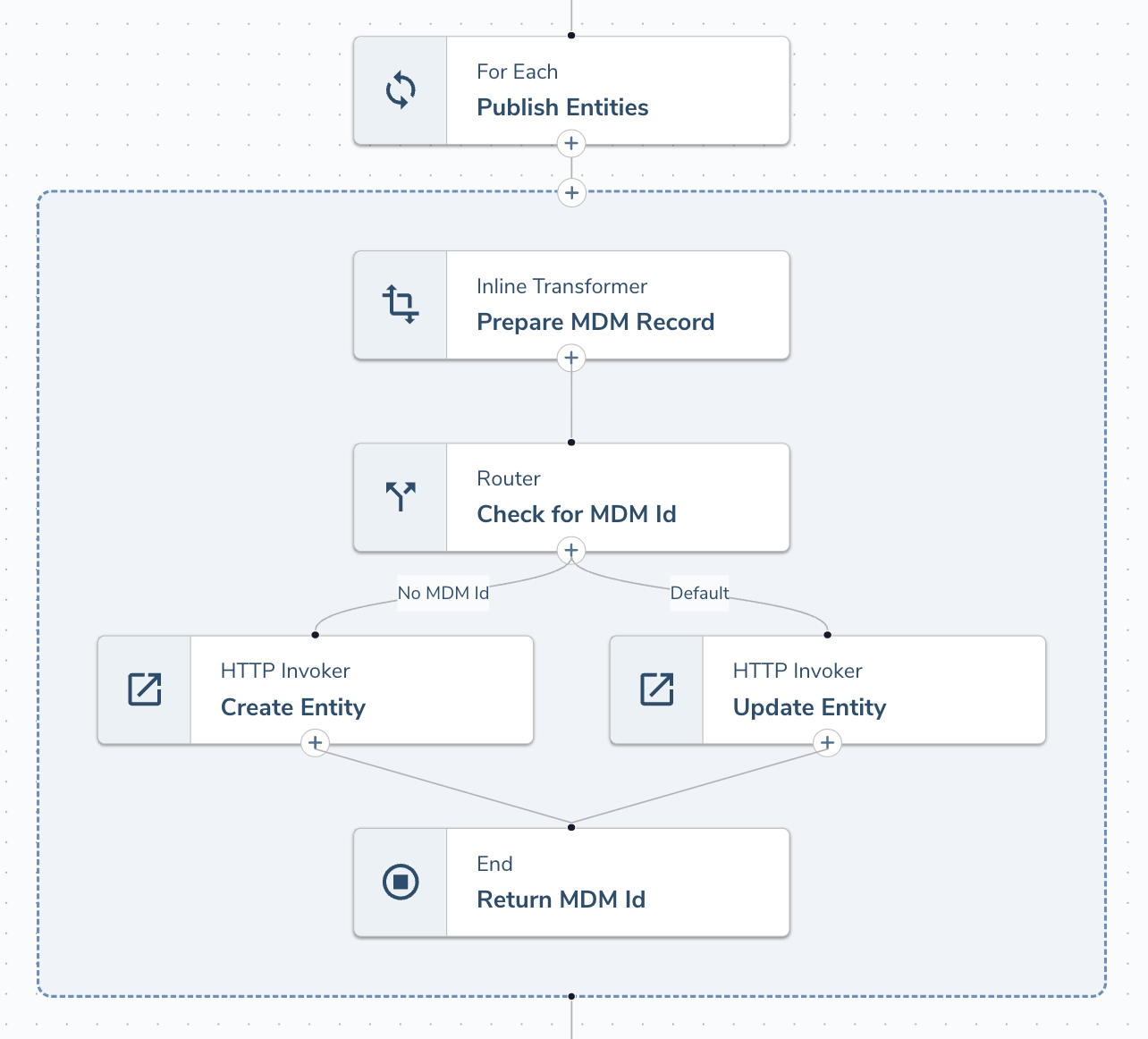
Consider a typical scenario where you would publish the entity updates to an external MDM. In the above example the ForEach task will iterate over the list of Entities retrieved from a Supergraph Task. For each entity it will check if an ExternalId field is defined before calling either the Create or Update APIs. Using an End task we can return the output for each iteration for evaluating later in the Flow.
Integration Flows can execute up to 5 parallel branches (array items) at once, allowing for the list to be processed up to 5x faster than using a procedural loop which processes one at a time.
The ForEach Task supports Async Operations like HTTP Callback and EventIngress but does not allow for nesting Parallel Operations (e.g. running a ForEach or Parallel task within a ForEach task).
Configurable Options
The ForEach task requires the following configuration:
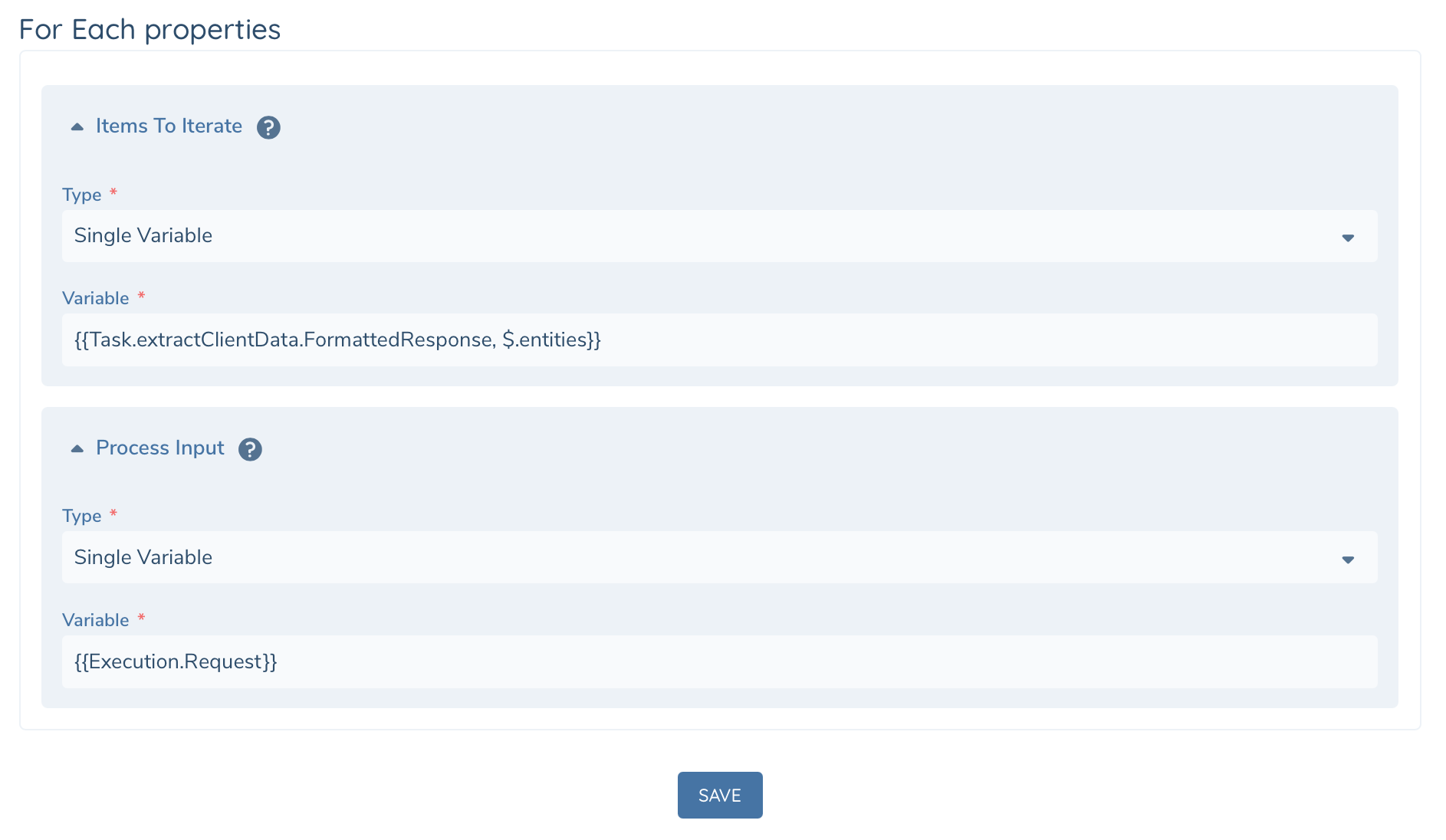
| Configuration | Description |
|---|---|
| Items to Iterate | Templated Input defines json array to iterate over. Array can contain up to 1000 items. |
| Process Input | Templated Input defines the input to each branch of Execution |
A ForEach task can process up to 1000 items in an array. If the array contains more the task will throw an error at startup.
In scenarios where more than 1000 items must be processed you will need to wrap your ForEach loop in a procedural loop and process the total collection in batches.
Runtime
Tasks executing within a ForEach branch have additional details available at runtime via the Execution variable.
| Runtime Variables | DataType | Description |
|---|---|---|
| Execution.BranchRequest | Json | Current item from the array defined in "Items to Iterate" |
| Execution.ForEachRequest | Json | Branch input object contains the following... |
| CurrentIndex | Number | Item's Index within the Items to Iterate array. Use this to drive conditional logic such as adding a periodic wait for every 10 items. |
| TotalCount | Number | Total count of items in the Items to Iterate array |
| ProcessInput | Json | Process Input as defined in Task Configuration |
Each branch maintains it's own Execution.State. Any State data available before the ForEach task will not be available from within the branch. Any details required can be mapped into the branch using the Process Input configuration.
State data within each branch will not be available after the branch completes. Please use an End Task to return any output from the current branch at the end of processing.
If you use HTTP Callbacks within a ForEach or Parallel task then each branch will get it's own async Id (Execution.AsyncId).
The ForEach task will not complete until all branches/instances (and nested async tasks) have completed.
Task Output
The ForEach task returns the following output as the final result of the flow execution.
| Output Variables | DataType | Description |
|---|---|---|
| Responses | Json Array | Array of output from each branch |
| Status | String | Success or Failure |
| Output | Json | Branch Output, populated by an End Task at the end of the sequence of tasks |
| ErrorMessage | String | This will only be populated if there is an exception (see Errors below). |
Error Handling
The ForEach task will execute all instances in your array - even if a failure is encountered on one of the branches. If an exception occurs and you haven't configured Continue on Error in the Advanced tab of your ForEach task the execution will halt. Alternatively you can design your Flow to evaluate the branches and recover, or fail gracefully.
The ForEach task can throw the following exceptions:
- ForEachInvalidRequest thrown when Items to Iterate is not a valid JSON Array or exceeds the maximum number of items.
- ForEachTaskError denotes an exception during runtime while processing the branch (e.g. sub task throws an exception)
When there is an exception the task error output will include the following:
| Error Properties | DataType | Description |
|---|---|---|
| FailedIterations | Json Array | Array of integers representing the failed iterations / branches. e.g. FailedIterations [3, 8, 29] means responses[3], responses[8] and responses[29] will have status = failure. |
| Responses | Json Array | Array of output from each branch |
| Status | String | Success or Failure |
| Output | Json | Branch Output, populated by an End Task at the end of the sequence of tasks |
| ErrorMessage | String | If there is an error, the error message will be included. |
In the below design we've configured an error path to extract the Failed and Success responses using an Inline Transformer to store the results in Execution State. Similarly the successful path also extracts the responses to State. This allows us to handle the successful iterations in the event of a failure using logic as the normal path. Later in the Flow we can process the errors as needed.
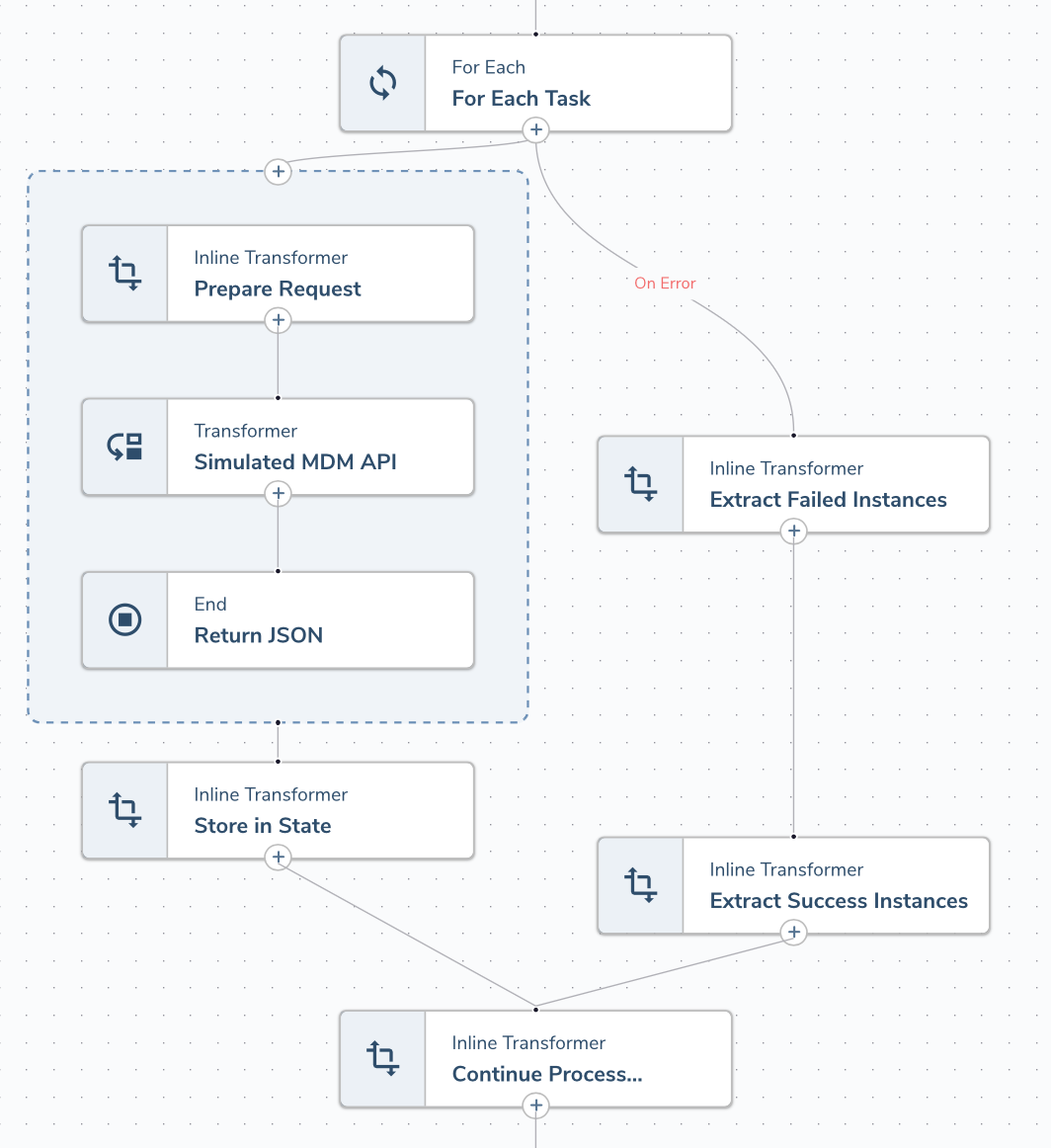
Each task in the screenshot above uses the following JSONPath to extract the responses...
Store In State: ExecutionState ($.Results) = {{Task.forEachTask.Responses, $.Output}}
Extract Failed Instances: ExecutionState ($.Failures) = {{Task.forEachTask.Responses, $[?(@.Status == 'Success')].Output}}
Extract Success Instances: ExecutionState ($.Results) = {{Task.forEachTask.Error, $.Properties.Responses[?(@.Status == 'Success')]}}
Execution Details
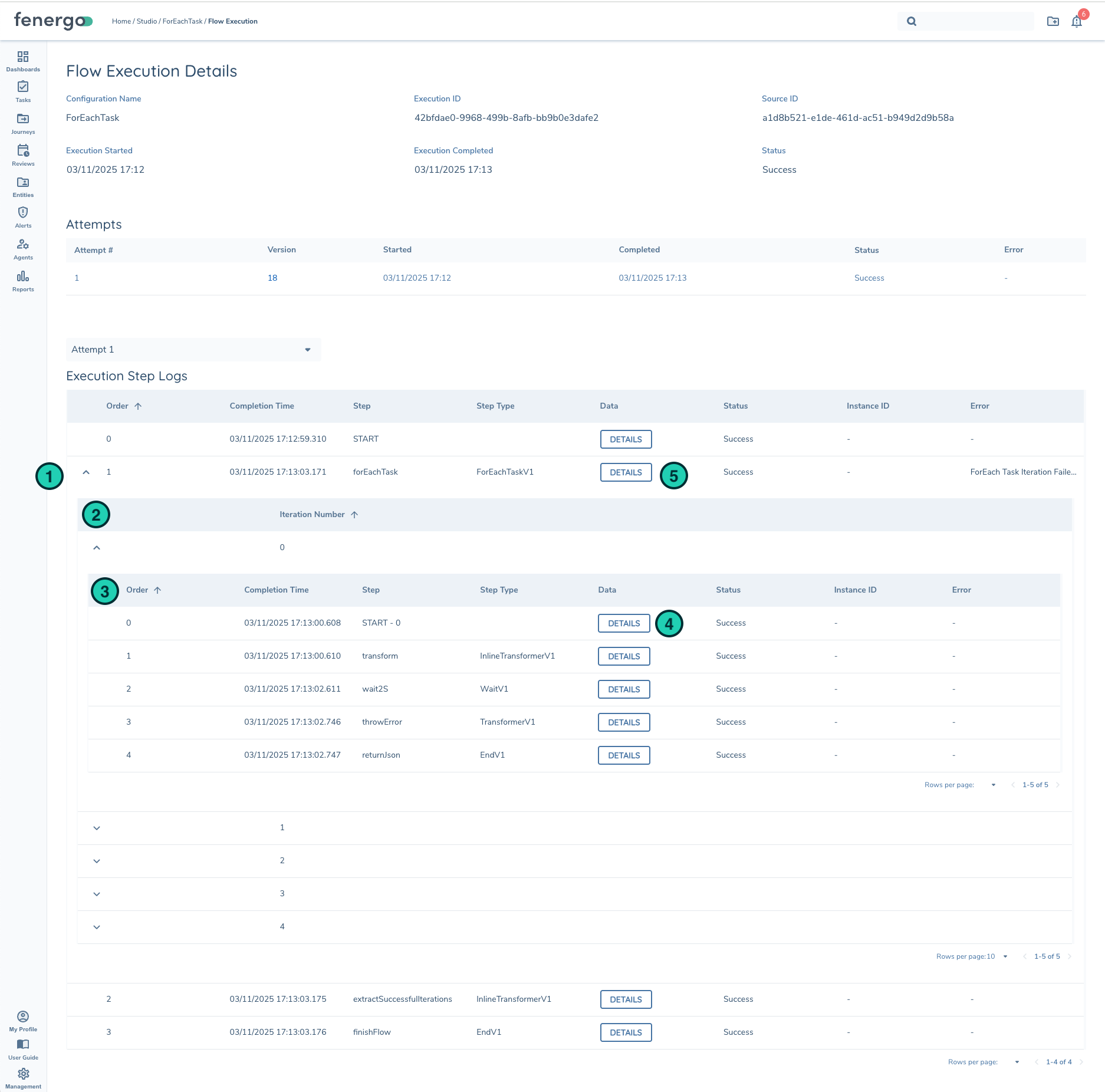
The Execution Details page has been updated to show ForEach Iterations (branches) nested in the Execution Step Logs.
| Description | |
|---|---|
| 1 | StepLog for ForEach task can be expanded to review each iteration/branch Flows |
| 2 | List of Iterations |
| 3 | List of tasks within the iteration/branch |
| 4 | Input to iteration/branch. You'll see Execution BranchRequest and ForEach Request defined here. |
| 5 | ForEach task output (Responses) from all iterations. |