Parallel
The Parallel Task enables concurrent execution of multiple independent branches of tasks. Each branch runs in parallel, allowing integrations to complete faster by overlapping operations that do not depend on one another.
Consider a common scenario where you need to publish data to two different APIs. Previously you would orchestrate those calls in sequence or via separate Flow Executions using the Flow Invoker task pattern. With the Parallel task you can now run both calls in parallel within the same Flow to simplify design and review outcome in a single Execution.
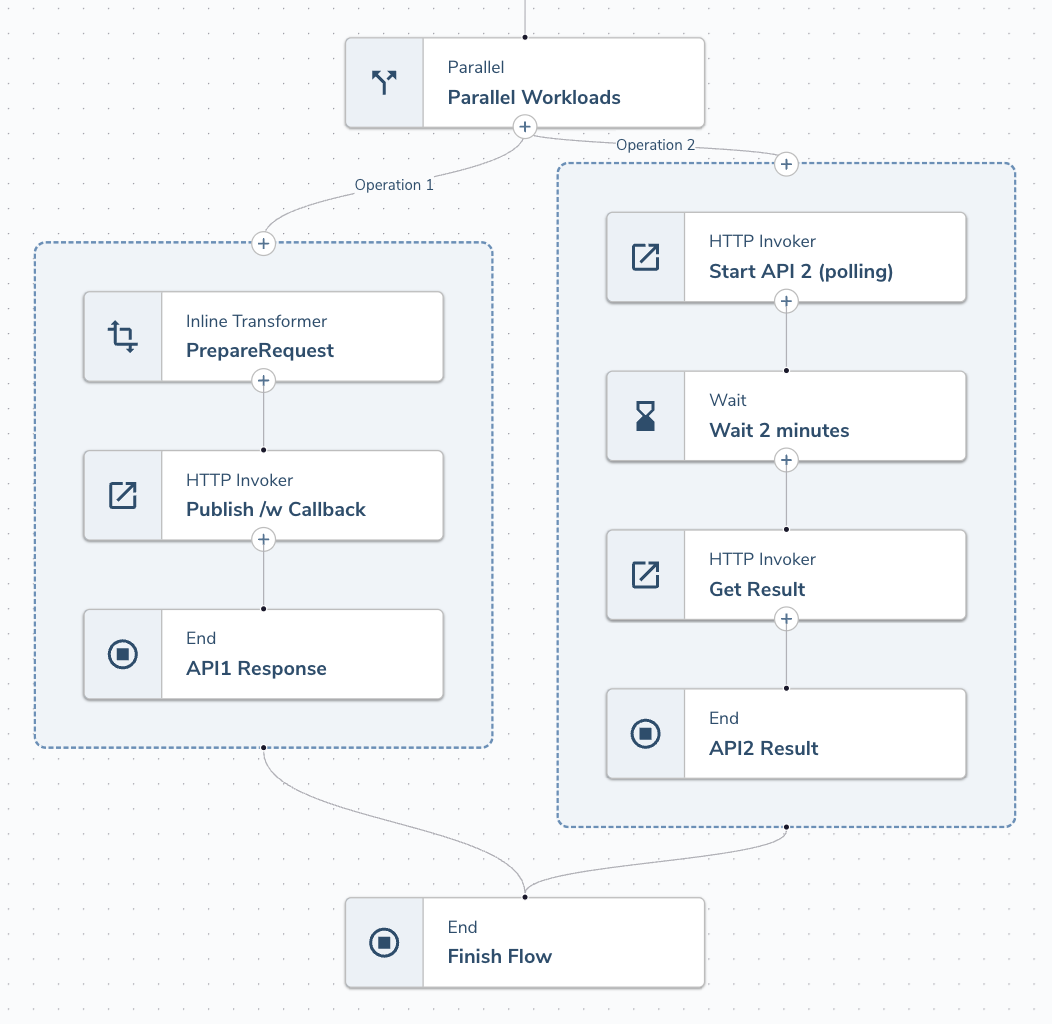
Parallel tasks supports between 2 and 5 branches.
Parallel tasks support Async Operations like HTTP Callback and EventIngress but does not allow for nesting Parallel Operations (e.g. running a ForEach or Parallel task within a Parallel task).
Configurable Options
The Parallel Task requires the following configuration.
| Configuration | Description |
|---|---|
| Branch Name | Name for the branch. This label will appear on the line between the Parallel Task and your branch context window, and in the Flow Execution Step Logs |
| Branch Input | Templated Input defines the input to each branch of Execution |
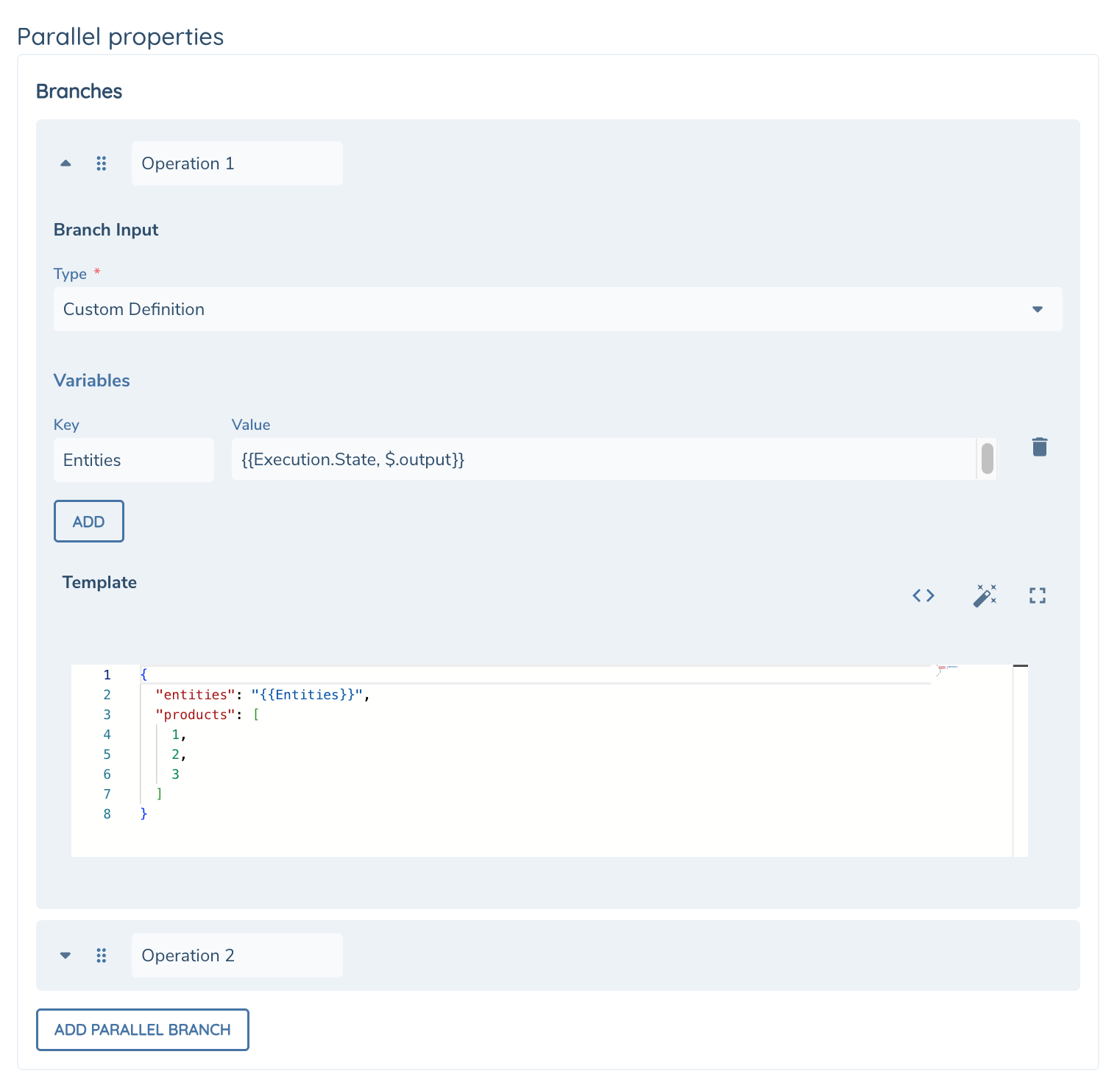
Each branch maintains it's own Execution.State. Any State data available before the Parallel task will not be available from within the branch. Any details required can be mapped into the branch using the Branch Input configuration.
State data within each branch will not be available after the branch completes. Please use an End Task to return any output from the current branch.
Runtime
Tasks executing within a Parallel branch have additional details available at runtime via the Execution variable.
| Runtime Variables | DataType | Description |
|---|---|---|
| Execution.BranchRequest | Json | Branch Input configured in your task configuration |
Each Branch will have it's own ASync Id (Execution.AsyncId) allowing you to have parallel ASync Operations, e.g. HTTP Callbacks.
The Parallel task will not complete until all branches (and nested async tasks) have completed.
Task Output
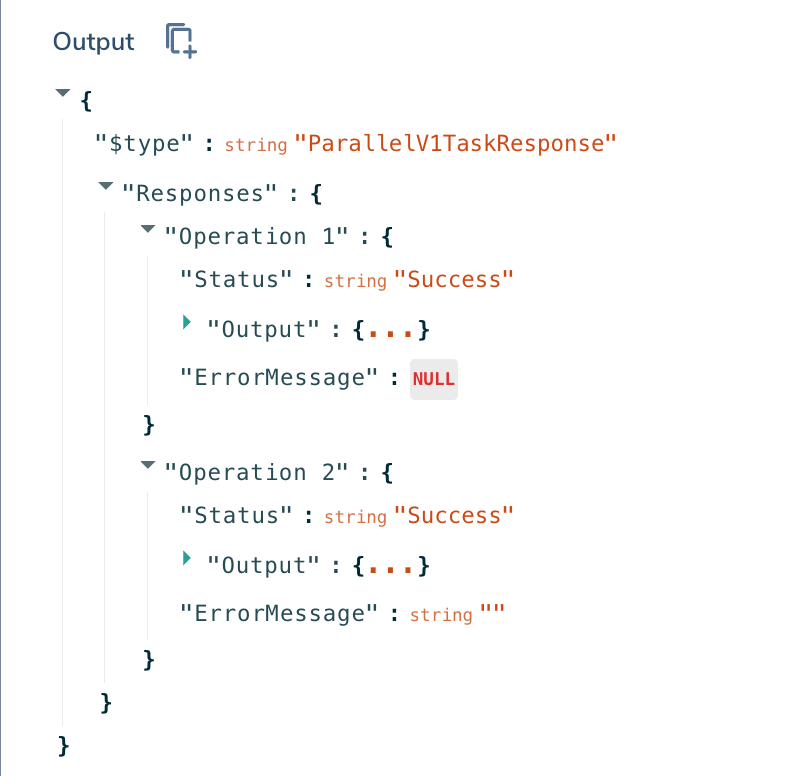
The Parallel task returns all Branch Responses as it's output letting you process the results or react to failures.
| Output Variables | DataType | Description |
|---|---|---|
| Responses | Json | Responses object contains the output of each Branch using the Branch Name as the attribute |
| Status | String | Success or Failure |
| Output | Json | Branch Output, populated by an End Task at the end of the sequence of tasks |
| ErrorMessage | String | This will only be populated if there is an exception (see Errors below). |
Error Handling
The Parallel task will execute all branches - even if a failure is encountered on one of them. If an exception occurs and you haven't configured Continue on Error in the Advanced tab of your Parallel task the execution will halt. Alternatively you can design your Flow to evaluate the branch results and recover, or fail gracefully.
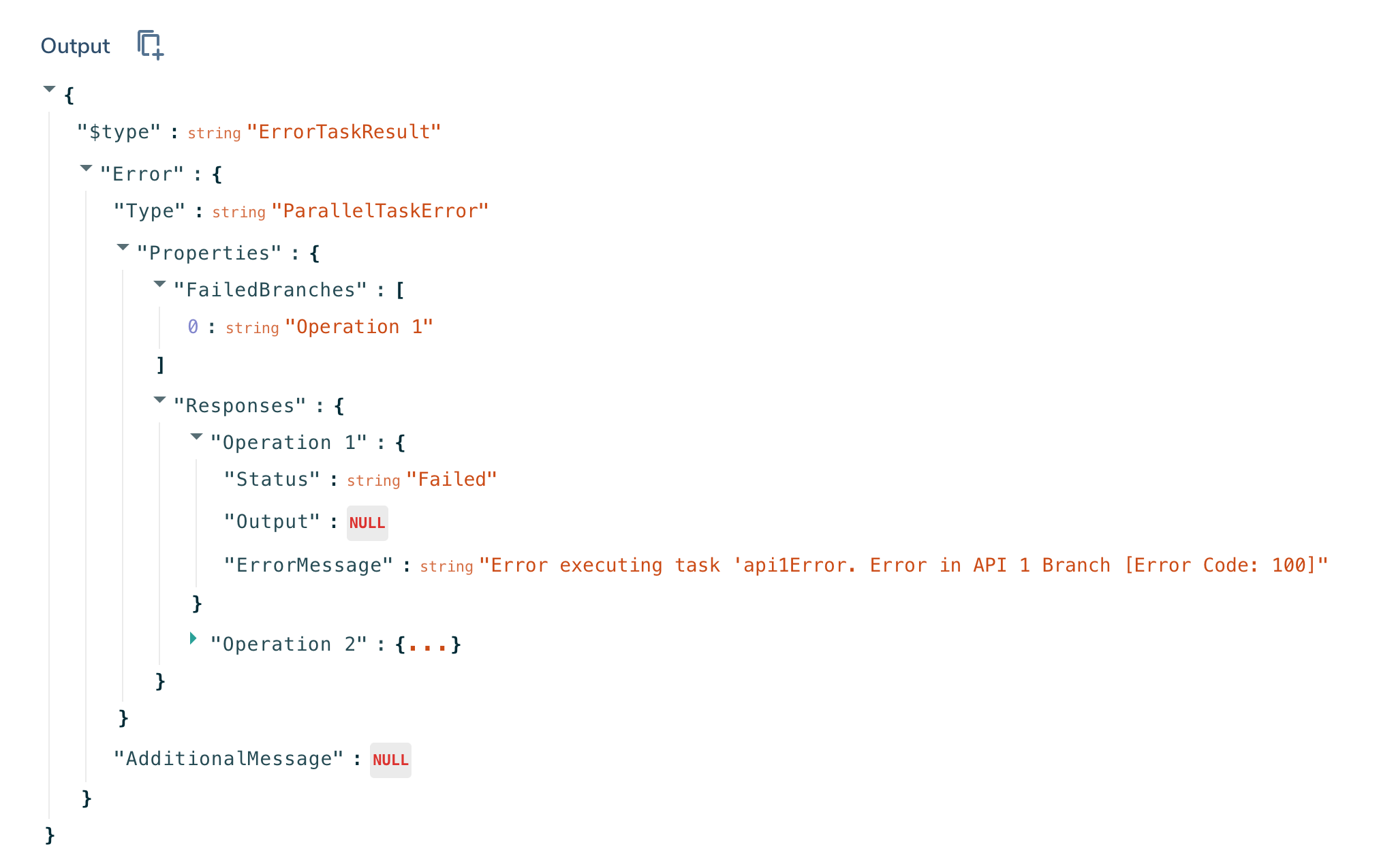
The Parallel task can throw a ParallelTaskError which denotes an exception while running the tasks within one or more branches. When there is an exception the task error output will include the following:
| Error Properties | DataType | Description |
|---|---|---|
| FailedBranches | Json Array | Array of branch names with Status = Failure e.g. FailedBranches ["Operation1"] means Responses.Operation1 will have Status = failure. |
| Responses | Json Array | Array of output from each branch |
| Status | String | Success or Failure |
| Output | Json | Branch Output, populated by an End Task at the end of the sequence of tasks. Value will be null if branch failed. |
| ErrorMessage | String | If there is an error, the error message will be included. |
Execution Details
The Execution Details page has been updated to show Parallel Branches nested in the Execution Step Logs.
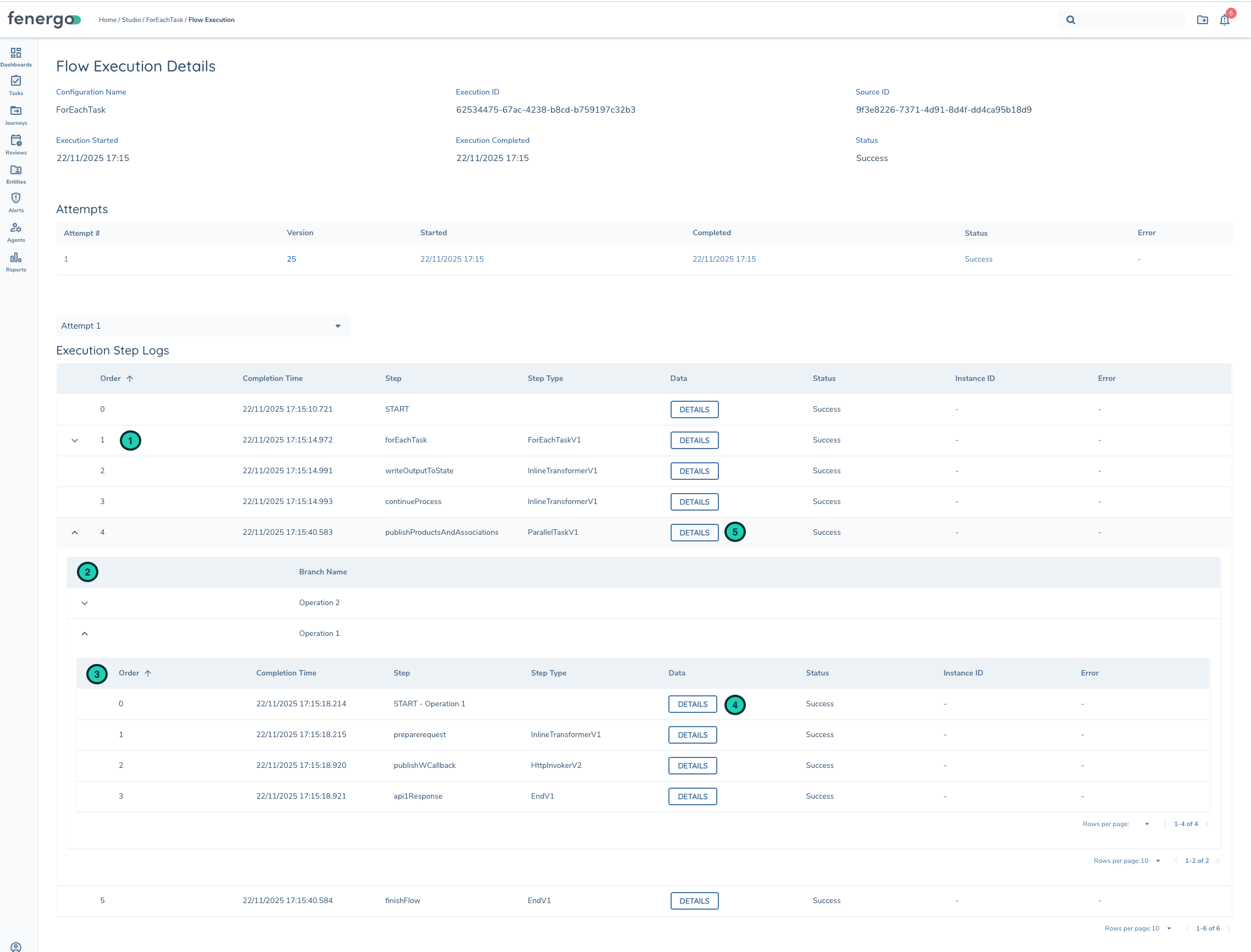
| Description | |
|---|---|
| 1 | Step Log for Parallel task can be expanded to review logs of each branch |
| 2 | List of Branches and Branch Name |
| 3 | List of Tasks within the branch |
| 4 | Input to branch. You'll see Execution BranchRequest defined here. |
| 5 | Parallel task output (Responses) from all branches. |