Configuring Legal Entity Groups
Configuring Group Journeys
As we are treating Groups like other Legal Entity Types in Fenergo SaaS (Company, Individual, Other), we can configure Journeys using the same approach elsewhere via configuring associated Scoping Conditions within Journey Builder.
Extending Conditions for Legal Entity Groups
One key point to note is that we have extended the "Legal Entity Type" Condition in the "Scoping Conditions" panel within the Journey Schema to include the new value of ‘Legal Entity Group":
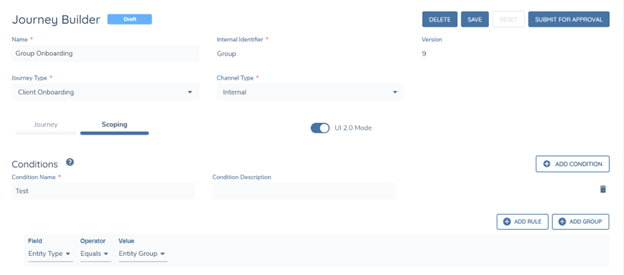
This will allow a User to configure the necessary Scoping Conditions to launch Group Journeys.
Configuring Group Requirements
Similar to Journey Configuration, we can also configure Policy Requirements in the same way we configure Requirements for existing Legal Entity types in Fenergo SaaS (Company, Individual, Other).
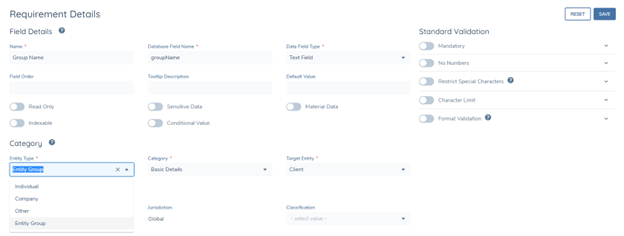
Users will be able to set the Legal Entity Type to "Legal Entity Group" to configure the necessary Policy Requirements in their Group Journeys.
Important Note: When creating Group Requirements, it is vital to include 'Group Name' (datakey: groupName) in your Configuration. The requirement will also need to be marked as Indexable.
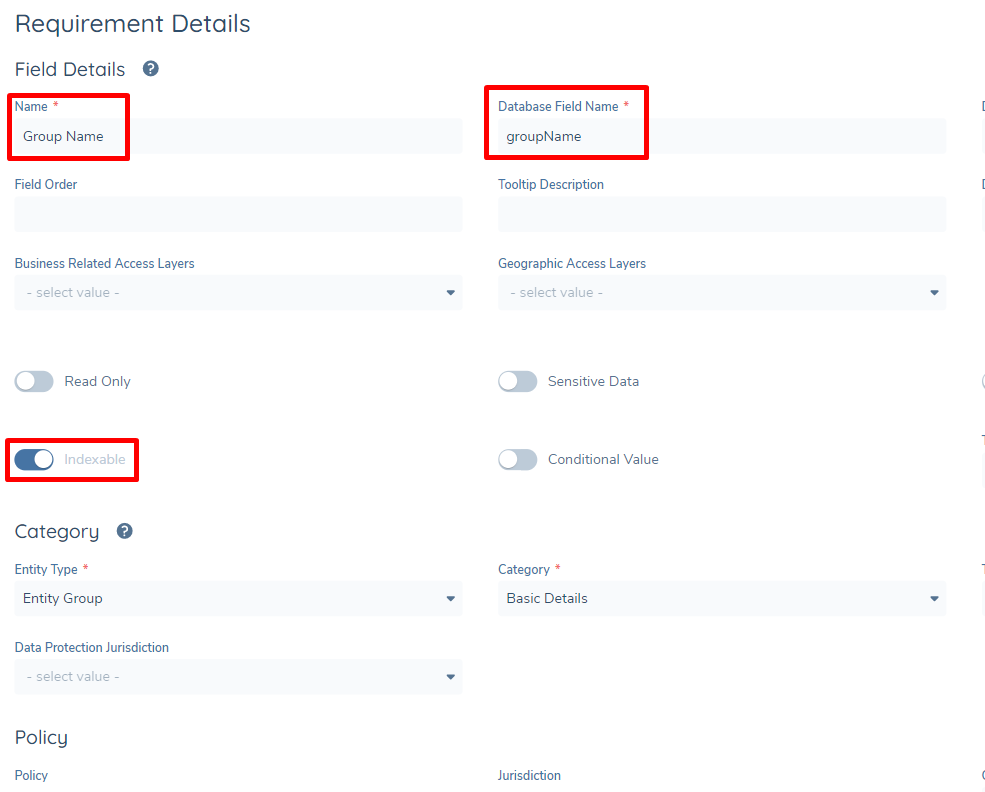
The reason for this is that without this datakey or having it without it being Indexable, Group Names will not be shown in any Search panels or Advanced Search screens. Instead, users will see the Legal Entity IDs.