Configuring the Product Risk Assessment Task
Product Risk Assessment Configuration
To calculate Product Risk the following must be configured.
- A risk model and configuration collection to evaluate the data of the products.
- Product Risk Rating and Score Datakeys configured in product policy and to which the output of the completed risk assessment will be captured for each product
- Overall / entity Risk rating and Score Datakeys configured in global policy and to which the overall risk score of all products will be automatically captured.
- A Product Risk Assessment task configured in the applicable journey.
For further detail on the configuration of a risk model please refer to the dedicated risk user guide.
Product Risk Assessment Task Configuration
To configure the Product Risk Assessment task, complete the following steps.
- Having added a task, in a draft journey scheme, select Product Risk Assessment from the task type dropdown.
- Use the 'Save to Entity' to indicate whether you want to aggregate the outcomes of the Product Risk Assessment and save them to the entity. This option requires a Calculation Algorithm (min, max, avg, sum) for the aggregation of product risk and entity level Risk Rating and Risk Score datakeys to save the aggregate values. With this option, you can also use the 'Only Assess Products Created/Updated Within Journey toggle' to either only aggregate risk values from product drafts (added/edited products in the current journey) or to include existing product risk score/rating values from verified products.
If the task is configured to assess only products created/edited in the journey, a risk score of 0 will be calculated if there are no qualifying products to assess.
Scores from verified products will not be recalculated, the existing verified scores can be included in the aggregate output to the entity. A product must be edited to recalculate the risk score.
-
For the dropdowns displayed, under the task content heading, select the required value
- Risk Model: Determines the risk factors to be evaluated.
- Risk Configuration Model: the values and scores assigned to each possible input of those factors.
- Risk Threshold Model: a model that translates a numerical score '23' to a descriptive value like 'High'.
-
Define the Product Risk Rating and Score Datakeys. These must be data base field names as configured in a product requirement set and will be used to output the risk assessment outcome for each individual product.
-
Enable Save to Entity. This should only be enabled if the desired outcome is to output an overall risk rating and score to the entity. This value may then be used in calculating the entities risk.
-
Set the Calculation Algorithm to be used when calculating the value to be captured on the entity.
- max: chooses the highest
- min: chooses the lowest
- sum: adds all values together
- avg: calculates the average ([sum of values]/[number of values])
-
Define the Risk Rating and Risk Score Datakeys. These are the data base field names used to output the overall risk assessment outcome and are configured in policy.
The image below provides an illustration of the Product Risk Assessment task configuration.
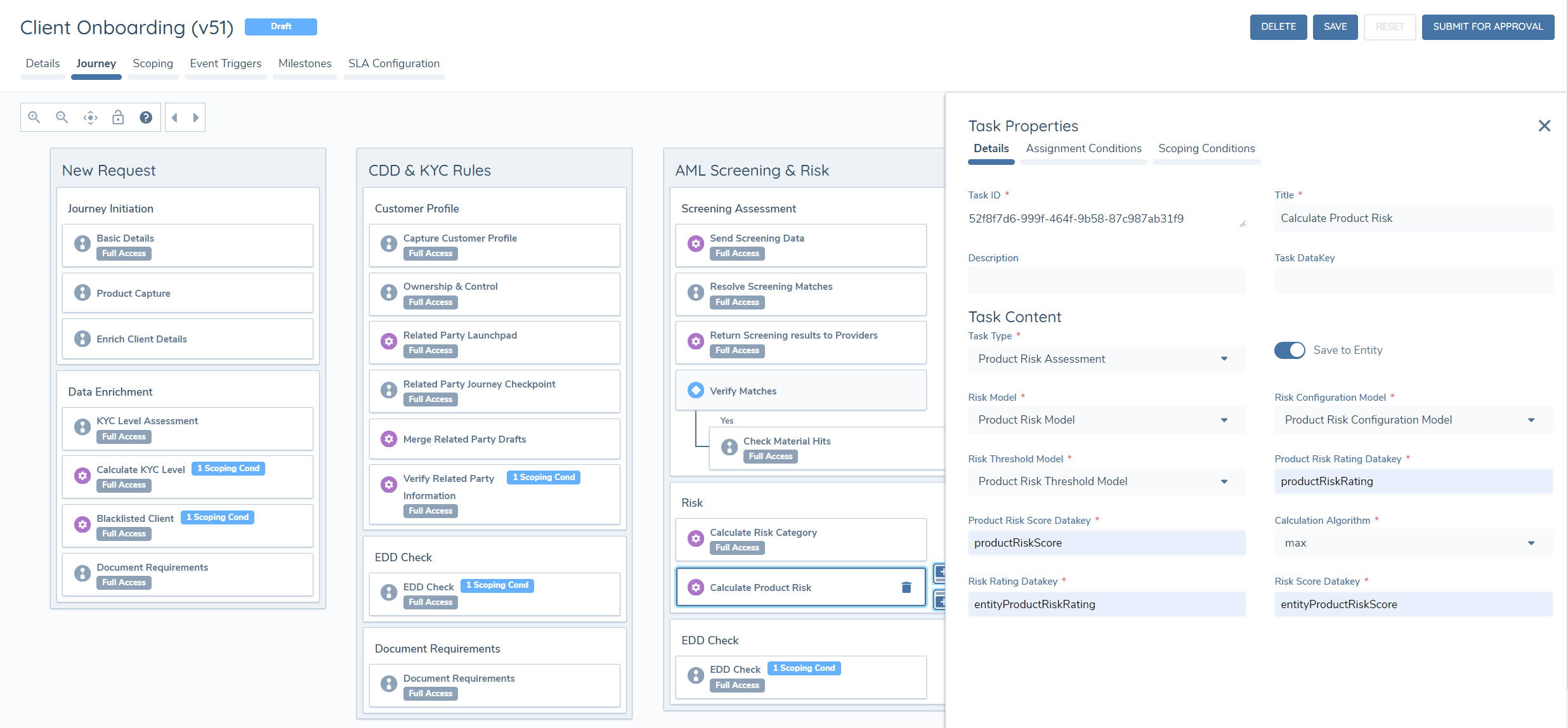
The steps above summaries a single product risk assessment task. However, this task can be configured to appear multiple times in a journey, repeating the same process but using different risk models each time. Each task may be configured with different Rating and Score data base field names allowing for greater flexibility when it comes to calculating risk dependent on different models.
Re-assessment of 'Onboarded' Produccts
Verified data is only changed via drafts in Fenergo, so The Product Risk Assessment task will only assess product drafts from the current journey. Verified Product Risk Scores for Onboarded products can be aggregated with draft product scores and stored at the Entity level, however for clients that want onboarded products to be reassessed before aggregation, the 'Create Onboarded Product Drafts' task must be used. This task will force the creation of drafts for all Products that are 'owned' by the root entity and in an 'Onboarded' state, making them eligible for Product Risk Assessment.
'Create Onboarded Product Drafts' Task Configuration
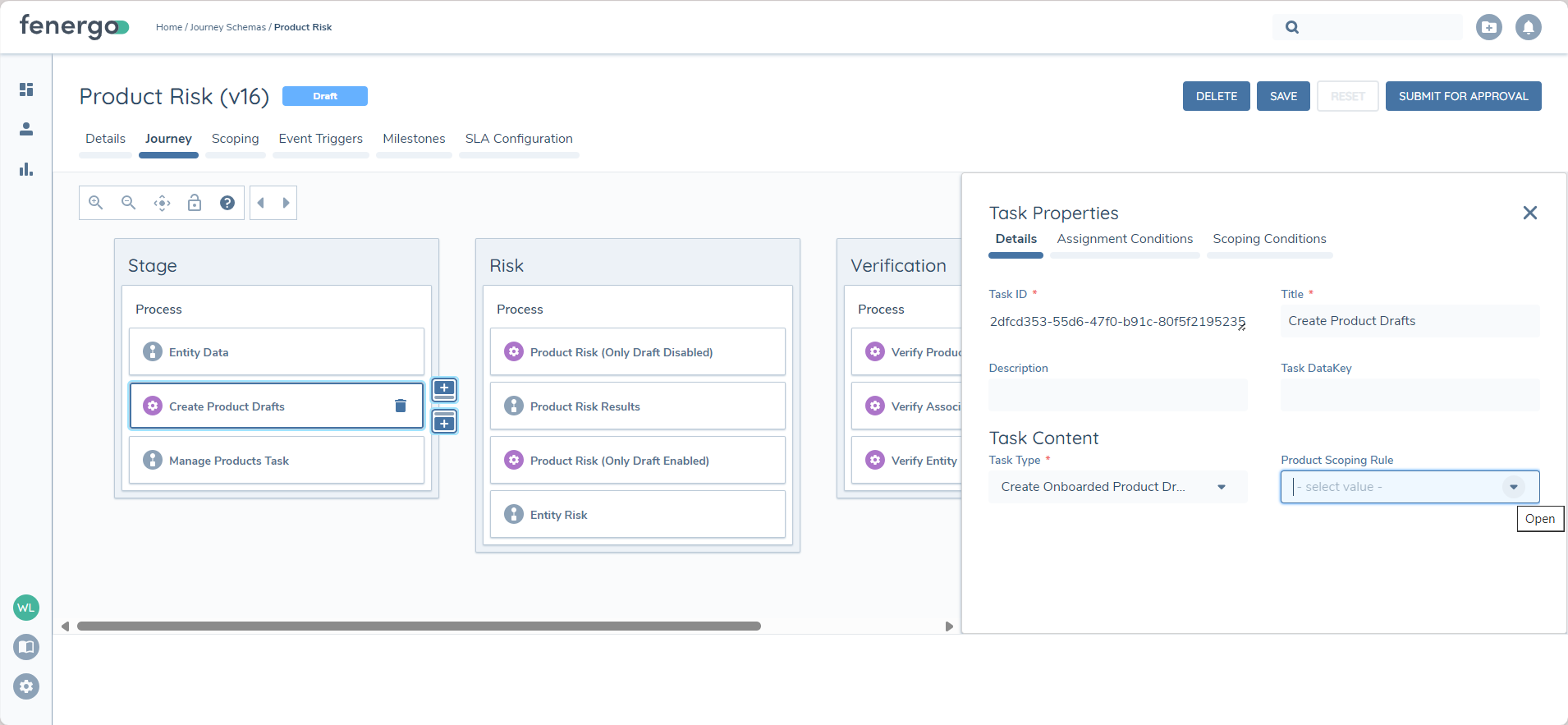
The task must be placed before a 'Manage Products' task (in the same stage) - this is enforced by validation. When onboarded products are "in review", they may trigger new requirements that could also be an input to Product Risk - the Manage Products task (when configured with required product actions) will force that all mandatory requirements are satisfied for all product drafts.
The task can be configured with or without a Product Scoping Rule. When configured without a Product Scoping Rule, the system will automatically create drafts for all 'Onboarded' products that are owned by the Root Entity. When configured with a Product Scoping Rule, the system will only create Product Drafts for owned and 'Onboarded' products that meet the conditions of the selected Product Scoping Rule.
Automatically opening drafts for onboarded products could result in conflicts if any of those products are also being edited in another journey.
It's strongly recommended that the Conflict Resolution task in all journeys where products can be edited if the 'Create Onboarded Product Drafts' task is used in any.
This will handle any potential conflicts created between product drafts in parallel journeys.