User Guidance
User Guidance in the Portal provides contextual help to external users as they move through and complete tasks within the Portal. Its purpose is to guide the user through each step of the process, increase confidence, and avoid unnecessary delays caused by confusion or uncertainty.
Well-written guidance can:
- Unblock users who are unsure of what to do.
- Increase completion rates by clarifying expectations.
- Reduce rework and support queries.
- Present help at the right time without overwhelming the user.
For configuration steps, see Configuring User Guidance in the Portal.
Task-Level Guidance
Overview
Task-level guidance provides contextual help at the top of each supported task screen within the Portal. This enables external users to understand what is required before they begin completing fields or uploading documents.
Why It’s Important
- Provides a clear summary upfront.
- Helps users start with confidence.
- Reduces errors caused by misinterpreting task purpose.
Supported Tasks
- Data
- Documents
- Related Parties (Standard, Outreach New, Outreach Existing)
- Products
- Review Task
- ID&V
Note: Task-level guidance is only available for External Journey Tasks and External Stage Tasks. It is not available for Internal Journeys, Internal Stages, or System Tasks.
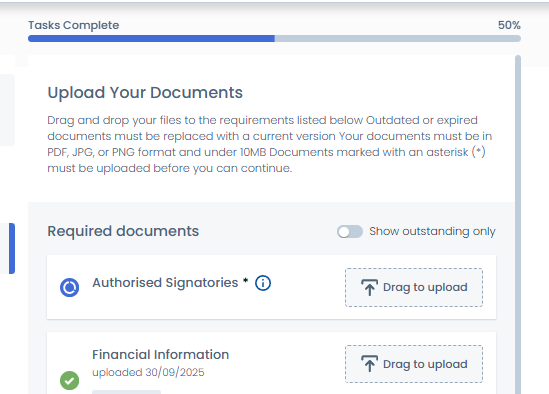
Field Tooltips
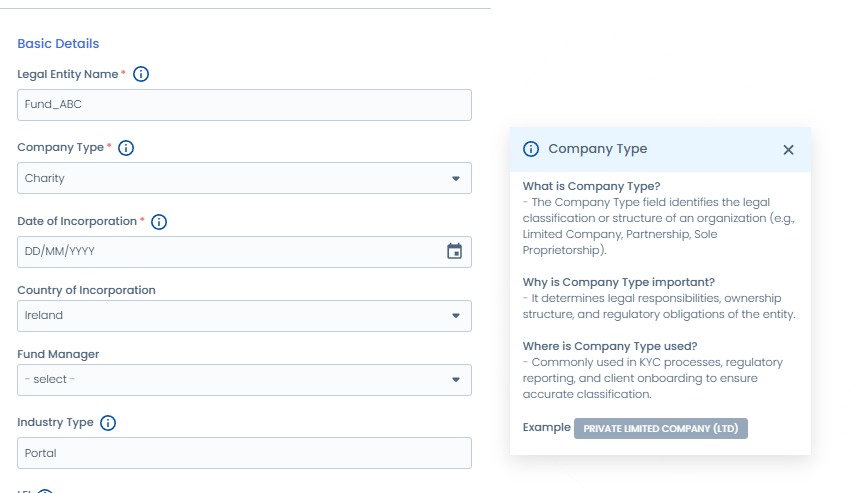
Tooltips on Data Tasks provide contextual guidance to users when completing data fields in the Portal.
They are configured in Policy Configuration and can display a tooltip icon with Markdown-formatted content.
- Tooltips are available for all input fields in Data tasks.
- Use tooltips to provide additional context or to explain complex fields without cluttering the UI.
- When a tooltip is configured for a field, no visual indicator (an icon/colour change) is displayed by default. The tooltip will only appear when the user hovers over or taps the field.
Document Requirements Guidance
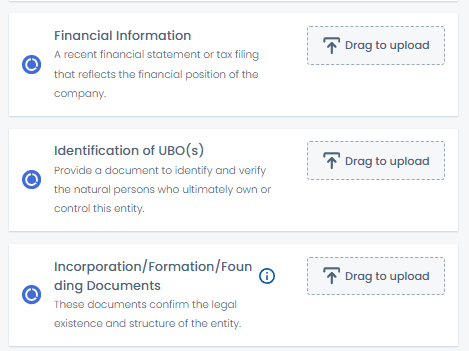
Inline Descriptions
-
Inline guidance is available only on Document Requirements tasks.
-
Use inline descriptions for a brief summary of the document’s purpose.
-
Best practice:
- Keep descriptions to under 2 lines.
- Maintain consistent length across all requirements so the UI displays cleanly.
- Describe why the document is needed, not the action (avoid repeating words like “upload” or “attach”).
-
Example: “Proof of address to confirm client residency.”
Document Tooltips
-
Tooltips can be configured on each document requirement for additional supporting details.
-
Use tooltips to explain:
- Accepted document types
- Expiry rules
- Jurisdiction-specific guidance
-
Example: “Accepted documents include utility bills, bank statements, or government-issued letters dated within the last 3 months.”
Verified Documents Indicator
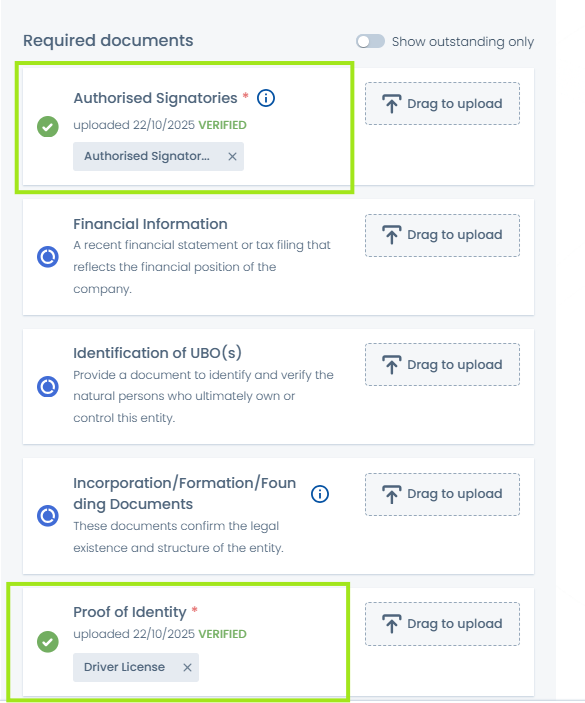
This feature introduces a Verified Documents Indicator for Outreach document tasks in Portal. When enabled, documents uploaded before the Outreach Start Date display with a Verified tag, helping users identify which documents have already been accepted and avoid re-uploading duplicates.
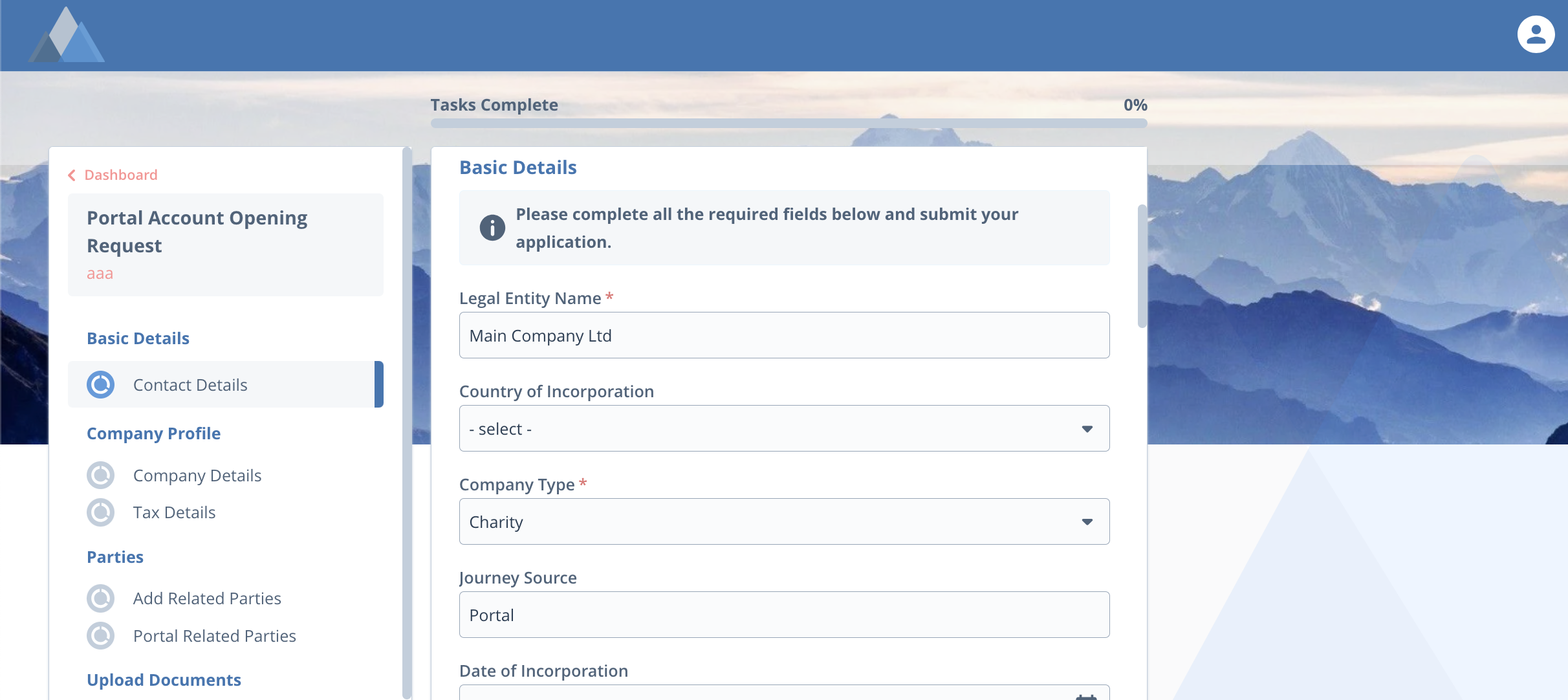
User Guidance Field
The Portal User Guidance field allows step-by-step instructions and visual aids (headers, lists, links) to be displayed directly within tasks.
Benefits
- Streamlines onboarding and document submission.
- Provides context-specific instructions at the right time.
- Improves accuracy and speed, helping users complete tasks the first time.
Category-Level Guidance (per Data Task)
User Guidance can also be configured at category level within Data tasks. This allows configurators to add Portal Guidance text per requirement category, which is displayed whenever that category is used in a task.
- Useful for adding broader context about a group of fields.
- Helps keep field-level guidance short, while providing additional clarity at section level.
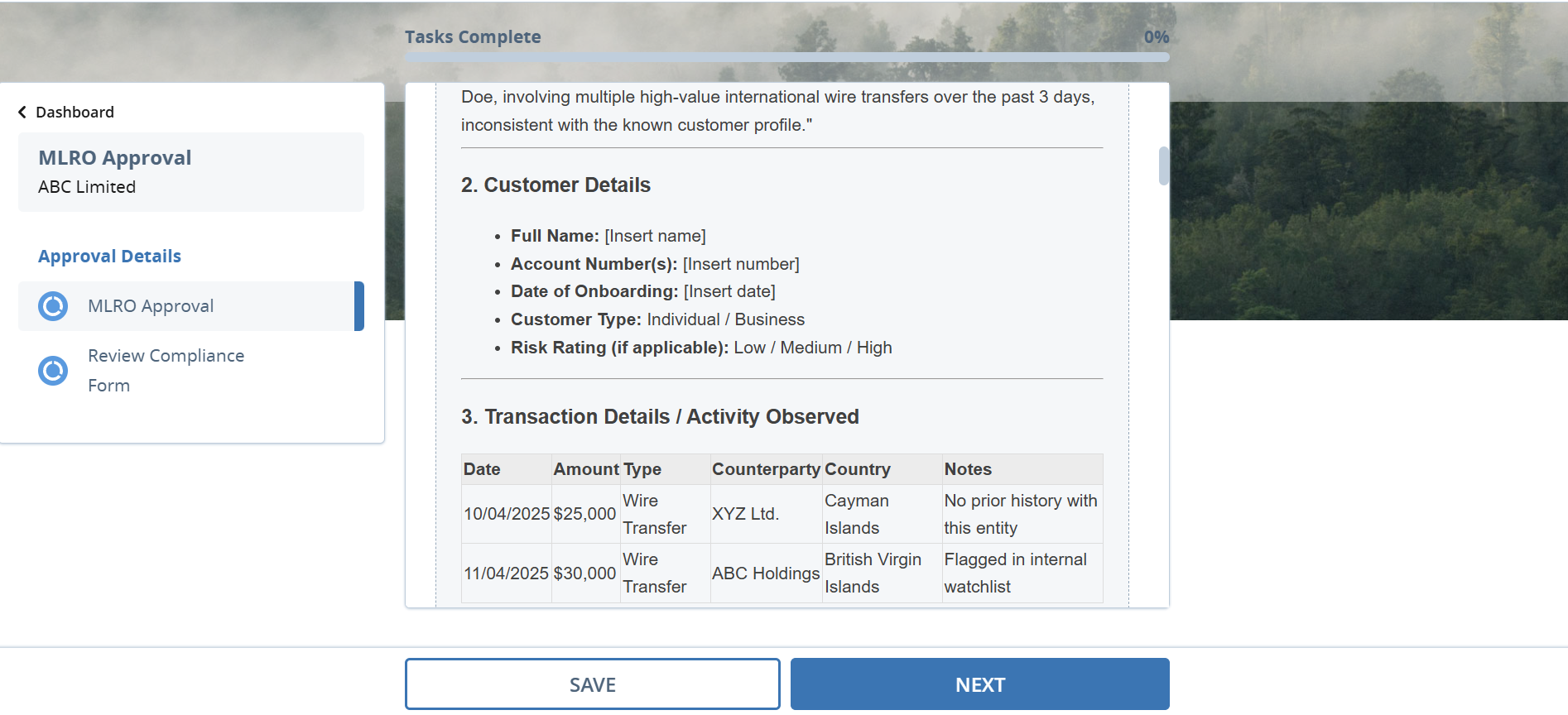
Read-Only Rich Text Editor
The Rich Text Editor can be used to render read-only guidance text provided by internal Fenergo users. This ensures external users receive clear, formatted instructions directly in the Portal.
Use Cases
- Feedback from a KYC analyst about what has been validated or rejected.
- Instructions on what corrective action is required.
- Summarised feedback or clarification in structured text.
The Rich Text Editor supports formatted content (headers, bold, italics, lists, hyperlinks), but will always display in read-only mode in the Portal.
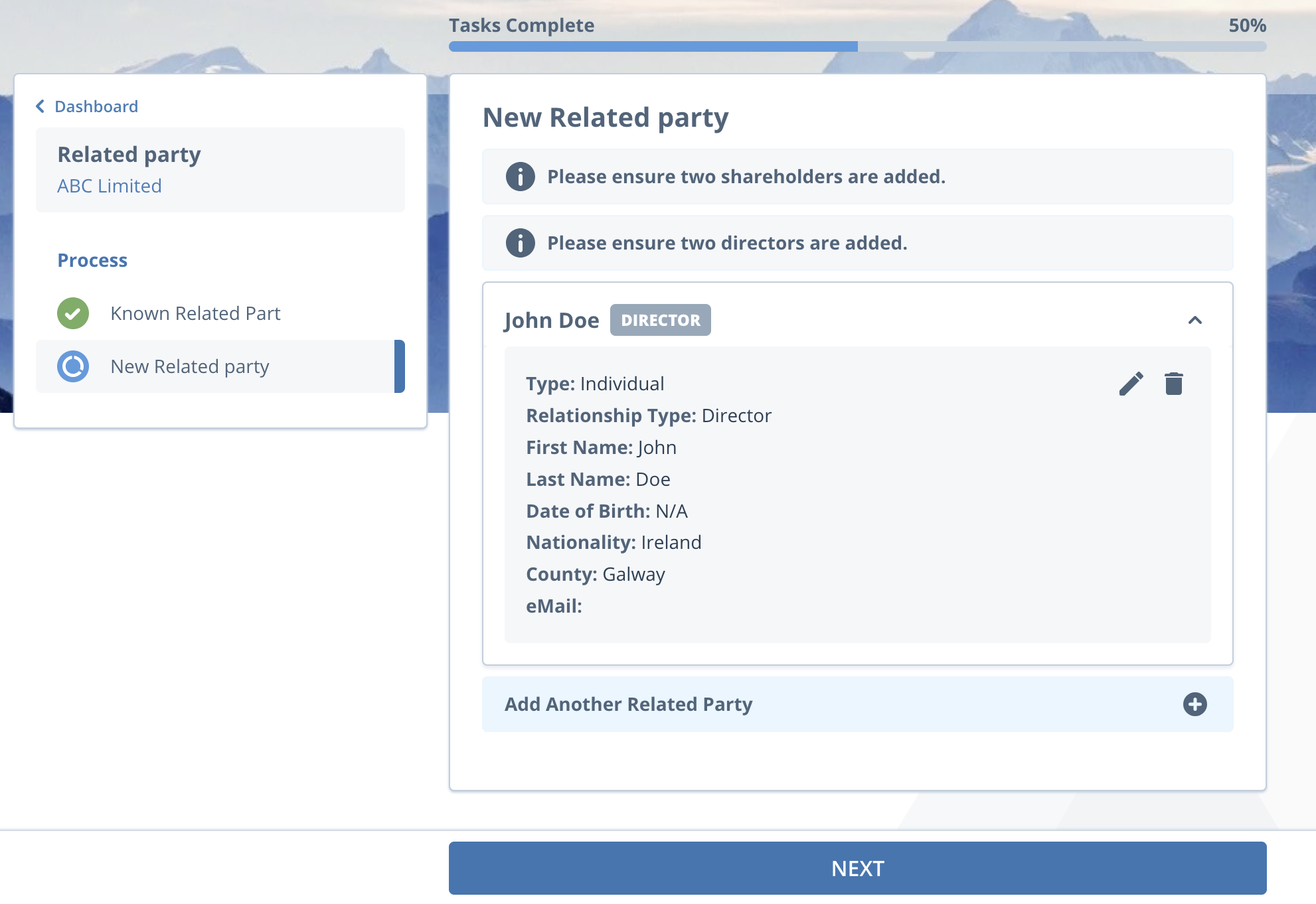
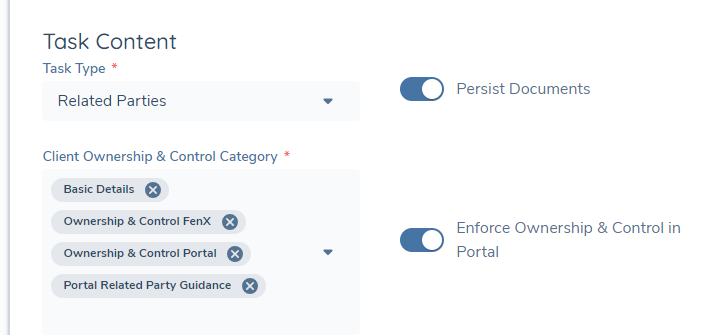
Ownership and Control Rules in Related Party Tasks
Ownership and Control rules can be displayed within the Standard Related Party and Outreach New Related Party tasks. These provide informational guidance to help users through the process of adding new related parties.
- Standard Related Party Task: Rules can be mandatory (blocking progression) or advisory only.
- Outreach Related Party Tasks: Rules are advisory only to avoid blocking users who may not have all the required information.
This approach balances compliance requirements with user experience.
Best Practices for Writing User Guidance
-
Keep it concise
- Use short sentences and avoid jargon.
-
Be action-oriented
- Focus on what the user must do.
- Examples: “Provide proof of identity” or “Click Save to continue.”
-
Use the right format
- Inline text = essential, always visible.
- Tooltips = optional, additional context on demand.
-
Avoid overwhelming the user
- Provide only what is needed in the moment.
- Use progressive disclosure to layer detail.
-
Maintain consistency
- Use the same tone and formatting style across tasks.
Why This Matters
Carefully designed User Guidance ensures that:
- Users can complete their tasks without getting stuck.
- Completion rates improve by reducing errors and uncertainty.
- Support queries and delays are minimised.
- The overall Portal experience is smoother, more intuitive, and more user-friendly.
Quick Reference - Guidance Types
| Guidance Type | Where It Applies | Purpose | Best Practice |
|---|---|---|---|
| Task-Level Guidance | Top of tasks (Data, Docs, Related Parties, etc.) | Set context before users start | Keep short; no duplication of field labels |
| Field Tooltips | Input fields in Data & Documents tasks | Explain complex fields on hover/focus | Concise; optional detail only |
| Inline Descriptions | Document Requirements tasks only | Brief summary of document purpose | Max 2 lines; consistent length; avoid “upload” |
| Document Tooltips | Document Requirements tasks | Provide extra details (valid types, expiry, rules) | Use Markdown; suitable for detailed notes |
| Portal User Guidance Field | Policy-configured guidance fields | Context-rich instructions within Data tasks | Use Markdown for clarity and structure |
| Category-Level Guidance | Requirement Categories in Data tasks | Add instructional text across a group of fields | Keep general; avoid field-level repetition |
| Rich Text Editor | Read-only messages in Portal | Summarised analyst feedback or structured instructions | Always read-only; use clear plain language |
| O&C Guidance | Related Party tasks (Standard/Outreach) | Explain Ownership & Control rules | Advisory for Outreach; mandatory optional |