Configuration Release Hub (Beta)
Configuration Release Hub is available as a Beta (MVP) feature. It will not advance further in its current form — this Beta will be superseded by the Enterprise Control Plane (ECP), Fenergo's forthcoming centralised management layer for governing your entire tenant estate. ECP will provide a unified console for monitoring, governing, and controlling all tenant environments from a single pane of glass, with native source control and CI/CD integration, configuration versioning, and auditable promotion workflows. Configuration Release Hub Beta is still available to use, for enabled tenants, however, we will formally transition to ECP later in 2026.
Current Limitations:
- Supported Domains, Configuration Types and Dependencies
- We will add support for outstanding domains, configuration items and dependencies incrementally. This work is currently targeted for Q3/Q4 2026, but this can change.
- Bundles can be created and edited, but not deleted or cloned.
- Removal of items already selected within a bundle is a single-select process only.
- Bundles are imported exclusively via API. There is no UI for initiating imports or viewing Bundle Import History. :::
Overview
Configuration Release Hub introduces a new, modernised approach for Fenergo SaaS clients to manage and deploy configuration. Instead of promoting configuration changes in ad hoc, manual imports from one tenant to another, Configuration Release Hub enables customers to maintain their configuration in a single source tenant (typically a Dev tenant), grouping changes into versioned Configuration Bundles. A Bundle version can be consistently imported to each higher tenant (when ready), following standard SDLC best practices.
This represents a major shift in how configuration is managed:
- Configuration can be maintained centrally in a single tenant (this is a guide, not enforced).
- Versioned Bundles represent a consistent snapshot of configuration (e.g., “Phase 1 Release”).
- Promotion to higher tenants (UAT, Pre-Prod, Prod) is performed via API, enabling deployment automation and CI/CD alignment.
- Importing is decoupled from the UI, and permissions no longer require users to have domain-level edit/approve permissions in target environments.
- Customers can ensure that the only way to change configuration in higher tenants is via bundle import.
This separation of designing configuration (done in Dev) and deploying configuration (performed by automated pipelines, or specific API instructions) increases governance, consistency, and deployment safety.
Configuration Release Hub 'Best Practice'
Controlling where configuration is changed and promoting the same configuration for testing in each higher tenant is the best way to ensure quality in production. With Configuration Release Hub, we encourage our customers to designate one tenant for manual configuration changes, for example your Dev tenant. In this tenant, you can create 'Configuration Bundles' to build collections of 'ready' configuration incrementally – when new configuration changes are complete, simply create a new version of the relevant Bundle. You can either use individual API calls to import configuration to each higher tenant when ready, or leverage our APIs in your CI/CD pipeline and simply approve a bundle version for higher tenants.
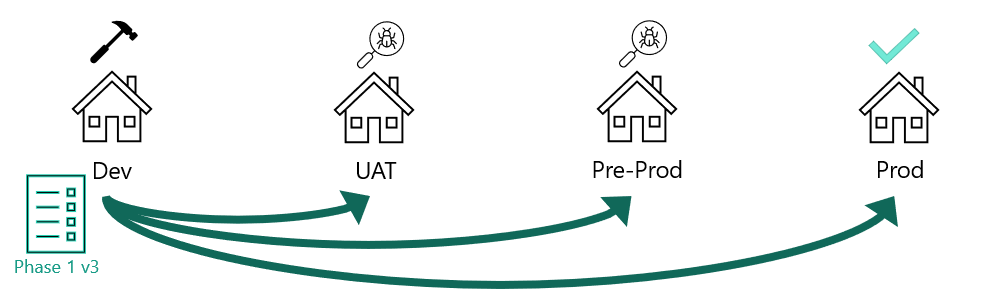
Steps
- Create and maintain configuration in the Dev tenant
- Add or update items within Draft Bundle versions
- Publish Bundle versions to lock a point-in-time snapshot
- Use APIs to import these versions into any tenant within your Tenant Group. Optionally, use pipelines to ensure consistent, repeatable releases.
This workflow provides strong SDLC alignment, predictable releases, and safer promotion of configuration to higher environments.
Managing Configuration Bundles
Users with 'Configuration Release Hub - Access' permission can navigate to Configuration Release Hub -> Configuration Bundles via the left navigation menu. Configuration Bundles are versioned collections of configuration items that can be promoted together to higher-level tenants. Versions advance within the source configuration tenant (Dev), with a new version created whenever configuration changes occur. The definition of a “Bundle” is entirely customer-specific. You can create as many as required, assigning each a Name and an optional Description. You can also add Version Notes to every new version.
Typical examples include:
- A project phase (e.g. “Phase 1”)
- A channel release (CLM, Portal)
- A jurisdiction or regional rollout
- Tenant-specific configuration sets (e.g. for alliance partners)
Bundles are ideally created and maintained only in your source (Dev) tenant (recommended, not enforced). When a configuration sprint closes, create a new Bundle draft version. The Configuration As Of Date defaults to the current date, ensuring the draft automatically picks up new versions of existing items. You can then add any new configuration items as needed.
Create
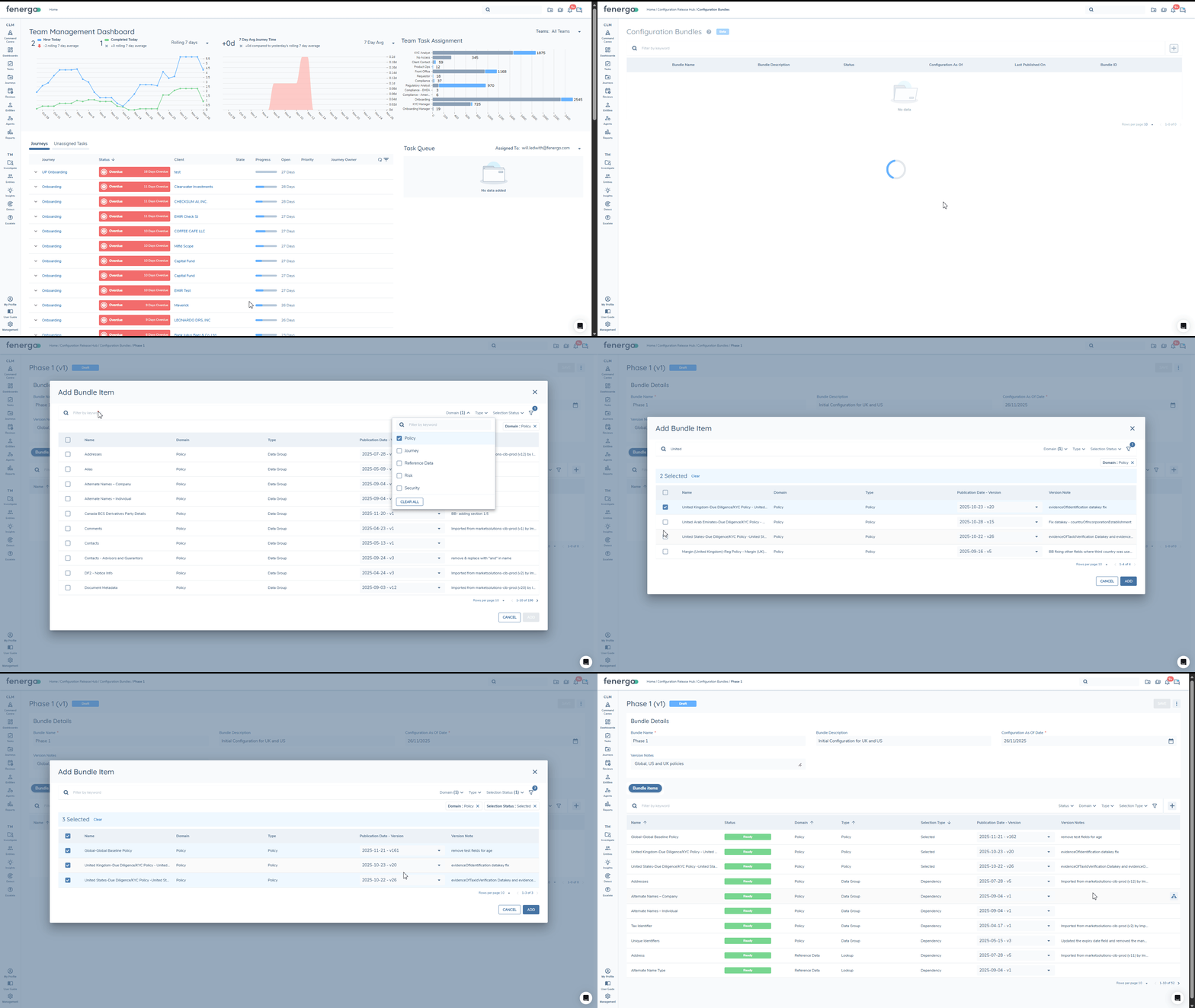
From the 'Configuration Bundles' home, users with 'Configuration Release Hub - Create Bundle' permission will be able to click the + icon to create a new bundle. 'Bundle Name' is mandatory and users can provide an optional 'Bundle Description' to provide context of the bundle’s scope/purpose for other users (this can also be edited in any subsequent version).
Within the new Bundle draft, you can provide an optional 'Version Note' at any time, to describe the contents of this specific bundle. To select items, use the + icon, then select one or more Domains to begin. Additional filters can be used to limit items based on 'Configuration Type' (like Policy, Data Group, Lookup etc.) or 'Publication Date' (for example, if you only want to see recently published configuration). 'Selection Status' can be used to focus on either Not Selected items (useful if selecting a lot of items at once and they are getting in the way) or Selected items (review in one place before adding to the bundle, change the defaulted version etc.).
Configuration As Of Date
When a new draft version is created, the 'Configuration As Of Date' defaults to today. This date drives the default version of Selected Items and dependencies (i.e. they default to the latest version published on that date).
Publication Date - Version
Versioned configuration (whether selected or dependency) will default to the latest version relative to the 'Configuration As Of Date'. The value can be manually changed in either the Bundle Items table or while selecting items in the Add Bundle Item modal. All versions are available to select, whether past or future relative to the CAO Date.
Dependencies
Dependencies are referenced within another item and are required for it to work, such as a Journey Task which references a Team, or a 'Select' data requirement in a policy which references a Lookup. Dependencies are automatically calculated in Configuration Bundles when:
- Items are added to or removed from the bundle
- Publication Date - Version is changed
- Configuration As Of Date is changed (and saved)
Within the Configuration Bundle table, the 'Selection Type' column will indicate 'Selected' or 'Dependency'. You can explore Dependencies bi-directionally using the 'View associated dependencies' icon at the end of the row. This will show any other items that are 'Dependency For Selected' (such as Lookups and Data Groups for a selected Policy) and also items that are 'Dependent On Selected' (for example, a selected Risk Model may be a dependency for a Journey Schema). This is especially helpful if there are errors due to missing dependencies.
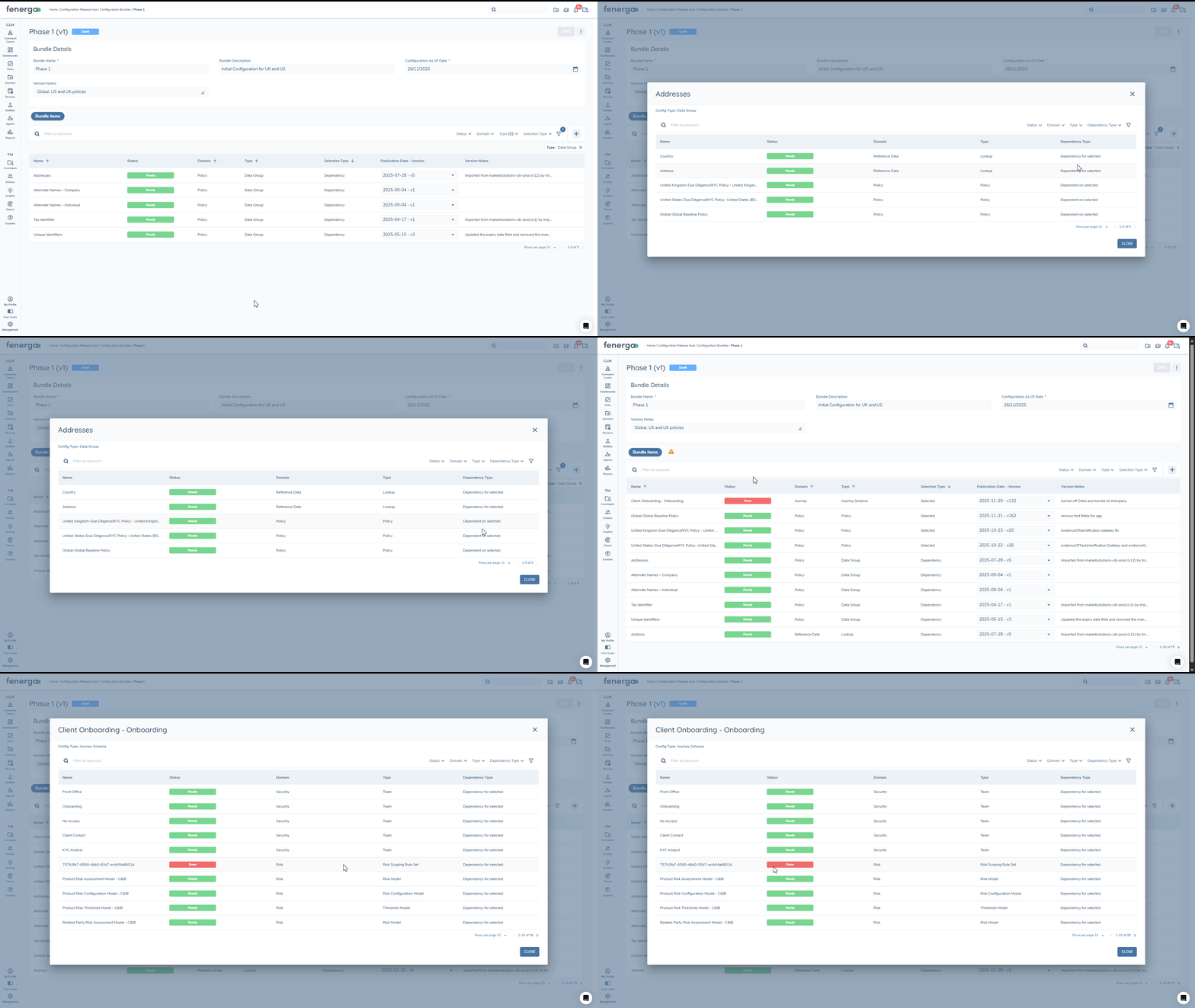
Teams are created in a target tenant when they are directly selected or they are imported as a dependency and don't already exist in the target tenant. Because Teams are not versioned, we take a conservative approach to updating them once they are created – for example, if permissions were added in a lower tenant for testing purposes, we don't necessarily want those additional permissions to make their way into production. To update an existing Team's permissions, create a bundle that includes only the selected Teams that you want to update. When you import this Configuration Bundle to a tenant, the permissions of the Team will be updated.
Edit
You can edit an existing bundle by navigating to a version from the Configuration Bundles home and then using the ellipsis menu in the top left to 'Create New Draft'. You can create a new draft from any version, but only one draft can exist at any time. The new draft will be created with the 'Configuration As Of Date' defaulted to today, this will automatically update the version of Selected items and Dependencies to the latest version available on this date. The date can be manually changed, as appropriate.
The Bundle Name and Bundle Description are editable with each new version. Version Notes can be provided to summarise the content/purpose of the new draft. New items can be added and previously 'Selected' items can be removed using the delete icon on the right of the row ('Dependencies' cannot be manually removed).
If you wanted to create a new draft bundle to pick up all the changes since the previous version, the updated CAO date will capture the latest versions of items already selected and you can use filters in the 'Add Bundle Item' modal to display all non-selected items with a publication date > the date the current sprint started. Then simply select all!
Configuration Bundle Draft Actions
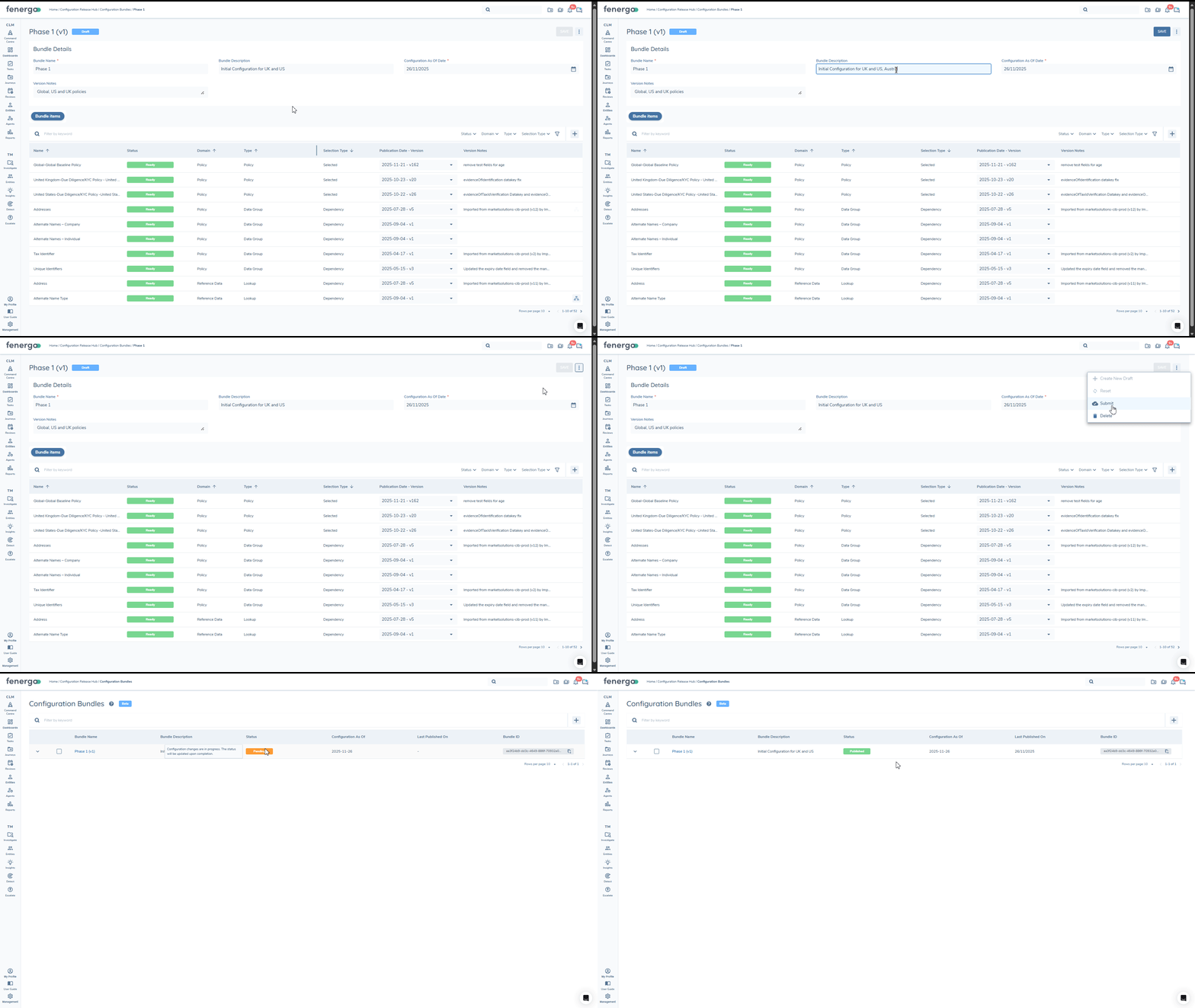
With all mandatory inputs filled and the necessary items selected, you can now:
- Save
- Submit (Publish the version)
- Delete
- Reset (reverts unsaved changes to fields in the "Bundle Details" section)
Configuration Bundle Storage
When a Configuration Bundle is published, it is securely stored in a segregated folder for each tenant group within S3, outside the tenant infrastructure. This ensures:
- Bundle versions remain safely stored even if configuration is deleted from a tenant
- Configuration can always be restored via import
- Pipeline-driven deployment is safe and repeatable
Bundle Troubleshooting and Error Codes
When a Bundle version has one or more items that show an 'Error' status, users can mouse over the 'Error' chip to see the error message. There are two common errors:
- FEN-CRH-0009:
- If the CAO date was updated to before a selected version’s V1 was published then no version is available. The item should be removed or the date should be updated.
- FEN-CRH-0002:
- This may occur if a dependency is not supported (thus is not available to the bundle) or if the configuration references a dependency that has been removed (such as a Lookup has been deleted but a Select Data Requirement in a Policy is still referring to it). The item either needs to be removed or modified so that the missing dependency is resolved. Filtering by 'Status' can reveal all 'Error' items or you can use the 'View associated dependencies' button to isolate which dependency has the error.
| Error Code | Name | Description |
|---|---|---|
| FEN-CRH-0001 | ConfigRetrievalError | Occurs when configuration data cannot be retrieved or is not found. |
| FEN-CRH-0002 | MissingDependency | Occurs when a required dependency is not found in the Bundle. |
| FEN-CRH-0009 | CaoUpdateConfigRetrievalError | Occurs when configuration retrieval fails after a change to the Configuration As Of Date. |
| FEN-CRH-0003 | ExportError | Generic error when a configuration export fails. |
| FEN-CRH-0015 | ConfigNotFoundForExport | Occurs when configuration is not found for export. |
| FEN-CRH-0010 | DependencyResolutionByNameFailed | Occurs when dependency resolution by name fails due to no matching configuration found. |
| FEN-CRH-0014 | CircularDependencyDetected | Occurs when adding a configuration item would create a circular dependency. |
Detailed logs are available via Get Bundle Version Logs endpoint.
Importing Configuration Bundles
Users/systems require the 'Configuration Release Hub - Import Bundle' permission to successfully request to import a Configuration Bundle version. In this Beta release, all import actions must be initiated via API. Endpoints are available to initiate the import, check statuses and logs. This also allows technical teams to embed configuration deployment directly into their CI/CD pipelines.
Import Workflow
-
Initiate Import
Configuration can only be imported to tenants within the same group (i.e. all of a given customer’s tenants will be in a single group). While authenticated within a target tenant (within the same group as the source), use the Create Bundle Import Session endpoint, providing:- Bundle ID
- Version number
This starts the process to import the requested configuration from the Group’s S3 storage into the target tenant. The response will include the Bundle Import Session Id.
-
Track Import Progress
Using the Bundle Import Session ID, you can query the status of the import via the Get Bundle Import SessionBy Id endpoint. The response will contain an overall status (Processing/Success/Failure) and then a status per item (Pending/InProgress/Success/NoChange/Failed). It also breaks down the dependencies associated with each item. Get Bundle Import Session. Error Codes are covered below, including access to detailed import logs.
If you don't have the Bundle Import Session ID, you can query Import Session IDs from the target tenant using the Get Bundle Import Sessions By Bundle Id endpoint. This will return all import session IDs for all versions of the bundle imported to that target tenant, including details like status, who initiated the import, start/completion date-time.
Import Troubleshooting & Error Codes
Below are the Error Codes that can be returned in the Import Session status response. Detailed logs are also available via the Get Bundle Import Session Logs endpoint.
| Error Code | Name | Description |
|---|---|---|
| FEN-CRH-0004 | ImportFailedDueToDependencyError | Import failed due to a dependency issue (missing or unresolved dependency). |
| FEN-CRH-0005 | ImportFailedDueToInternalError | Import failed due to internal processing error. |
| FEN-CRH-0006 | ImportFailedDueToTargetDomainError | Import failed due to a target domain issue (validation failure, rule violation, infrastructure issue). |
| FEN-CRH-0007 | ImportFailedDueToMissingConfigDefinition | Import failed because the configuration definition is missing or disabled. |
| FEN-CRH-0008 | ImportUnexpectedError | Unexpected error during the import process (system failure or unhandled exception). |
| FEN-CRH-0011 | StartImportErrorCircularDependencies | Unexpected error at import start; circular dependencies likely. |
| FEN-CRH-0012 | StartImportErrorMissingDependencies | Unexpected error at import start; missing dependencies likely. |
| FEN-CRH-0013 | StartImportCircularAndMissingDependencies | Unexpected error at import start involving both circular and missing dependencies. |
Permissions
- Configuration Release Hub - Access: Allows users to access "Configuration Release Hub" on the left navigation menu. Users are able to navigate to "Configuration Bundles" and view their contents.
- Configuration Release Hub - Create Bundle: Allows users to create and edit Configuration Bundles.
- Configuration Release Hub - Import Bundle: Allows users to import Configuration Bundle versions (no domain configuration permissions required).