Configuring External Data for the Fenergo Salesforce App
The Fenergo CLM for Salesforce External Data Adapter facilitates seamless custom integration with Salesforce, enabling clients to import account and related party data on demand from Fenergo.
By using Fenergo's external data functionality, it allows data to be mapped easily between Salesforce and Fenergo for Account and Related Parties and also allows for the injesting and deduplication of related parties. This allows analysts to review, deduplicate, or reject related parties before import, preventing entity duplication and ensuring a single customer view and allow the reuse of existing data, documents, screening etc.
The data and objects that can be sourced from Salesforce is defined in a mapping file called External Data Mapping which is defined in the custom metadata file. An example is included at the end of this document.
To find out more about Fenergo's external data functionality, refer to Configuring External Data Sources.
Important Notes
There are a few important items to be aware of prior to configuring External data.
- Search of Salesforce is currently restricted to return only the account that is subscribed/linked to a Fenergo entity. A generic search of Salesforce based on search criteria defined in Fenergois not supported
- Search of Individual accounts is not supported
- Import of datagroup information for the main account and related parties is not currently supported
- Multi- Select dropdown field type is not currently supported
- Multi Level import of Shareholders is not supported. Related parties must be connected to the main account
To Configure External Data for Salesforce
The first step required will be to create an Authentication Key and Encryption Key
-
Authentication Key - Create a random key with bit - 256, then encode the text with base 64
- UTBXcjRVVG83Y1d0S2IyZ2VqVm5hRHIySzVockRlYnc=
- Note this is an example. Clients will generate their own Authentication key
-
Encryption Key - Create a random key with bit - 256, then encode the text with base 64.
- Q21HaFpNc3ZQV1hwRloySjQwZENSYUNOVGlIdFJTbEs=
- Note this is an example. Clients will generate their own Encryption key
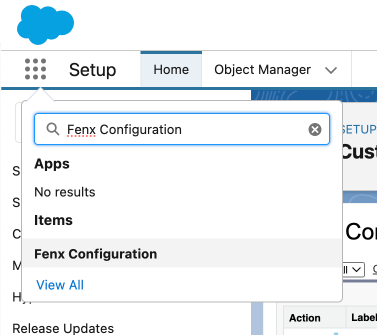
Next, navigate to the Fen X Configuration area in Salesforce
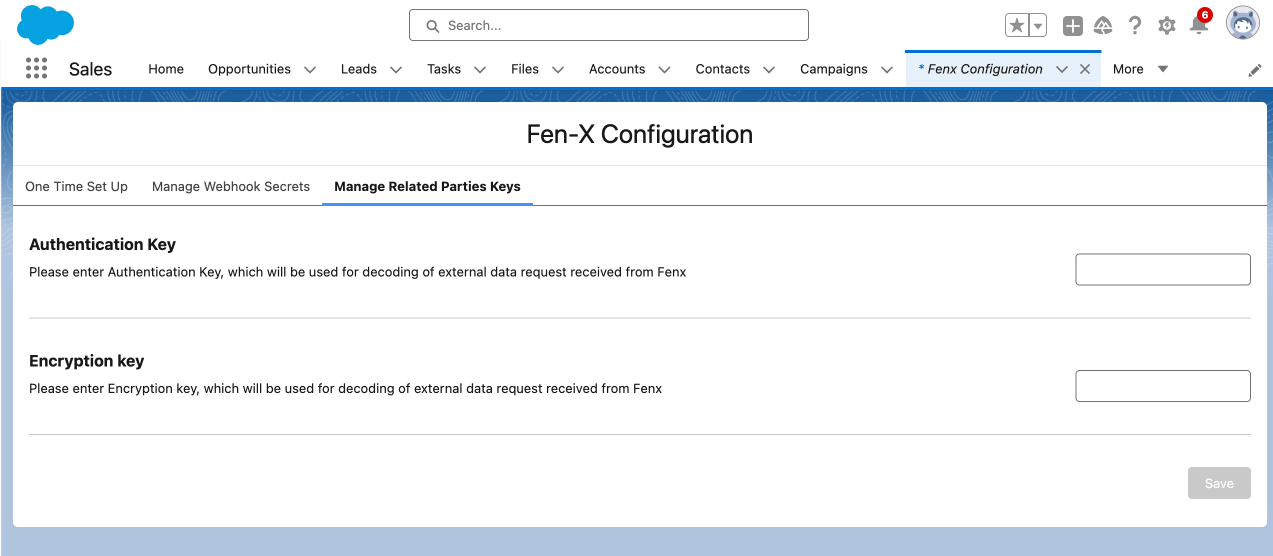
On the Manage Related Parties Keys, Enter the Authentication and Encryption Key generated in previous step and Click Save
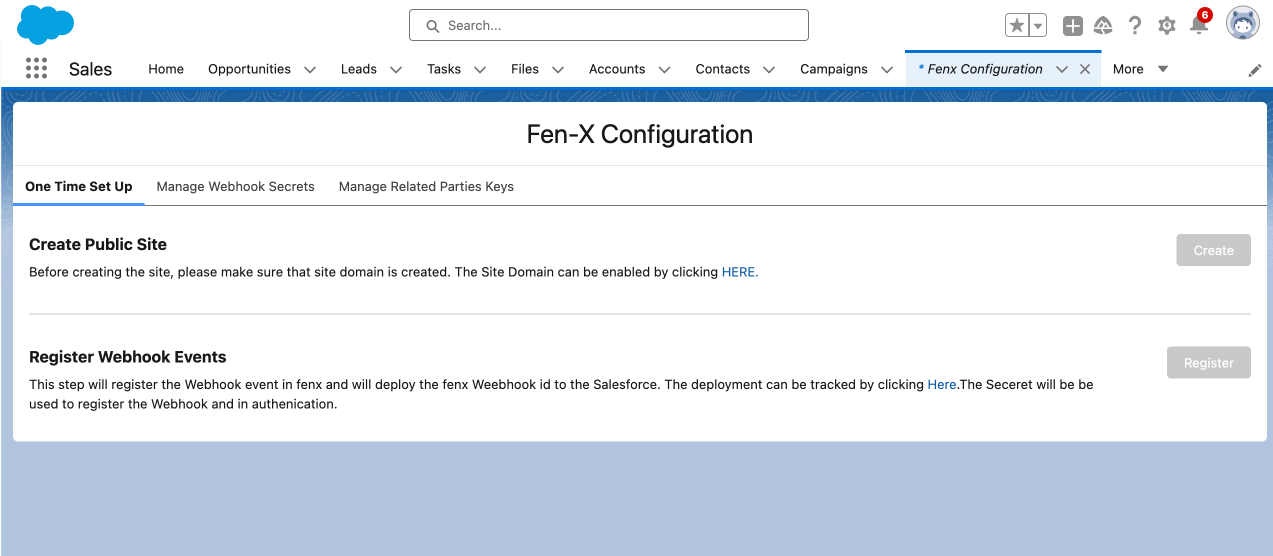
Navigate to One time setup tab and click Here link under Create Public Site
Under the Sites section, click FenxWebhook

Copy the Domain Name URL from the Custom URLs section. Once copied. Add the following to the end of the URL /Fenx/services/apexrest/fenx/fenxexternaldata. Example URL would be htttps://exampleURL.com/Fenx/services/apexrest/fenx/fenxexternaldata
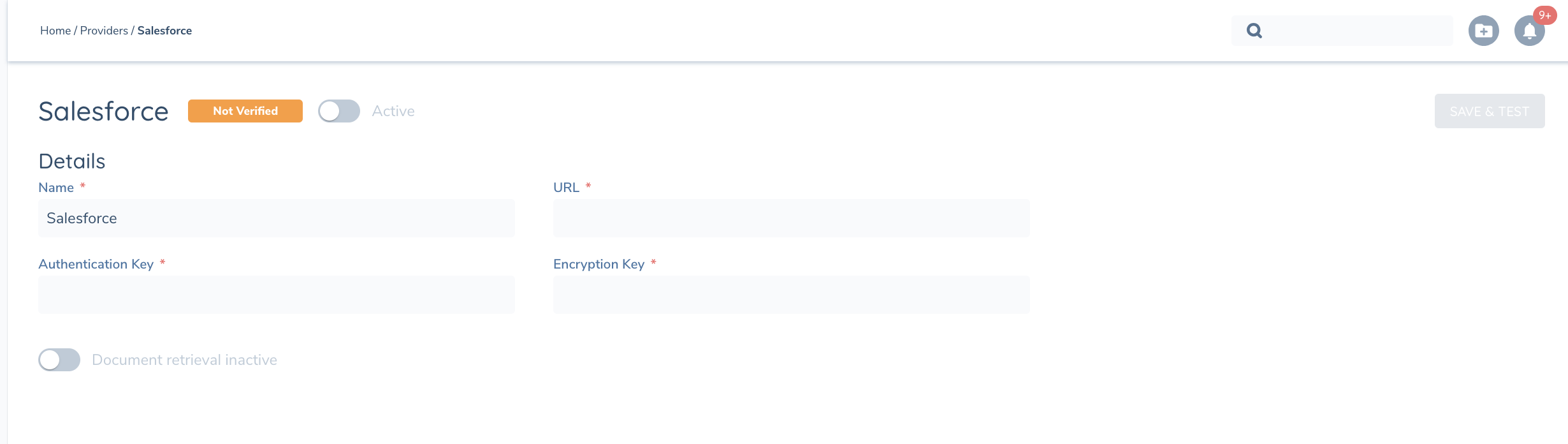
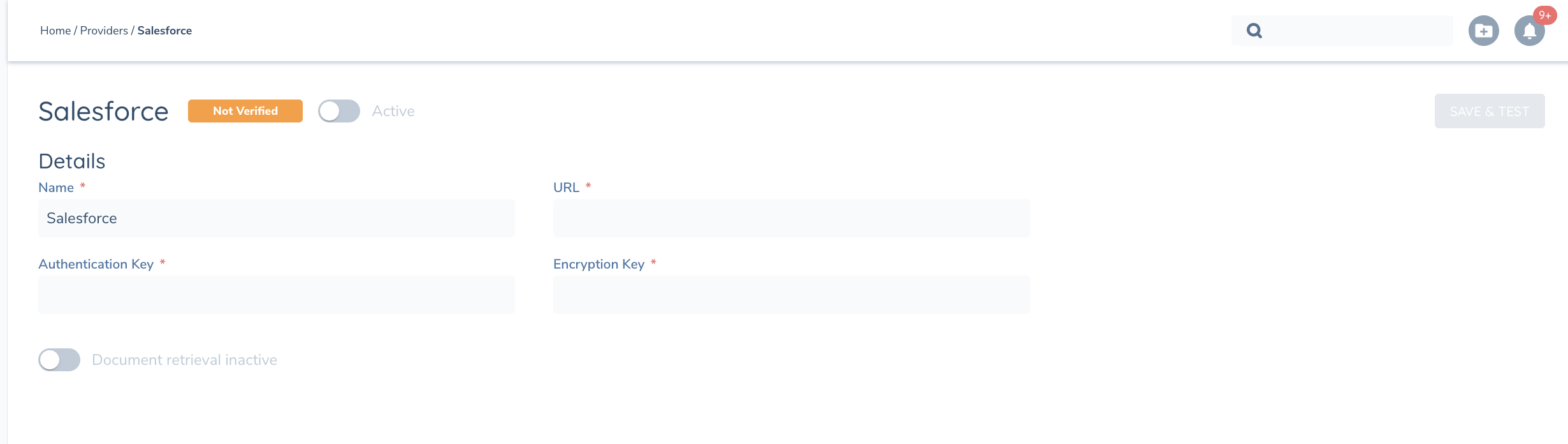
Copy this URL and navigate to Fenergo > External Data and Add a custom provider
Enter the following details
- Name of Custom Provider e.g. Salesforce
- URL from the previous step
- Authentication Key generated in Step 1
- Encryption Key generated in Step 1
Once complete, Activate the Active toggle and Click Save & Test
Navigate to Setup > Remote Site Settings ExternalDataReceptorCallbackProduction and verify that this is set to Active.
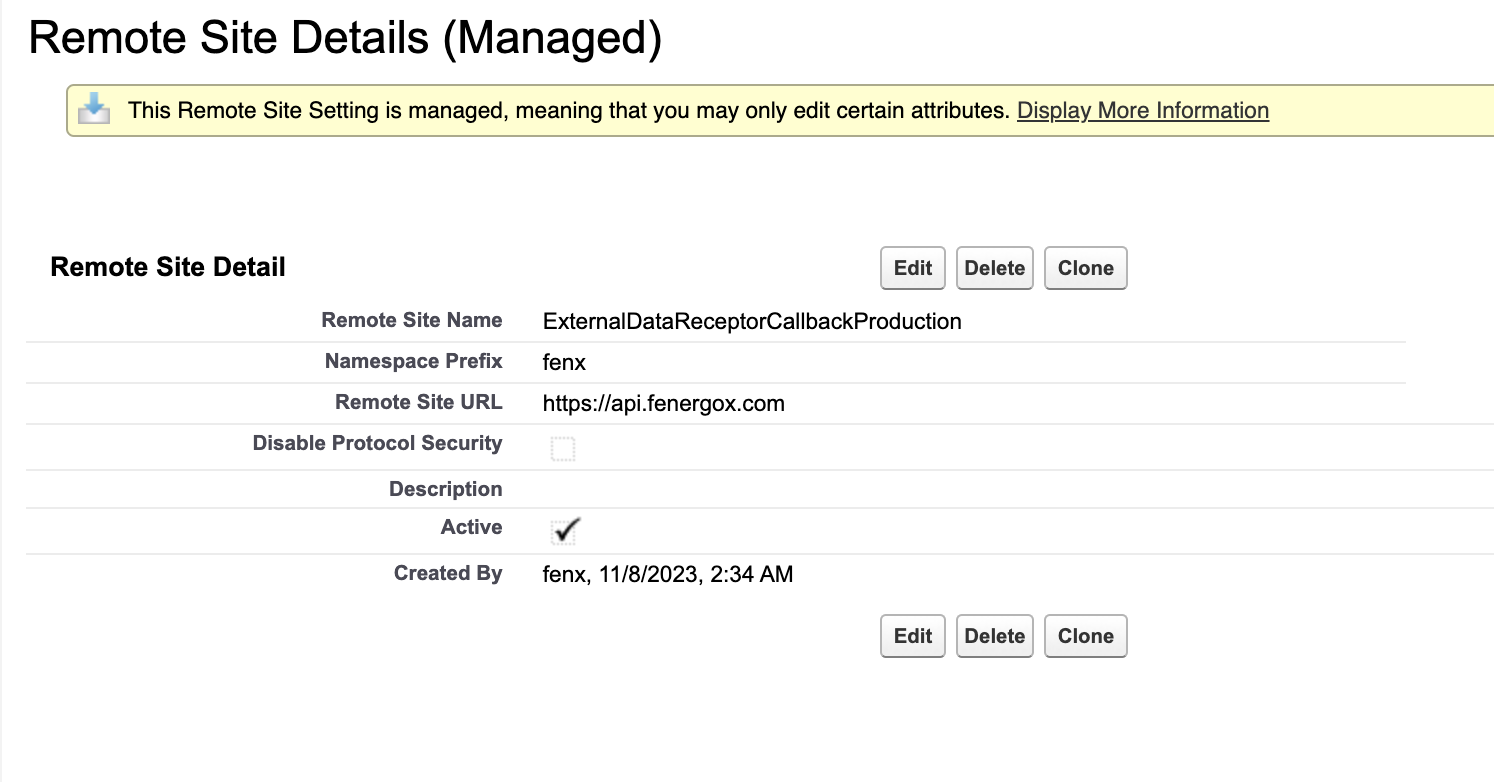
If the above step fails, please verify the URL is correct in External Data End Point custom metadata file in Salesforce e.g. https://api.fenergox.com/ and try again
Now that the 2 systems are able to communicate, clients will need to configure and specify what Salesforce account data and related party data is available via the external data integration on Fenergo. To update this mapping please navigate to Custom metadata Types > Fen X Configuration > External Data SF Fields. Once this step is complete, follow the steps in Configuring External Data Sources.
See below for example configuring fields from Salesorce for External data.
External Data SF Fields Configuration Example
{
    "type": "Company",
    "mappingStructureVersion": "1",
    "salesforceToFenxFieldAPINames": [
        "<Schema.SObjectField>Name</Schema.SObjectField>",
        "<Schema.SObjectField>Id</Schema.SObjectField>",
        "<Schema.SObjectField>AccountNumber</Schema.SObjectField>",
        "<Schema.SObjectField>Payment_Country__c</Schema.SObjectField>",
        "<Schema.SObjectField>Main_Business_Country__c</Schema.SObjectField>",
        "<Schema.SObjectField>CompanyType__c</Schema.SObjectField>",
        "<Schema.SObjectField>CountryOfIncorporation__c</Schema.SObjectField>",
        "<Schema.SObjectField>CompanyCategory__c</Schema.SObjectField>",
        "<Schema.SObjectField>JurisdictionOfOnboarding__c</Schema.SObjectField>",
        "<Schema.SObjectField>Lei__c</Schema.SObjectField>",
        "<Schema.SObjectField>GleifEntityStatus__c</Schema.SObjectField>",
        "<Schema.SObjectField>Industry</Schema.SObjectField>",
        "<Schema.SObjectField>Isic__c</Schema.SObjectField>",
        "<Schema.SObjectField>Nace__c</Schema.SObjectField>",
        "<Schema.SObjectField>OnboardingComment__c</Schema.SObjectField>",
        "<Schema.SObjectField>NomineeAccount__c</Schema.SObjectField>",
        "<Schema.SObjectField>Priority__c</Schema.SObjectField>",
        "<Schema.SObjectField>ClientActivity__c</Schema.SObjectField>",
        "<Schema.SObjectField>CustomerPriority__c</Schema.SObjectField>",
        "<Schema.SObjectField>AccessLayerGeographic__c</Schema.SObjectField>",
        "<Schema.SObjectField>AccessLayerBusinessRelated__c</Schema.SObjectField>",
        "<Schema.SObjectField>Website</Schema.SObjectField>",
        "<Schema.SObjectField>RegistrationNumber__c</Schema.SObjectField>",
        "<Schema.SObjectField>DateOfIncorporation__c</Schema.SObjectField>"
        ],
    "salesforceToFenxDataGroupCollections": [
],
    "individualRelatedParty": {

        "salesforceToFenxFieldAPINames": [
            "<Schema.SObjectField>Name</Schema.SObjectField>",
            "<Schema.SObjectField>FirstName</Schema.SObjectField>",
            "<Schema.SObjectField>LastName</Schema.SObjectField>",
            "<Schema.SObjectField>Email</Schema.SObjectField>",
            "<Schema.SObjectField>Title</Schema.SObjectField>",
            "<Schema.SObjectField>LeadSource</Schema.SObjectField>",
            "<Schema.SObjectField>Business_Title__c</Schema.SObjectField>",
            "<Schema.SObjectField>Nationality__c</Schema.SObjectField>",
            "<Schema.SObjectField>Citizenship__c</Schema.SObjectField>",
            "<Schema.SObjectField>Place_of_Birth__c</Schema.SObjectField>",
            "<Schema.SObjectField>Net_Worth__c</Schema.SObjectField>",
            "<Schema.SObjectField>Birthdate</Schema.SObjectField>"
            ],
        "salesforceObjectApiName": "Contact",
        "relationshipType": {
            "options": [
                "Director",
                "Secretary",
                "COO",
                "Advisor"
            ],
            "fieldAPIName": "<Schema.SObjectField>Department</Schema.SObjectField>"
        },
        "relationshipPathToAccount": "AccountId",
        "fullNameFieldAPIName": "<Schema.SObjectField>Name</Schema.SObjectField>",
        "shareholderCriteria": {
            "values": [
                "Shareholder"
            ],
            "fieldAPIName": "<Schema.SObjectField>Department</Schema.SObjectField>"
        },
        "ownerShipFieldAPIName": "<Schema.SObjectField>OwnerShip__c</Schema.SObjectField>",
        "companyofficialsCriteria": {
            "values": [
                "Director",
                "Secretary",
                "COO",
                "Advisor"
            ],
            "fieldAPIName": "<Schema.SObjectField>Department</Schema.SObjectField>"
        }
    },
    "companyRelatedParty": {

        "salesforceToFenxFieldAPINames": [
            "<Schema.SObjectField>Name</Schema.SObjectField>",
            "<Schema.SObjectField>Id</Schema.SObjectField>",
            "<Schema.SObjectField>AccountNumber</Schema.SObjectField>",
            "<Schema.SObjectField>Payment_Country__c</Schema.SObjectField>",
            "<Schema.SObjectField>Main_Business_Country__c</Schema.SObjectField>",
            "<Schema.SObjectField>CompanyType__c</Schema.SObjectField>",
            "<Schema.SObjectField>CountryOfIncorporation__c</Schema.SObjectField>",
            "<Schema.SObjectField>CompanyCategory__c</Schema.SObjectField>",
            "<Schema.SObjectField>JurisdictionOfOnboarding__c</Schema.SObjectField>",
            "<Schema.SObjectField>Lei__c</Schema.SObjectField>",
            "<Schema.SObjectField>GleifEntityStatus__c</Schema.SObjectField>",
            "<Schema.SObjectField>Industry</Schema.SObjectField>",
            "<Schema.SObjectField>Isic__c</Schema.SObjectField>",
            "<Schema.SObjectField>Nace__c</Schema.SObjectField>",
            "<Schema.SObjectField>OnboardingComment__c</Schema.SObjectField>",
            "<Schema.SObjectField>NomineeAccount__c</Schema.SObjectField>",
            "<Schema.SObjectField>Priority__c</Schema.SObjectField>",
            "<Schema.SObjectField>ClientActivity__c</Schema.SObjectField>",
            "<Schema.SObjectField>CustomerPriority__c</Schema.SObjectField>",
            "<Schema.SObjectField>AccessLayerGeographic__c</Schema.SObjectField>",
            "<Schema.SObjectField>AccessLayerBusinessRelated__c</Schema.SObjectField>",
            "<Schema.SObjectField>Website</Schema.SObjectField>",
            "<Schema.SObjectField>RegistrationNumber__c</Schema.SObjectField>",
            "<Schema.SObjectField>DateOfIncorporation__c</Schema.SObjectField>"
            ],
        "salesforceObjectApiName": "Account",
        "relationshipType": {
            "options": [
                "Director",
                "Secretary",
                "Advisor",
                "CEO"
            ],
            "fieldAPIName": "<Schema.SObjectField>Type</Schema.SObjectField>"
        },
        "relationshipPathToAccount": "ParentId",
        "fullNameFieldAPIName": "<Schema.SObjectField>Name</Schema.SObjectField>",
        "shareholderCriteria": {
            "values": [
                "Shareholder",
                "Beneficial Owner"
            ],
            "fieldAPIName": "<Schema.SObjectField>Type</Schema.SObjectField>"
        },
        "ownerShipFieldAPIName": "<Schema.SObjectField>OwnerShip__c</Schema.SObjectField>"

    }
}
External Data SF Fields Configuration Example with Comments
Below is an example of the configuration file with brief explainations for each section
{
    "type": "Company",
    "mappingStructureVersion": "1",

    <!--  List of Field to be returned for the main Salesforce Account] -->
    "salesforceToFenxFieldAPINames": [
        "<Schema.SObjectField>Name</Schema.SObjectField>",
        "<Schema.SObjectField>Id</Schema.SObjectField>",
        "<Schema.SObjectField>AccountNumber</Schema.SObjectField>"
    ],
    <!-- For future enhancement, Not currently supported -->
    "salesforceToFenxDataGroupCollections": [
    ],
    "individualRelatedParty": {

        <!-- List of Field to be returned for Individual Related Parties -->
        "salesforceToFenxFieldAPINames": [
            "<Schema.SObjectField>Name</Schema.SObjectField>",
            "<Schema.SObjectField>FirstName</Schema.SObjectField>",
            "<Schema.SObjectField>LastName</Schema.SObjectField>"
        ],
        <!-- Specify the SF object to return Individual Related parties captured in SF -->
        "salesforceObjectApiName": "Contact",

        <!-- Values and the field in Salesforce used to display Relationship type on External Data Results Screen -->
        "relationshipType": {
            "options": [
                "Director",
                "Shareholder",
                "UBO"
        ],
            "fieldAPIName": "<Schema.SObjectField>Department</Schema.SObjectField>"
        },

        <!-- Specify how the Individual related party object e.g. Contact is connected to the main account -->
        "relationshipPathToAccount": "AccountId",

        <!-- The full name of the individual is a required field for External Data integration -->
        "fullNameFieldAPIName": "<Schema.SObjectField>Name</Schema.SObjectField>",

        <!--  Specify what type of Individual shareholders that can be returned to Fenergo and the field that is used to capture the shareholder relationship-->
        "shareholderCriteria": {
            "values": [
                "Shareholder",
                "UBO"
            ]
            "fieldAPIName": "<Schema.SObjectField>Department</Schema.SObjectField>"
        },

        <!-- When caputing shareholders, ownership percentage is another field that should be specified -->
        "ownerShipFieldAPIName": "<Schema.SObjectField>OwnerShip__c</Schema.SObjectField>",

        <!-- Specify what type of company officals can be returned for Salesforce and the field that is used to capture this relationship-->
        "companyofficialsCriteria": {
            "values": [
                "Secretary",
                "Advisor"
            ],
            "fieldAPIName": "<Schema.SObjectField>Department</Schema.SObjectField>"
        }
    },

    <!-- Company Shareholder info -->
    "companyRelatedParty": {
        <!-- List of company shareholder datapoints -->
        "salesforceToFenxFieldAPINames": [
            "<Schema.SObjectField>Name</Schema.SObjectField>",
            "<Schema.SObjectField>Id</Schema.SObjectField>",
        ],
        <!-- Object used to capture compare shareholders in Salesforce -->
        "salesforceObjectApiName": "Account",

        <!-- Values and the field in Salesforce used to display Relationship type on External Data Results Screen -->
        "relationshipType": {
            "options": [
                "Shareholder"
            ],
            "fieldAPIName": "<Schema.SObjectField>Type</Schema.SObjectField>"
        },
        <!-- Specify how the Company shareholder  is connected to the main account -->
        "relationshipPathToAccount": "ParentId",

        <!-- Required field for External Data integration -->
        "fullNameFieldAPIName": "<Schema.SObjectField>Name</Schema.SObjectField>",

        <!--  Specify what type of company shareholders that can be returned to Fenergo and the field that is used to capture the shareholder relationship-->
        "shareholderCriteria": {
            "values": [
            "Shareholder",
            "Beneficial Owner"
        ],
            "fieldAPIName": "<Schema.SObjectField>Type</Schema.SObjectField>"
        },

        <!-- When caputing shareholders, ownership percentage is another field that should be specified -->
        "ownerShipFieldAPIName": "<Schema.SObjectField>OwnerShip__c</Schema.SObjectField>"

    }
}