Configuring the Investment Account Risk Assessment Task
Investment Account Risk Assessment Configuration
To calculate Investment Account Risk the following must be configured.
- A risk model, risk configuration model, and risk threshold model to evaluate the data of the Investment Accounts.
- Investment Account Risk Rating and Score datakeys configured in policy, to which the output of the completed risk assessment will be captured for each Investment Account.
- Risk Rating and Score datakeys, configured in policy, to which the overall aggregated Investment Account risk score will be captured.
- An Investment Account Risk Assessment task configured in the applicable Investor journey. The journey schema should include an Investment Account capture or edit step before this task, ensuring that Investment Account records and required risk input fields exist before the task runs.
For further detail on the configuration of a risk model please refer to the dedicated risk user guide.
Investment Account Risk Assessment Task Configuration
To configure the Investment Account Risk Assessment task, complete the following steps:
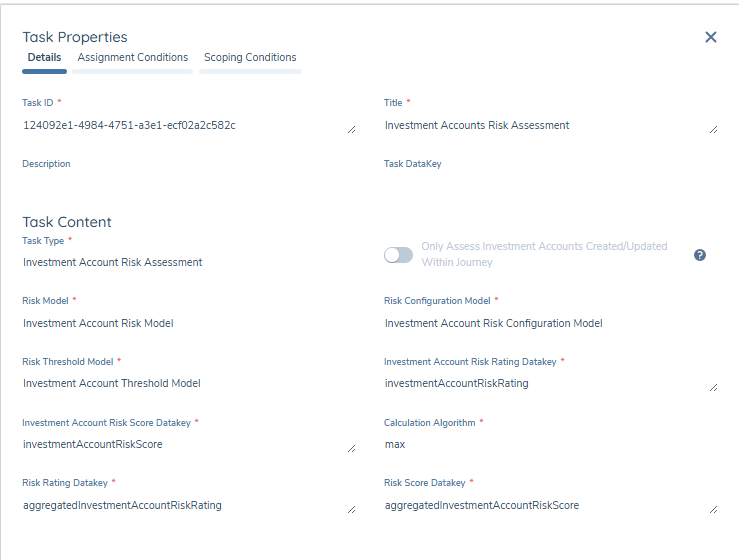
-
Having added a task, in a draft journey schema, select Investment Account Risk Assessment from the task type dropdown.
-
You can use the Only Assess Investment Accounts Created/Updated Within Journey toggle to either only assess Investment Accounts with a draft in the current journey (newly added or edited accounts) or to include existing verified Investment Account risk score and rating values in the aggregated output.
infoInvestment Accounts in Pending Offboarding or Offboarded status are always excluded from the assessment regardless of the toggle setting. The task does not create drafts or force Investment Accounts into draft to perform assessment.
If no Investment Accounts are in scope at runtime, the task completes successfully without writing any changes.
Scores from verified Investment Accounts will not be recalculated, the existing verified scores can be included in the aggregate output to the entity. An Investment Account must be edited to recalculate the risk score.
-
For the dropdowns displayed under the Task Content heading, select the required value:
- Risk Model: Determines the risk factors to be evaluated.
- Risk Configuration Model: The values and scores assigned to each possible input of those risk factors.
- Risk Threshold Model: A model that translates a numerical score to a descriptive value, for example High, Medium, or Low.
-
Define the Investment Account Risk Score Datakey and Investment Account Risk Rating Datakey. These must be Investment Account database field names configured in a requirement set and will be used to output the risk assessment outcome for each individual Investment Account.
-
Set the Calculation Algorithm to be used when combining individual Investment Account scores into a single aggregated value:
- max: chooses the highest
- min: chooses the lowest
- sum: adds all values together
- avg: calculates the average ([sum of values]/[number of values])
-
Define the Risk Rating Datakey and Risk Score Datakey. These are the database field names used to output the overall aggregated Investment Account risk assessment outcome.
The steps above describe a single Investment Account Risk Assessment task. This task can be configured to appear multiple times in a journey, repeating the process using different risk models each time. Each task may be configured with different Rating and Score database field names, allowing for greater flexibility when calculating risk across different models.