Legal Holds
A Legal Hold allows Compliance users to block the deletion of an entity while legal or regulatory proceedings are active. While a Legal Hold is in place, both manual and automated deletion are suppressed; when the Legal Hold expires or is removed, the entity returns to the standard deletion lifecycle.
Legal Holds apply to all entity types that have an Entity Profile Page, not just clients.
This guide covers:
- The Legal Hold record and its lifecycle (Create, View, Modify, Remove)
- Where Legal Holds are managed and how status is displayed on the Entity Profile
- How Legal Holds interact with the Data Deletion scheduler and manual deletion
- Expiry notifications to the Responsible Team
- Audit behaviour for Legal Hold lifecycle events
Permissions
Legal Hold permissions sit under the Entity Data domain:
- Legal Hold Access: view the Legal Hold modal and status chips, and receive expiry notifications (when eligible).
- Legal Hold Edit: create or modify a Legal Hold on an entity.
- Legal Hold Delete: remove a Legal Hold from an entity.
Permissions are enforced consistently in the UI and across all supported interfaces.
Key concepts
One Legal Hold per entity
Only one Legal Hold may exist per entity at any time. While one exists, a new Legal Hold cannot be created for that entity; the existing Legal Hold must be modified or removed first.
Active vs Expired
A Legal Hold's status is derived from its Expiry Date:
- Active: Expiry Date is in the future. Deletion is blocked.
- Expired: Expiry Date is today or in the past. Deletion is no longer blocked, but the Legal Hold record remains visible on the entity until it is removed or the entity itself is deleted.
Removing a Legal Hold deletes the Legal Hold record. Audit entries for the Legal Hold always persist (see Audit behaviour).
Relationship to retention and deletion
Legal Holds do not change retention periods or policy configuration. They act as a final gate before deletion:
- If a Legal Hold is Active, the entity is skipped by the Data Deletion Scheduler and cannot be deleted manually.
- If a Legal Hold is Expired (or no Legal Hold exists), deletion proceeds according to the rules described in the Deleting Data guide.
The Legal Hold record
A Legal Hold is a record associated with a single entity. It captures the following information:
- Legal Hold Reason (mandatory, selected from the "Legal Hold Reason" Reference Data lookup)
- Legal Hold Details (mandatory)
- Legal Hold Duration (mandatory, captured in months)
- Responsible Team (mandatory, selected from Security Configuration Teams)
- Start Date (system-managed, set on creation)
- Expiry Date (system-managed, calculated as Start Date + Duration)
- Audit fields: Created By/On, Modified By/On, Removed By/On, Removal Reason
The Start Date cannot be changed after the Legal Hold is created. Changing the Duration recalculates the Expiry Date and may move the Legal Hold between Active and Expired.
Managing a Legal Hold
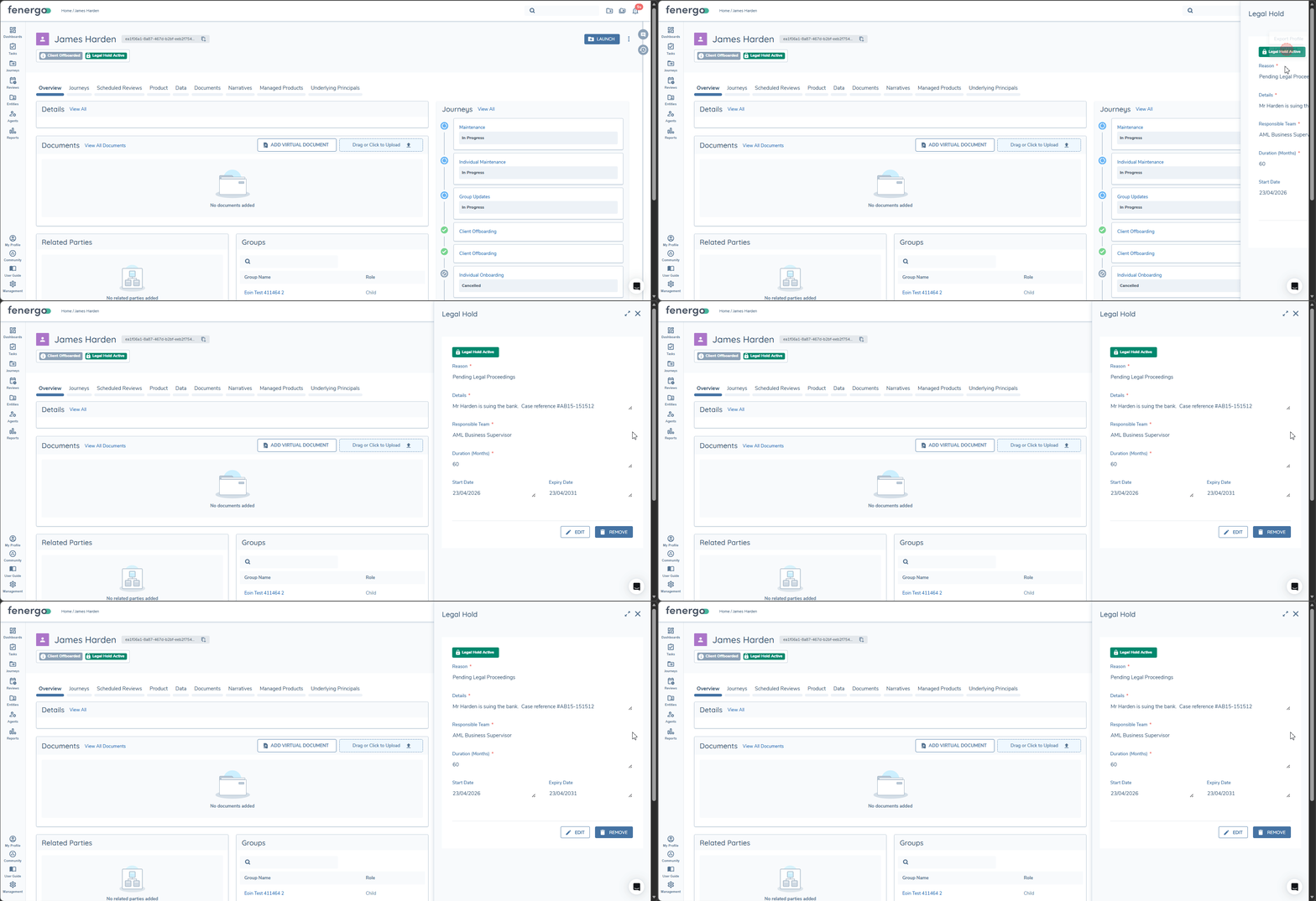
Legal Holds are managed from the Entity Profile Page (EPP) via the ellipsis menu. The same modal supports Create, View, Modify and Remove (subject to user permissions).
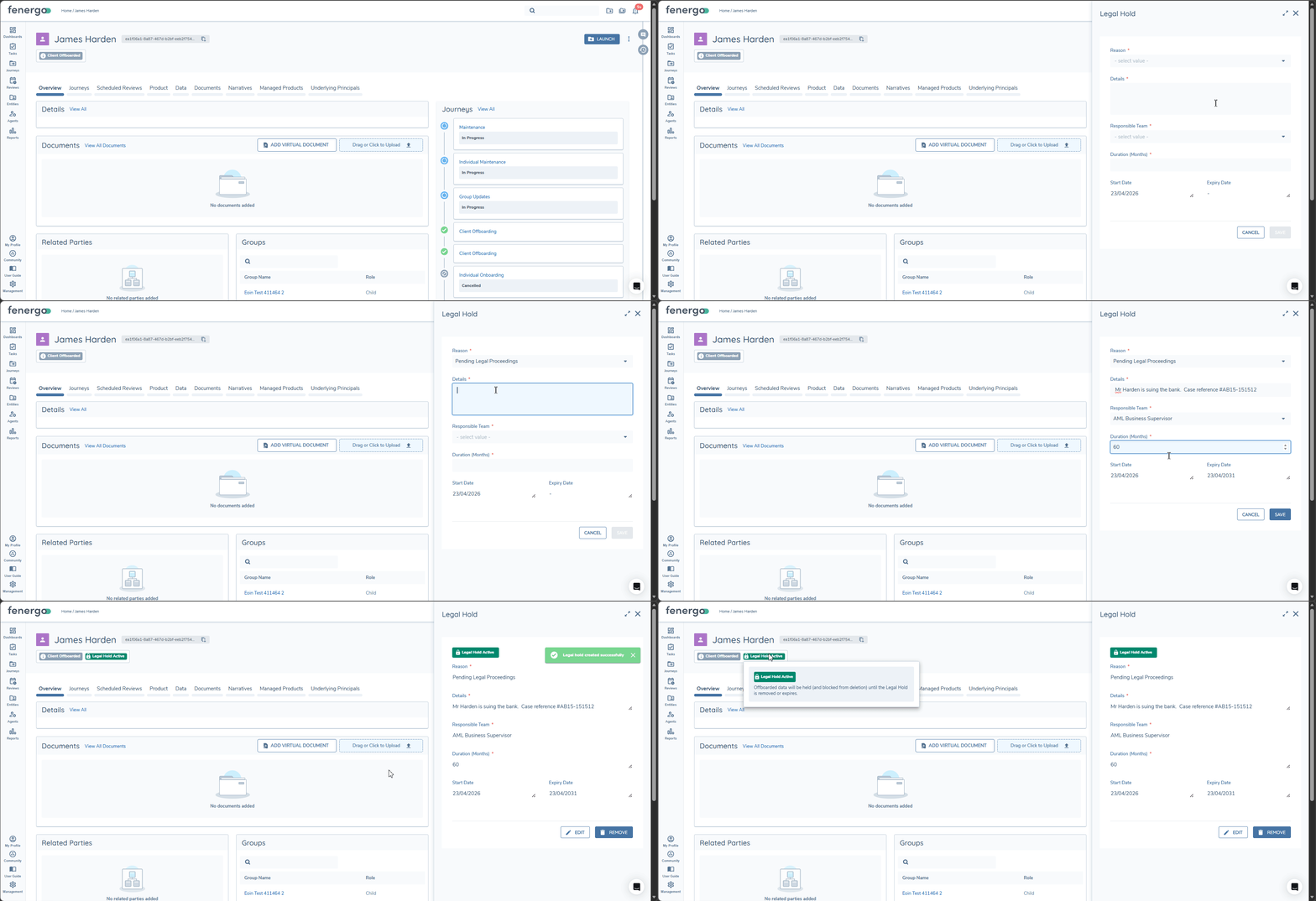
Create a Legal Hold
Available when no Legal Hold exists on the entity and the user has Legal Hold Edit permission.
All mandatory fields must be provided to enable 'Save'. On Save:
- The Legal Hold is created with the Start Date set to the current date.
- The Expiry Date is calculated from Start Date + Duration.
- The Legal Hold becomes Active.
- An audit entry is written.
View a Legal Hold
Available to any user with Legal Hold Access permission. All fields are displayed as read-only.
Modify a Legal Hold
Available when a Legal Hold exists (Active or Expired) and the user has Legal Hold Edit permission. The following fields can be changed:
- Legal Hold Reason
- Legal Hold Details
- Legal Hold Duration
- Responsible Team
The Start Date cannot be changed. Updating the Duration recalculates the Expiry Date; this may cause the Legal Hold to move between Active and Expired. An audit entry records the before and after values for each changed field.
Remove a Legal Hold
Available when a Legal Hold exists and the user has Legal Hold Delete. A Removal Reason is mandatory and must be confirmed.
On removal:
- The Legal Hold record is deleted from the entity.
- An audit entry is written capturing the Removal Reason, the user and the timestamp.
- Deletion of the entity is no longer blocked by a Legal Hold.
Status chips on the Entity Profile
When a Legal Hold record exists for an entity, a status chip is displayed in the Entity Profile header. The chip is informational only; clicking it does not open the modal. Tooltips are visible to all users and do not require any Legal Hold permission.
Legal Hold Active is displayed when the Expiry Date is in the future.
- Tooltip: "Offboarded data will be held (and blocked from deletion) until the Legal Hold is removed or expires."
Legal Hold Expired is displayed when the Expiry Date is today or in the past.
- Tooltip: "Offboarded data eligible for deletion (as scheduled) now that the Legal Hold has expired."
No chip is displayed when no Legal Hold record exists, including after a Legal Hold has been removed. The chip updates immediately after any Legal Hold lifecycle action (Create, Modify, Remove).
Interaction with Data Deletion
Legal Holds act as a gate at the point of deletion. Retention periods, Data Deletion Processes and Data Deletion Journeys continue to behave as described in the Deleting Data guide.
Automated Data Deletion Scheduler
When the scheduler evaluates entities whose retention date has passed:
- If an Active Legal Hold exists, the entity is skipped and no Data Deletion Journey is created.
- If the Legal Hold is Expired (or has been removed), the scheduler proceeds as normal.
- Once a Legal Hold expires or is removed, the entity is picked up on the next scheduler run provided its retention date has passed. No manual intervention is required.
Manual deletion
Attempts to delete an entity directly while an Active Legal Hold exists are rejected. Deletion is only permitted once the Legal Hold is Expired or Removed.
Cascade behaviour at entity deletion
When an entity is fully deleted (via the scheduler or directly), any remaining Legal Hold record on that entity - Active or Expired - is also deleted as part of the cascade. Audit entries for the Legal Hold persist and remain accessible.
Expiry notifications
To help Responsible Teams act before a Legal Hold expires, the system generates advance notifications at the following intervals:
- 30 days before expiry
- 15 days before expiry
- 5 days before expiry
- 1 day before expiry
Each Legal Hold generates at most one notification per interval. Clicking a notification navigates the user to the Entity Profile Page for the affected entity; users without Legal Hold Access can open the entity but cannot see Legal Hold details.
Who receives a notification
A user receives a Legal Hold Expiry notification only when all of the following are true:
- They are a member of the Legal Hold's Responsible Team.
- Their Legal Hold Expiry notification toggle is enabled.
- System or email notifications are enabled on their user profile.
Like all notifications, the Legal Hold Expiry notification toggle is disabled by default. Users must enable to the notification toggle in their Profiles' Notification Settings opt out at any time via their notification settings under 'Data Protection'.
Audit behaviour
All Legal Hold lifecycle events are audited and available via query API or Advanced Reporting (audit_legalhold table)
An audit entry is written for each of:
- Create Legal Hold: captures entity, Reason, Details, Duration, Responsible Team, Start Date, Expiry Date, Created By/On.
- Modify Legal Hold: captures the before and after values for Reason, Details, Duration, Responsible Team and Expiry Date, plus Modified By/On.
- Remove Legal Hold: captures the Removal Reason and Removed By/On, with an optional snapshot of the prior Legal Hold values.