Review Manager - User Guide
The Review Manager domain facilitates effective KYC review management, supporting the upkeep and maintenance of entity profiles, associated products and documents.
Key features include:
- Review Journey Scheduling - automated scheduling of review journeys based on configurable rules.
- ETL Review Migration - creating and updating scheduled and in progress reviews as part of an ETL migration.
- Review Manager Dashboard - a dashboard for In Progress and Scheduled reviews with bulk action capabilities providing full visibility and control over review scheduling.
Review Journey Scheduling Feature
Important Note
This feature is available now for non-live customers to utilise fully. If any rules have been configured in Journey Schedules, these can be replaced with Entity Scoping rules in Review Journey Scheduling to benefit from greater configurability and transparency.
Any customer using our Product feature can now utilise Review Journey Scheduling to configure rules for Product Reviews.
Transitioning from Journey Schedules to Review Domain
Clients that are using the Journey Schedules feature to trigger review journeys in production can now transition to the new Review Domain. The transition is designed to be seamless with minimal actions required, however there are some configuration steps you need to take.
There are two scenarios that the transition will cater for:
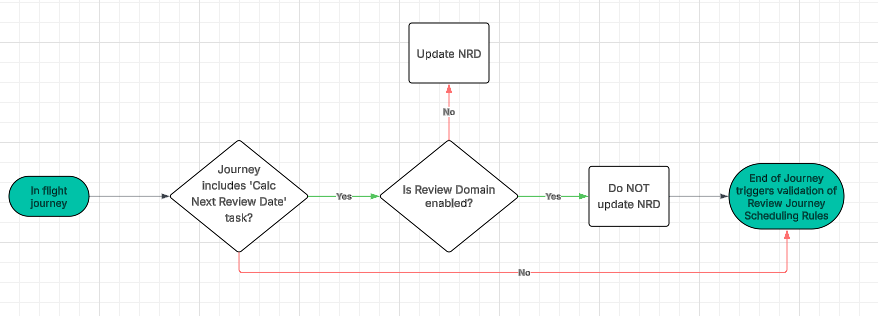
- Entities that have in-flight journeys that would result in the calculation of a Next Review Date (via the 'Calculate Next Review Date' task) - if the in-flight journey contains the 'Calculate Next Review Dates' task, the system will perform an additional check to see if the Review Domain has been enabled for your tenant. If it has not been enabled, the system will update the Next Review Date and you will continue to leverage the Journey Schedules feature. However, if the Review Domain is enabled, the system will not update the Next Review Date (severing the connection to the Journey Schedules feature), and on completion of the in-flight journey the Review Journey Scheduling rules will be evaluated. If any rules are satisfied, the system will create a Scheduled Review for that entity, and going forward the Review Journey Scheduling rules will create reviews in the system. In addition the system will check if there is an existing in-progress review for the entity, and if there is the system will not launch another review.
- Entities in your system that have a Next Review Date scheduled for the future - when the Next Review Date arrives, the system will validate the entity against the Journey Schedule rules as normal, and if a rule is satisfied it will launch a journey. At this point the system will perform an additional check to see if the Review Domain is enabled for your tenant. If it is, the system will create the journey in the Review Domain, set the status to In Progress, and that review will be available on the In Progress tab of the Review Manager Dashboard. This logic will remain in place until all future Next Review Dates have been reached. Once they have, all future reviews will be triggered via the Review Journey Scheduling rules in the Review Domain.
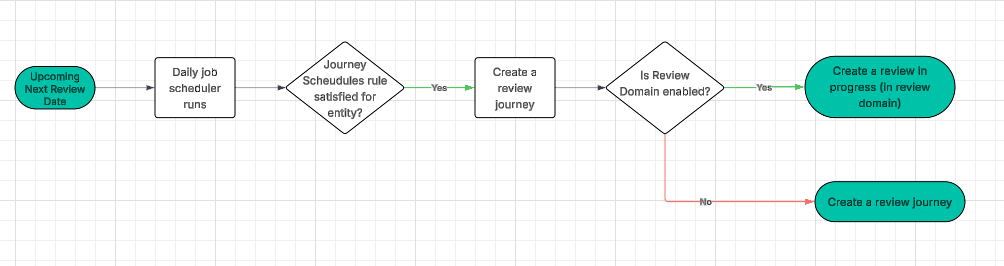
In order for these two scenarios to be successful, there are two important configuration steps to take:
- Remove all 'Calculate Next Review Date' tasks from all journey schemas where it is configured.
- Ensure that your Review Journey Scheduling rules are configured so the Review Domain can create reviews based on your rules going forward (see below).
Feature Overview - Review Journey Scheduling
Review Journey Scheduling will eventually replace Journey Schedules as a more flexible, scalable and efficient way to launch review journeys. The Journey Schedules feature supports simple configuration to automatically launch journeys, but it's trigger conditions are limited to indexed fields, which reduces its utility.
Review Journey Scheduling enables refined configuration with access to all policy and product requirements. Configured Scoping Rules will determine what 'Reviews' are required for an Entity (and any associated Products) following the completion of each journey and schedule them accordingly. Scheduled Reviews will be visible on an Entity's Profile Page.
The Review Journey Scheduler runs daily, launching journey instances using the specified 'Review Journey' (Journey Type) for Reviews scheduled for the current date.
Permissions - Review Journey Scheduling
- Review Journey Scheduling Access
- Allows users to view Scoping Rules for Review Journey Scheduling. Note: Product Configuration Access is also required to view 'Product Scoping Rules' tab
- Review Journey Scheduling Edit
- Allows users to create new Scoping Rule instances and save drafts
- Review Journey Scheduling Approve
- Allows users to submit draft scoping rules for approval and approve/reject
- Review Journey Scheduling Archive
- Allows users to archive published Scoping Rule versions
- Review Journey Scheduling Delete
- Allows users to delete whole Scoping Rule instances and draft versions
- Scheduled Review Access / Journey Access
- Allows users to view an entity's Scheduled Reviews on the Entity Profile Page or via Review Query API. Users who already have Journey Access will already be able to view Scheduled Reviews.
- Scheduled Review Edit
- Allows users to create or edit Scheduled Reviews via Review Command API.
- Scheduled Review Delete
- Allows users to Delete a Scheduled Review via Review Command API.
- Deferred Document Requirements Review Config Access
- Allows a user to access the 'Document Requirements' tab
- Deferred Document Requirements Review Config Edit
- Allows the user to edit the toggle and set the 'Review Journey' in the 'Document Requirements' tab
Scoping Rule Configuration
Scoping rules are used to evaluate which 'Reviews' an entity (and associated products) are in-scope for and to provide the review type and attributes to determine the 'launch date' for Scheduling. Navigate to 'Review Journey Scheduling' via the Journey Domain on the left navigation menu.
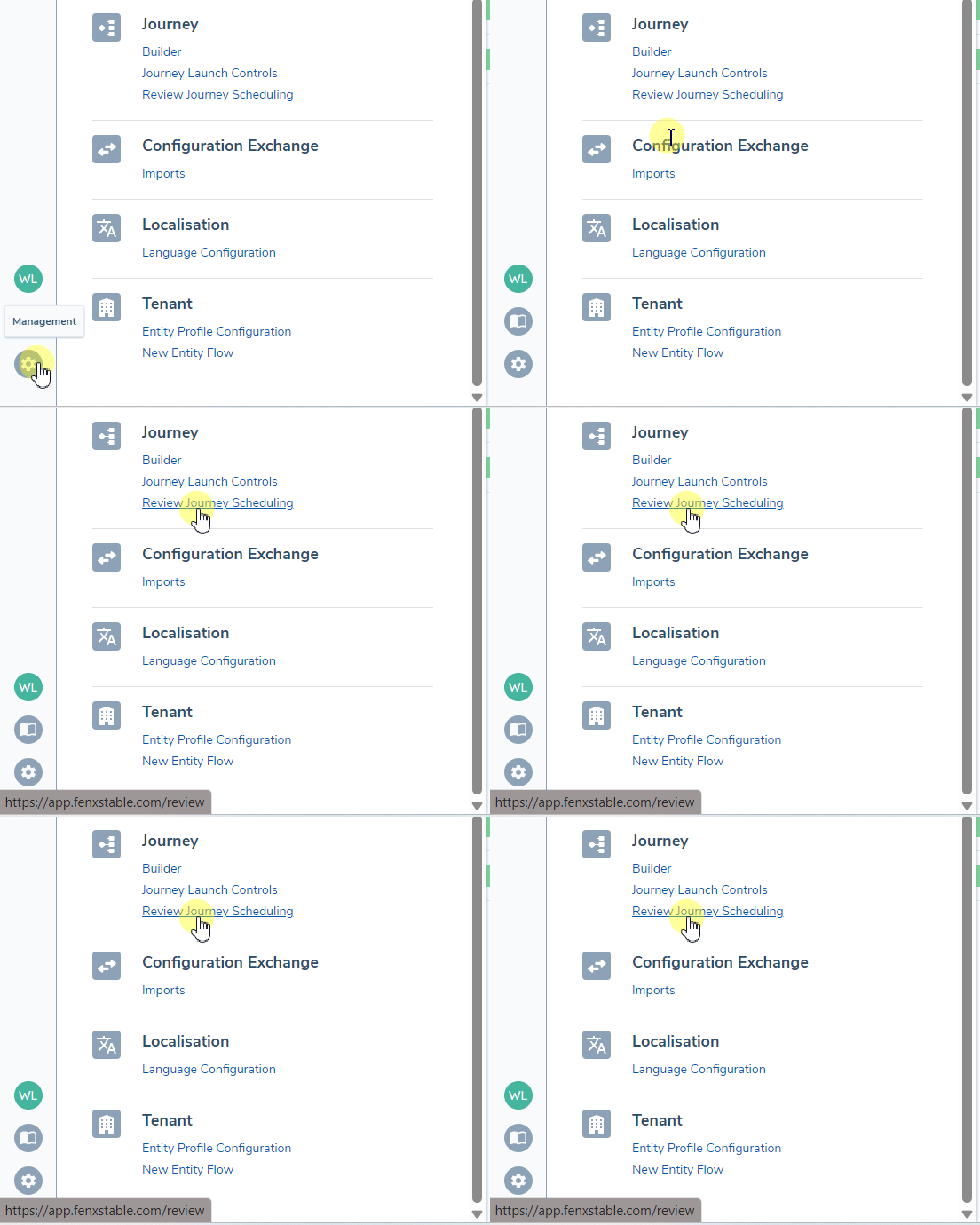
Entity Review Scoping Rules
Entity Scoping rules centralise the conditions against which entities will be assessed - an entity must satisfy at least 1 Entity Scoping rule to trigger a Review of ANY type. They not only determine whether a matching entity requires an entity review but also whether the associated products should be evaluated against Product Scoping Rules. This approach minimizes repetition of entity scoping conditions across multiple Product Scoping Rules.
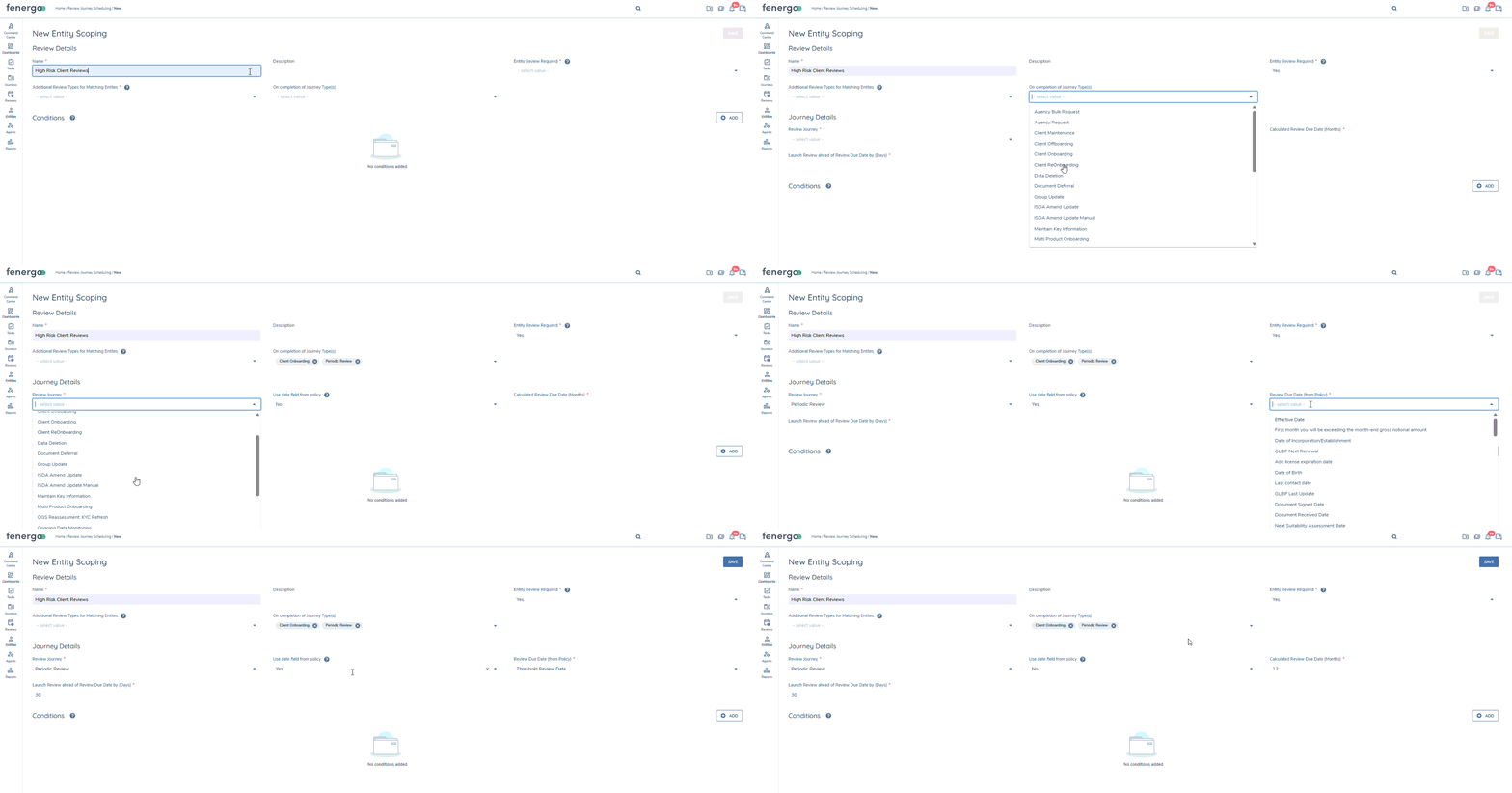
-
Entity Review Required
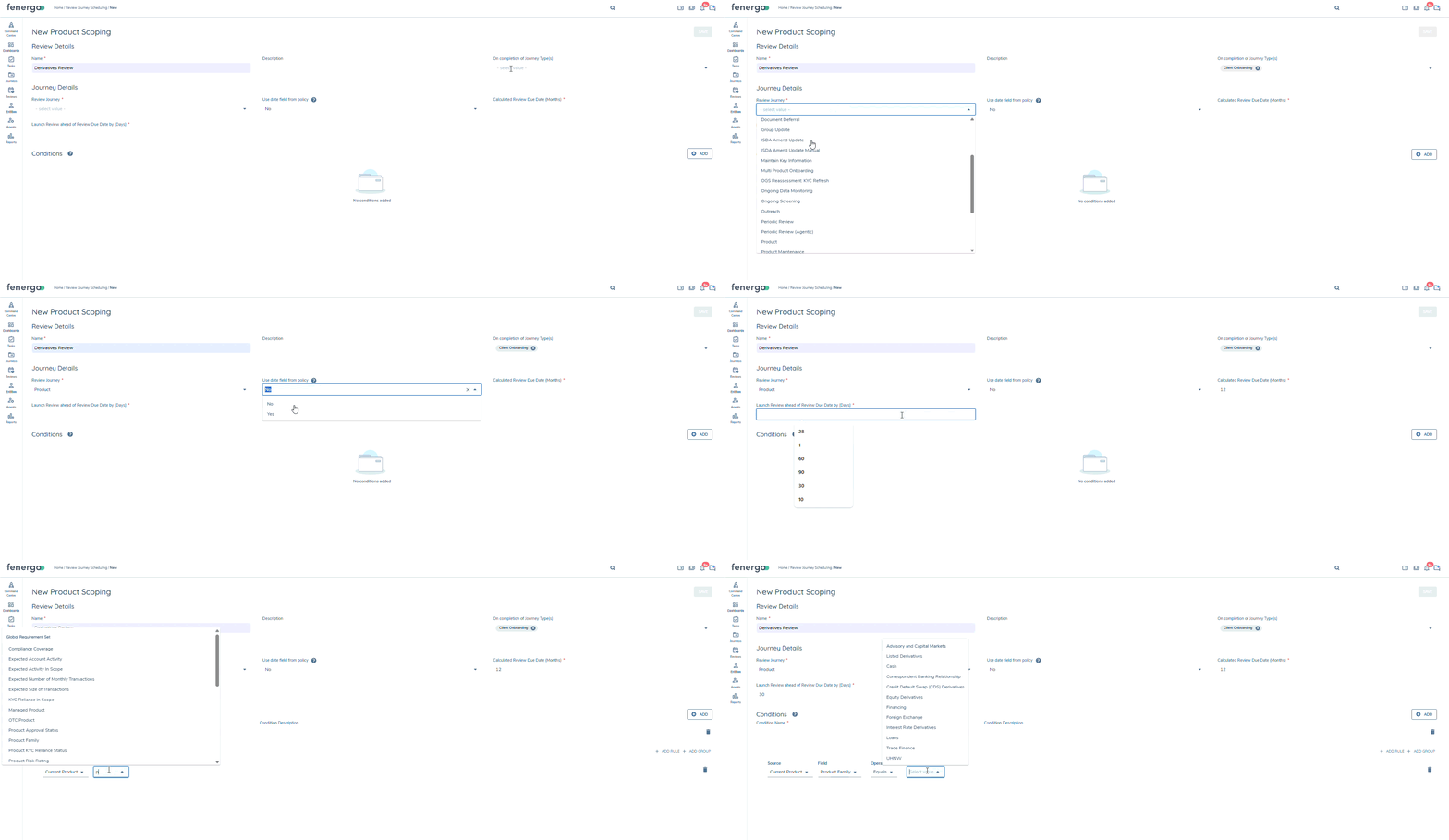
When Entity Review Required is set to 'Yes', users will provide the following:
- 'On Completion of Journey Type(s)' (the list of journey types, that when completed will trigger the evaluation of the rules) – if this field is left blank then the rules will be evaluated on completion of ANY journey types.
- 'Review Journey' (Journey Type to trigger on the launch date),
- 'Launch Journey in (Months)' OR 'Review Due Date (from Policy)' (enabled by 'use date field from policy' dropdown and allows users to select date & calculated date fields from policy to set as review due dates) and 'Launch Review ahead of Review Due Date by (Days)'. These combined inputs must result in a future launch date.
Users may also opt to include 'Product' in 'Additional Review Types for Matching Entities' if the Conditions specified in the rule would be appropriate to potentially schedule separate product reviews for any qualifying products. When Review Scheduling is assessed at journey completion, if multiple Entity Scoping rules with the same journey type are applicable to the entity, the rule with the earliest launch date will be chosen.
-
Entity Review Not Required
If Entity Review Required is set to 'No', then 'Additional Review Types for Matching Entities' becomes mandatory. This means that the rule will provide conditions an entity should meet for its products to be eligible for assessment under Product Scoping rules.
Like the entity scoping rules the user will provide the following for product scoping rules:
- 'On Completion of Journey Type(s)' (the list of journey types, that when completed will trigger the evaluation of the rules) – if this field is left blank then the rules will be evaluated on completion of ANY journey types.
- 'Review Journey' (Journey Type to trigger on the launch date),
- 'Launch Journey in (Months)' OR 'Review Due Date (from Policy)' (enabled by 'use date field from policy' dropdown and allows users to select date & calculated date fields from policy to set as review due dates) and 'Launch Review ahead of Review Due Date by (Days)'. These combined inputs must result in a future launch date.
Once published, 'Entity Review Required' and 'Review Journey' fields become read-only in subsequent versions. When Reviews have been scheduled using a given rule, changing these fields would not affect the already scheduled reviews meaning that these changes would be akin to creating a new rule. By disabling the fields, the situation is more transparent.
Product Review Scoping Rules
For an entity's products to be assessed, the entity must first meet the conditions of at least 1 Entity Scoping rule that includes 'Product' in the 'Additional Review Types for Matching Entities'. This means that the conditions specified in Product Scoping rules are applied above the Entity Scoping rules that triggered their assessment. This reduces repetition of entity scoping conditions across Product Scoping rules and focuses the conditions within Product Scoping rules on qualifying conditions for Products to be included in the Review and user will provide the following:
- 'On Completion of Journey Type(s)' (the list of journey types, that when completed will trigger the evaluation of the rules) – if this field is left blank then the rules will be evaluated on completion of ANY journey types.
- 'Review Journey' (Journey Type to trigger on the launch date),
- 'Launch Journey in (Months)' OR 'Review Due Date (from Policy)' (enabled by 'use date field from policy' dropdown and allows users to select date & calculated date fields from policy to set as review due dates) and 'Launch Review ahead of Review Due Date by (Days)'. These combined inputs must result in a future launch date.
Each qualified Product Scoping Rule will result in one scheduled Review Journey and eligible products will be reviewed together in the resulting Review Journey(s). Products can also be in-scope for multiple Review Journeys when eligible under multiple Product Scoping rules.
As with Entity Scoping rules, once published, 'Review Journey' field becomes read-only in subsequent versions. When Reviews have been scheduled using a given rule, changing this field would not affect the already scheduled reviews meaning that these changes would be akin to creating a new rule. By disabling the field, the situation is more transparent.
Document Deferral Review Configuration
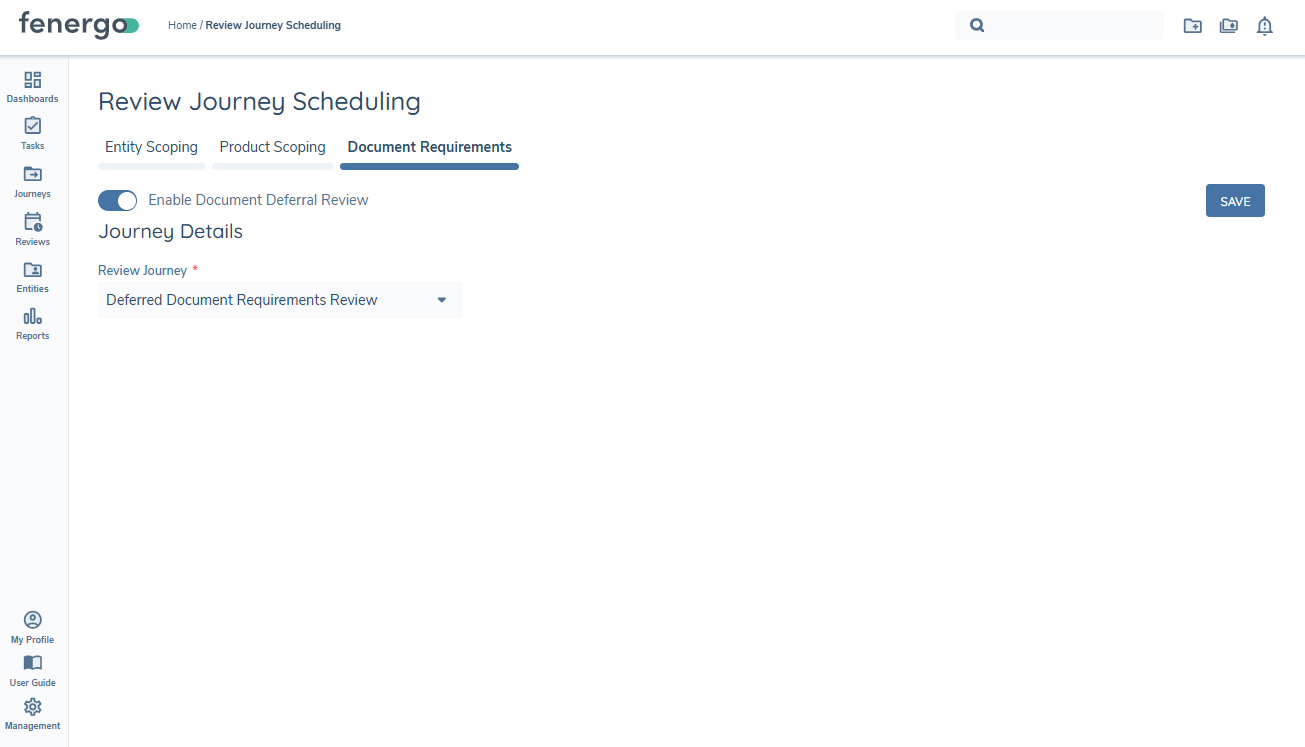
Deferred Document Requirements can be assessed and gathered on journey completion using the 'Document Requirements' configuration option. However, unlike Entity Review and Product Review Scoping Rules, it is not possible to configure rules using document metadata for when deferred documents should be in scope for review. Therefore the configuration here is to enable or disable the functionality, along with specifying the review journey type to be triggered by the Review process.
When the 'Enable Document Deferral Review' toggle is enabled, users will provide the 'Review Journey' which is the Journey Type to trigger on launch date. When Reviews have been scheduled using the configured journey, changing the journey type would not affect the already scheduled reviews, meaning that the change would only be applied to new Reviews created from that point forward.
Review Scheduling Process
When a journey has completed, the system will assess the entity against all applicable scoping rules configured under 'Review Journey Scheduling'.
Entity Review Scheduling
Entity Scoping Rules can be configured to trigger different Journey Types at desired review intervals. Where customers operate across multiple geographies or segments, we recommend a single entity review where possible. The system will ensure that only one 'pending' Entity Review can be scheduled per 'Review Journey'.
When an entity satisfies the scoping conditions of one or more Entity Scoping rules and currently has no 'pending' Entity Reviews, the system will schedule one per the configured rule. If multiple Entity Scoping rules are applicable with the same 'Review Journey', the system will always select the rule with the earliest launch date.
Once a 'Pending' status Entity Review is already scheduled for a given 'Review Journey' (Journey Type), the system would only update that scheduled review if:
- the entity is fully offboarded (Scheduled Review status will be updated to 'Offboarded')
- the entity has satisfied a scoping rule with the same 'Review Journey' that results in an earlier launch date
- the Review Journey has been launched (Scheduled Review status updated to 'Launched')
If the entity no longer meets the original Entity Scoping rule, the system will take a conservative approach and the Scheduled Entity Review persist to launch on the scheduled date.
Product Review Scheduling
Products are more directly linked to specific business lines or geographies and so Product Reviews can be scheduled scheduled for a whole enterprise or separately by region/business line (by Booking Entity, Product Family/Type, Selling Location etc). Journey Schema's are broadly configurable to accommodate review activities, so entity elements can be included within Product Review Journeys as required.
Before any products can be considered for Reviews, the Entity must first satisfy conditions for an Entity Scoping rule with 'Product' populated in the 'Additional Review Types for Matching Entities' field.
Each qualified Product Scoping rule will result in a single "Pending" Product Review applicable for all qualified Products. If a 'Pending' Product Review is already scheduled and a new product now satisfies the same Product Scoping rule, the system will add it to the scope of the existing Scheduled Review. Otherwise, once scheduled, the Product Review will only be updated in 3 circumstances:
- Product Scoping Rule updated, resulting in an earlier launch date
- Product Offboarded (Product removed from review scope)
- Entity is Offboarded (all Scheduled Reviews are set to 'Offboarded' status)
Document Deferral Review Scheduling
On journey completion, any document requirements that have been deferred for the entity in journey or any associated related party will be collated. A Document Deferral review will be created per entity, meaning that should the entity in journey (Entity A) and Related Party B (Entity B) and Related Party C (Entity C) have one or more documents deferred within the journey, then a Document Deferral Review will be created for each of these three entities, containing each applicable document requirement that has been deferred.
The Launch Date for an entity's Document Deferral Review will be the earliest deferral date of those requirements that have been deferred for that entity. Deferred documents in both the context of the entity as a Client and the entity as a Related Party will be contained in the one Review. Once the Launch Date is met, the assigned journey will trigger for that entity. This journey must contain the Deferred Documents Review task that is specific to this review type and is designed specifically to populate the deferred document requirement details to the user.
Once a 'Pending' status Document Deferral Review is scheduled for a given 'Review Journey' any subsequent document deferrals will be appended to that existing Review. If the Document Deferral Review journey has been launched, then any subsequent document deferrals for that entity will result in a new Review being created.
Please see the Document Deferral user guide for more information.
Viewing an Entity's Scheduled Reviews
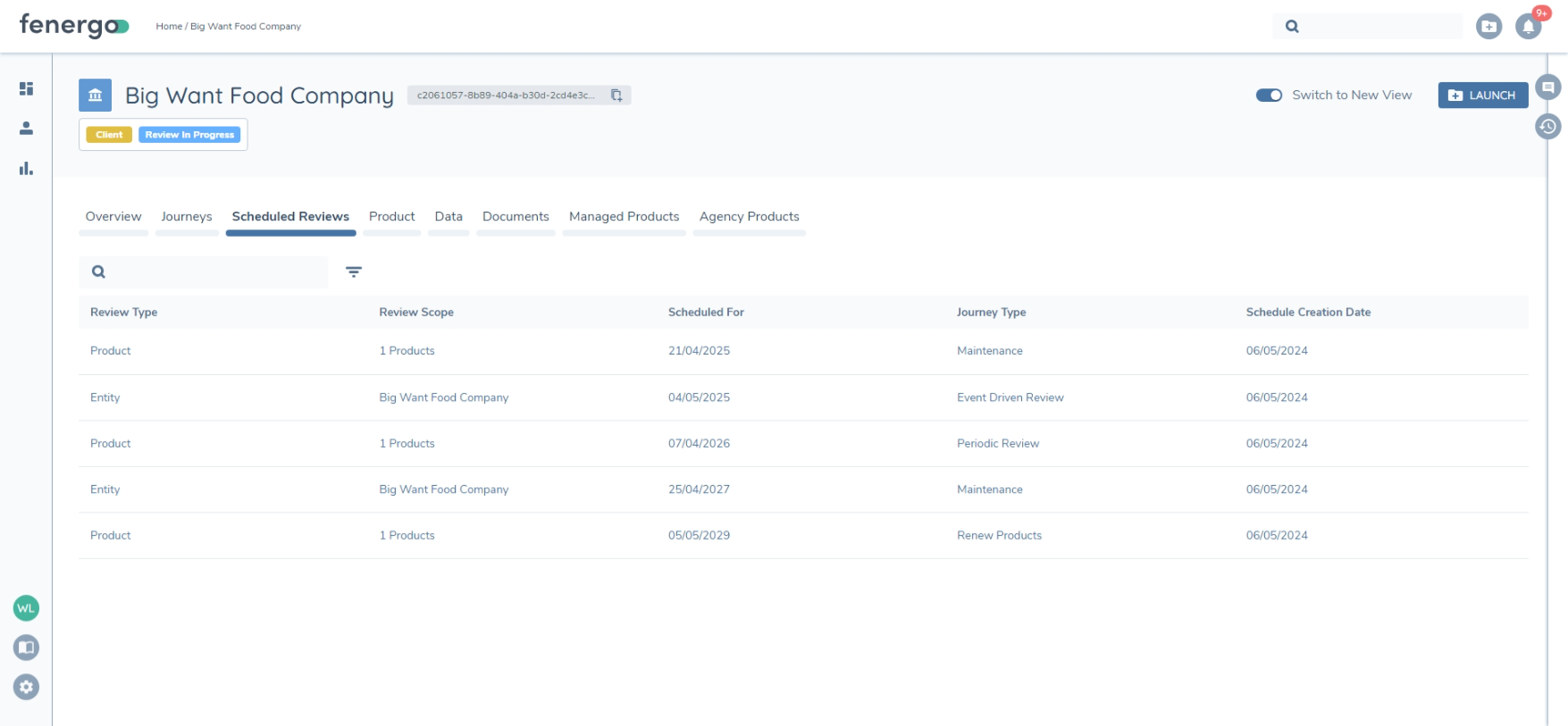
The Entity Profile page includes a tab to display an Entity's "Scheduled Reviews". The table will display all 'Pending' Scheduled Reviews for the Entity, its Products (if using the Product Domain), and Deferred Documents (if configured). Once a Scheduled Review is launched, it will be visible in its generated Journey Instance(s) and will no longer be visible here but visible on the Journeys tab. The scheduled and in-progress reviews will also be visiable from the new Review Manager Dashboard (see below).
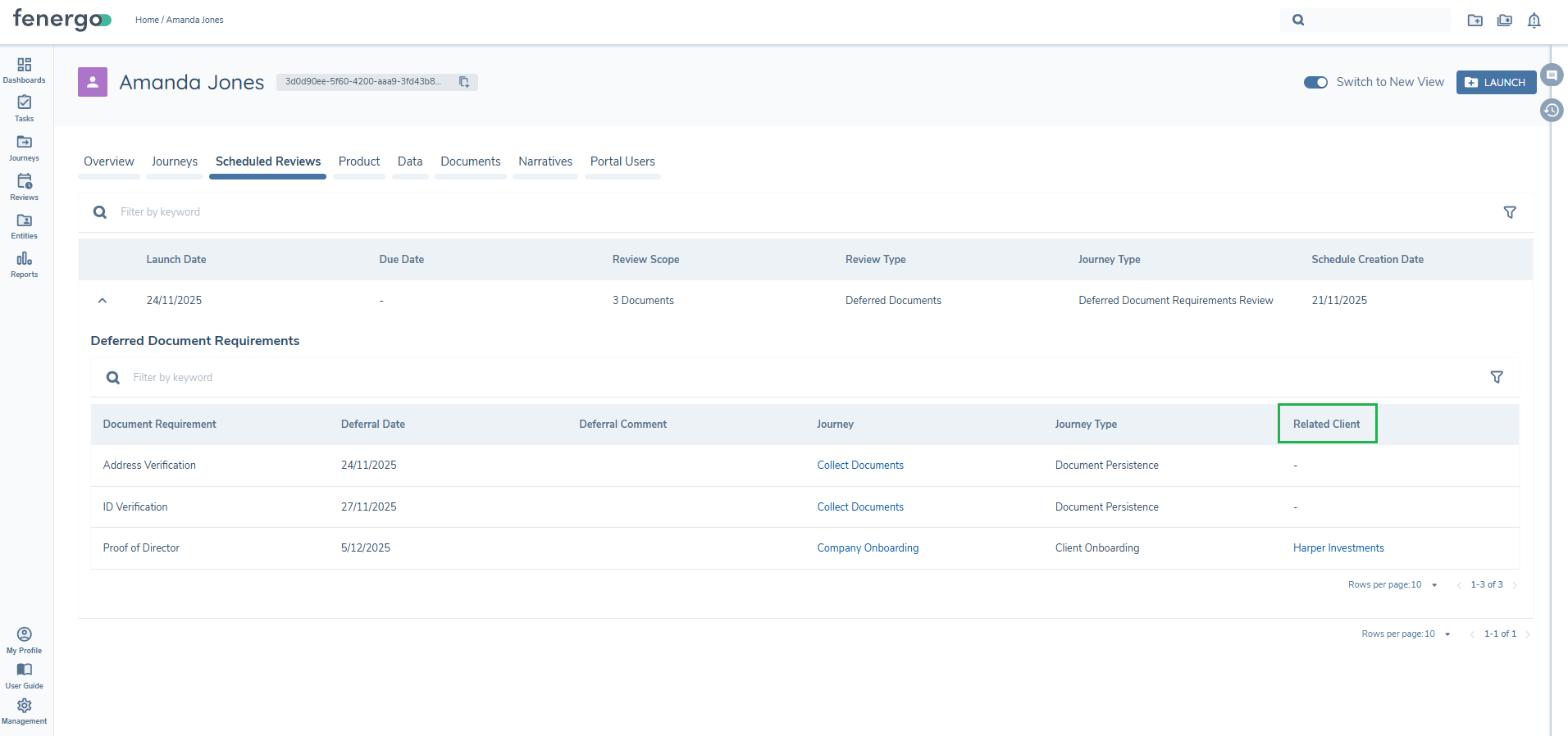
The Deferred Document Review row can be expanded to view the deferred documents that will be included in the review. Note the additional 'Related Client' detail where the document deferral was in the context of the entity as a related party.
Automatic Review Journey Launch
The Review Journey Scheduler will run daily the early morning (UTC). It will automatically launch journeys for entities with 'Pending' Scheduled Reviews with a 'launch date' that day. The system will launch journeys according to the scheduled 'Journey Type'. The scoping conditions of Journey Schemas with that type will determine which journeys are launched.
When a Scheduled Review results in one or more successfully launched journey instances, it will be updated to 'Launched' status.
Product Review Journeys - Product Filtering
When a Product Scheduled Review is launched, the products that qualified under the Product Scoping Rule are considered 'in-scope' for the review. When users access a Manage Products task within the launched journey, the system will filter to only display these 'in-scope' products, providing a clearer review context.
Product Filtering is also configurable via Product Scoping Rule selection for the Manage Products task. If a Product Scoping rule has been appled to the Manage Products task it will combine with the in-scope product filtering and may affect the displayed products.
Any products added within the task will be unaffected by filtering.
Configuration Exchange
Entity Scoping and Product Scoping rules configured in Review Journey Scheduling can be imported to higher tenants using Configuration Exchange. They are available for selection under the Journey domain with types 'Entity Review Schedule' and 'Product Review Schedule'. Users require the following permissions to successfully import:
- Review Journey Scheduling Access - required in the source tenant to access rules available for import
- Review Journey Scheduling Edit - required to import rules as as drafts in the target tenant
- Review Journey Scheduling Approve - required to publish imported rule drafts.
How ad-hoc reviews are managed in the review domain
Reviews don't always take place according to a strict schedule, and updates to client profiles can be initiated via trigger events, like a change in key data (Country of Inc. or availing of new products). These events can result in a the need for a full review of the client profiles and are time sensitive. It is important that as you review and update client profiles on a more ad-hoc basis that the periodic review schedules for these clients remain in line with policies and regulation. So with Fenergo's Review Manager there are two ways to ensure this happens:
-
Launch an existing scheduled review: If you wish to launch a review for a client, outside of the existing schedule, you can simply navigate either to the scheduled review tab on the review manager dashboard or the scheduled reviews tab on the entity profile page and launch an existing scheduled review ahead of time. On completion of this review the configured rules you have for scheduling reviews will kick in and schedule the next periodic review according to your rules.
-
Ad-hoc reviews updating review schedules: If we need to update a review schedule as a result of carrying out an ad-hoc review, perhaps from a material maintenance case, we need to ensure the following configuration is in place:
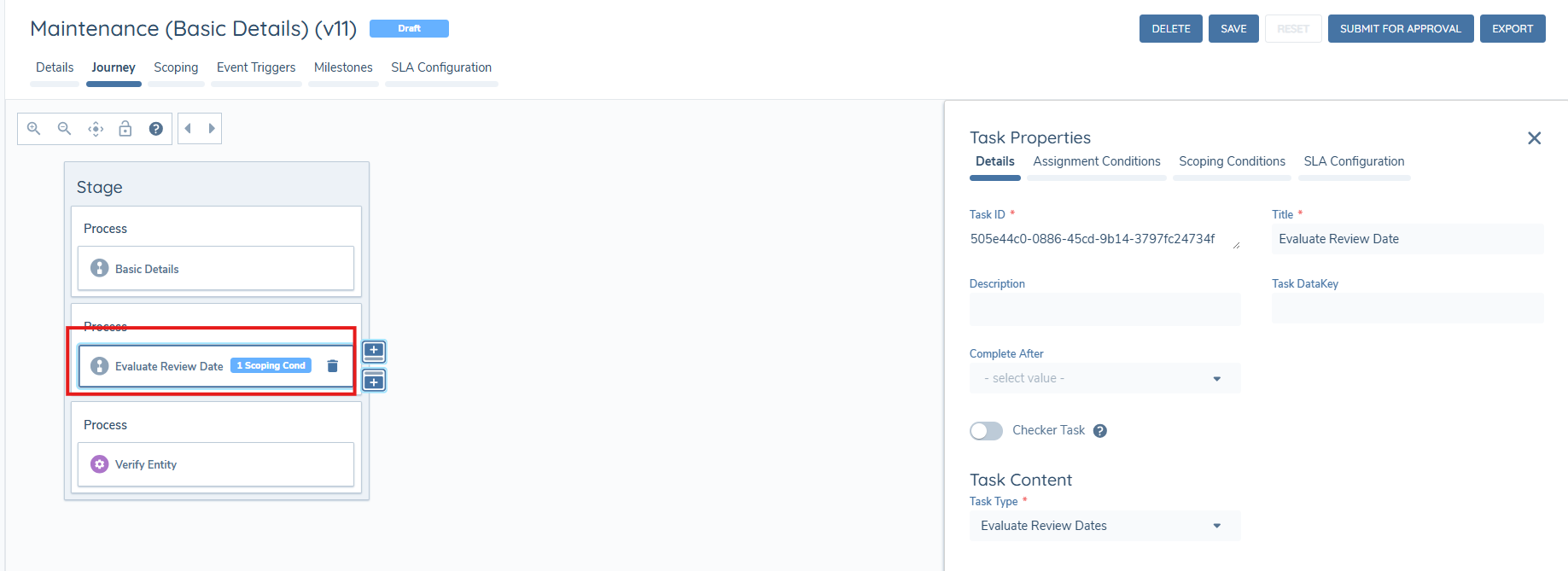
- Include a new task type called 'Evaluate Review Date' in the journey schema of journeys that can constitute a full review (e.g. Maintenance). The triggering of this task can be subject to scoping conditions, like the type of entity data change in the journey, or the outcome of an approval task.
-
On the task UI the user will be presented with a list of existing scheduled review(s) for the entity, from this list the user selects which scheduled review(s) dates should be recalculated on completion of the current ad-hoc review.
-
On this screen the user is presented with all the information they need to identify which review should be subject to a recalculation of the review dates. It includes:
- The journey type and review type, the rule name and description that created the review, current review due date and launch date.
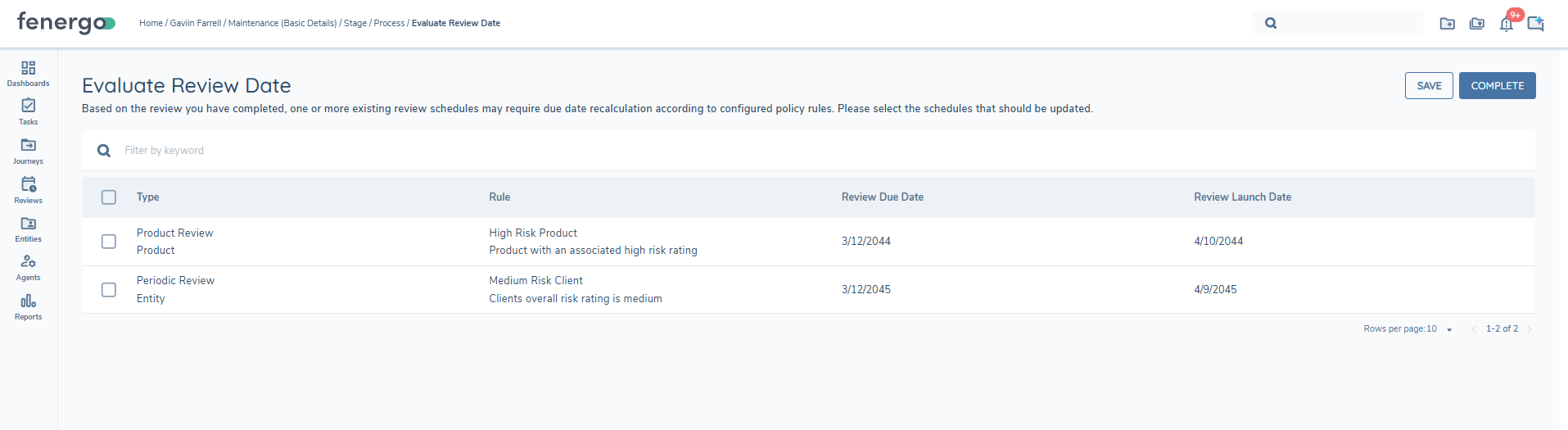
- When the journey completes the system will evaluate the review journey scheduling rules against the scheduled review(s) that the user selected, and will update the review due date and launch date according to the configured rules. This ensures that scheduled reviews dates are updated (brought forward or pushed out) as a result of what took place in the ad-hoc review journey and are in accordance with the configured rules set out by you.
NOTE:
- If your journey schema does not contain this new task type then scheduled review date will not be updated from ad-hoc reviews, and only from the completion of journeys that are specified in the 'on completion of journey type(s)' configuration in the rules.
- If your journey schema contains this new task type, but the task has not been scoped in (i.e. NOT triggered) then NO Review Journey Scheduleing rules will be evaluated at the end of that journey, meaning no dates will be updated and no new review schedules will be created.
Creating Reviews as part of ETL Migration
As part of data migration efforts, you may want to migrate entities into Fenergo with existing review dates, and schedule reviews according to the migrated review dates, well now you can. We have extended our ETL (extract, transform & Load) capabilities to allow for the creation of reviews as part of the migration post-load process. The process can create reviews as 'scheduled' or 'in progress', and can be enabled on request.
For general guidance on how ETL works see the ETL User Guide.
There are a few key steps to take to ensure that reviews are created for migrated entities:
-
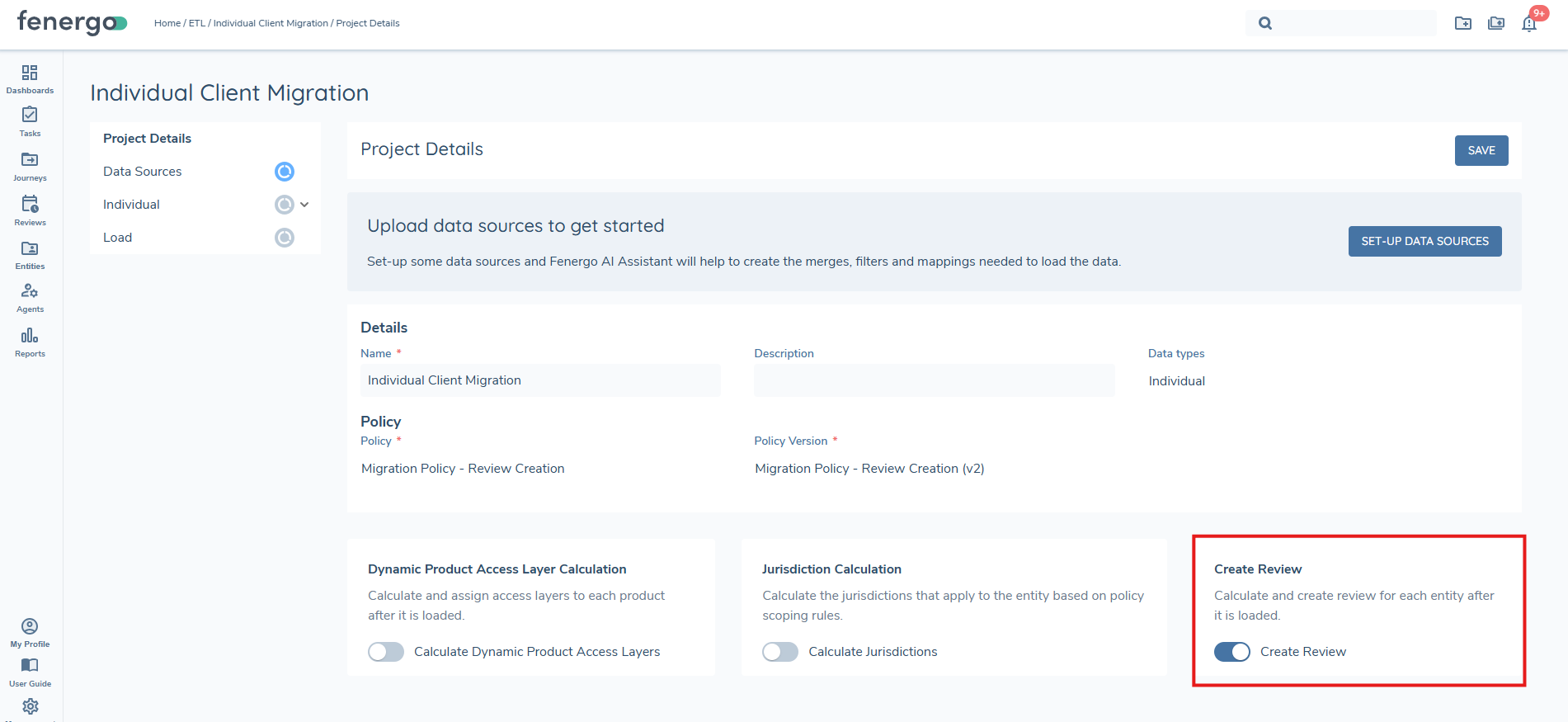
The 'Create Reviews' toggle must be on - this is located on the Project Details screen for ETL jobs.
-
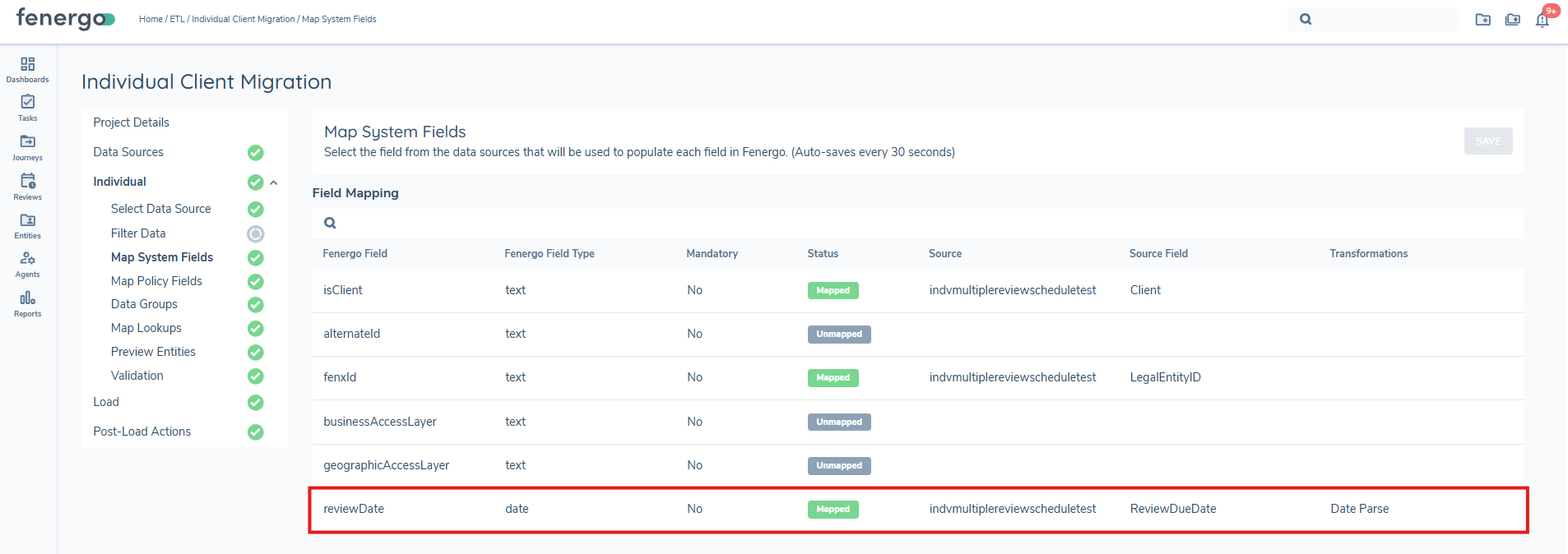
A review due date value from your source needs to be mapped to a new system field we have created in the ETL process.
All other necessary steps of the standard ETL migration process should be followed. When the load has completed successfully the post load actions will begin. At this point the system will evaluate each entity in the file against the configured Review Journey Scheduling rules. For each entity that satisfies a rule, the system will check whether a scheduled review already exists for that entity with the same journey type:
- If a matching scheduled review exists, the system will update the review due date with the value provided in the ETL file.
- If no matching scheduled review exists, the system will create a new scheduled review.
A few important notes to understand for the successful creation or update of a review object:
- The entity being migrated must contain a review date value, and the mapping to the system field as described above must be correct.
- A rule from the review journey scheduling configuration must be satisfied for each entity that requires a review. The rule that is satisfied will also be responsible for setting the launch date of the review journey.
- Where a matching scheduled review already exists for the entity and journey type, the system will update the review due date to the value in the ETL file rather than creating a duplicate review. Note: only reviews in a Scheduled status are eligible for update; in-progress reviews will not be affected.
- Where no matching scheduled review exists, a new review will be created in the normal way.
- Where review due date or a calculated launch date happens to be a past date then the review for that entity will be created and automatically set to In Progress, and the launch date will be set to the same date as the migration. These will appear on the In Progress tab of the review dashboard and NOT the scheduled tab. These in progress reviews will also be visible on the journeys tab of the entity profile.
- When the post load action is complete the system will display a visual report of the actions taken, a pie chart will display the total number of records processed and will indicate the number of reviews Created or Failed.
- A failed entity will display in the failed entities grid along with an error message. (This will later be accompanied with a downloadable CSV report).
- Successfully created or updated reviews will be available from the reviews dashboard as well as the entity profile page, either in the journeys tab or the scheduled reviews tab.
Review Manager Dashboard
Feature Overview - Review Manager Dashboard
The Review Manager Dashboard gives users visibility of all Scheduled and In Progress reviews they have access to. The dashboard consists of two tabs:
- Scheduled
- In Progress
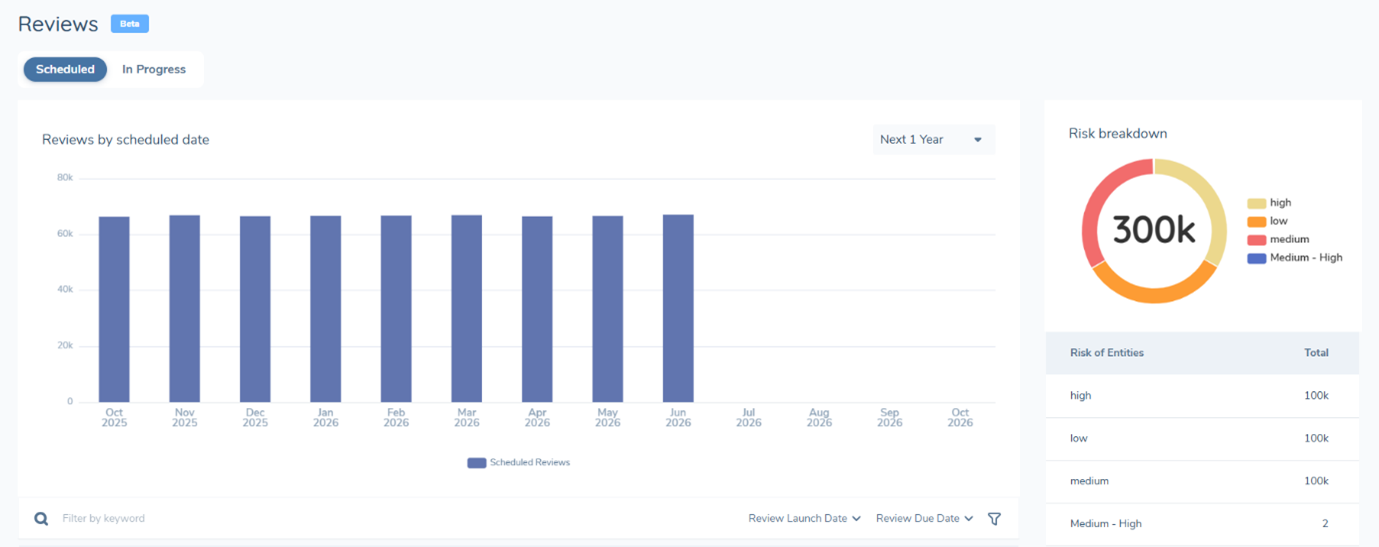
The scheduled tab provides three visualisations:
-
Reviews by scheduled date bar chart - gives users a count of scheduled reviews by timeframe, from the next 30 days out to three years.
-
Risk breakdown - a breakdown of the scheduled reviews according to the associated risk rating of the entities. The risk outcomes (High, Medium, Low) correspond to your risk configuration.
-
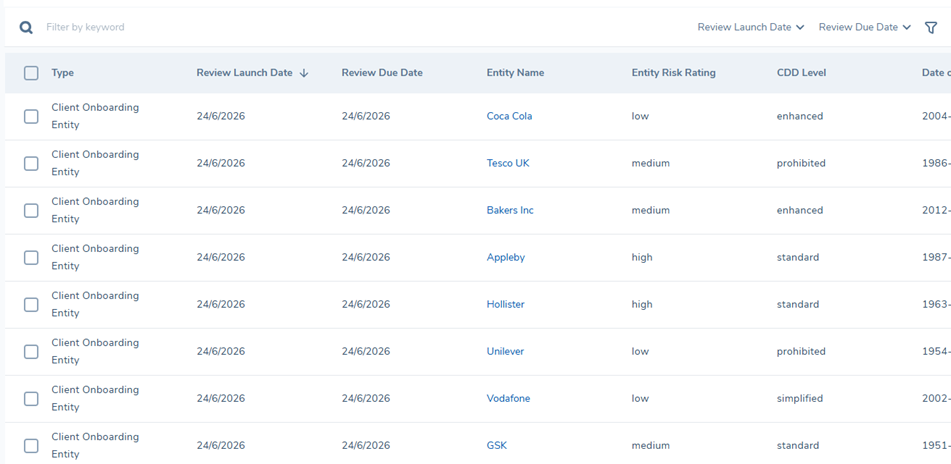
Reviews grid - contains the list of the scheduled reviews including additional information on the review and the associated entities. This grid can be searched as well as filtered by 'Review Launch Date' & 'Review Due Date' and sorted ascending/descending by column header. Making it easy for users to search for and find reviews. The columns in this grid are configurable under the Tenant View Configuration.
- Users can perform specific actions from this grid. By selecting the check boxes on the left hand side a user can launch the review journeys immediately or push out a reviews launch date. This can be done in bulk or for individual reviews.
- Users can perform specific actions from this grid. By selecting the check boxes on the left hand side a user can launch the review journeys immediately or push out a reviews launch date. This can be done in bulk or for individual reviews.
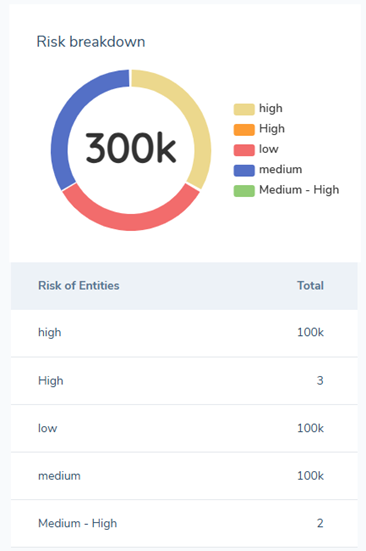
The In Progress tab includes a risk breakdown visualization and a reviews grid.
- Risk Breakdown - a breakdown of the in progress reviews according to the associated risk rating of the entities. The risk outcomes (High, Medium, Low) correspond to your risk configuration.
- Reviews grid - contains the list of the in progress reviews including additional information on the review and the associated entities. This grid can be searched as well as filtered by 'Review Launch Date' & 'Review Due Date' and sorted ascending/descending by column header. Making it easy for users to search for and find reviews. The columns in this grid are configurable under the Tenant View Configuration.
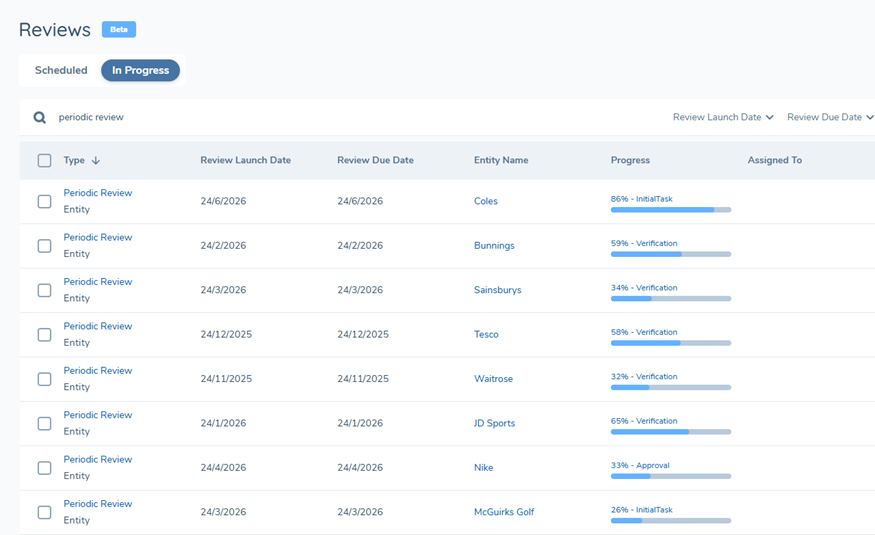
- Bulk assign reviews - by selecting the check boxes on the left hand side a user can assign/change the journey owner for the reviews. This can be done in bulk or for individual reviews.
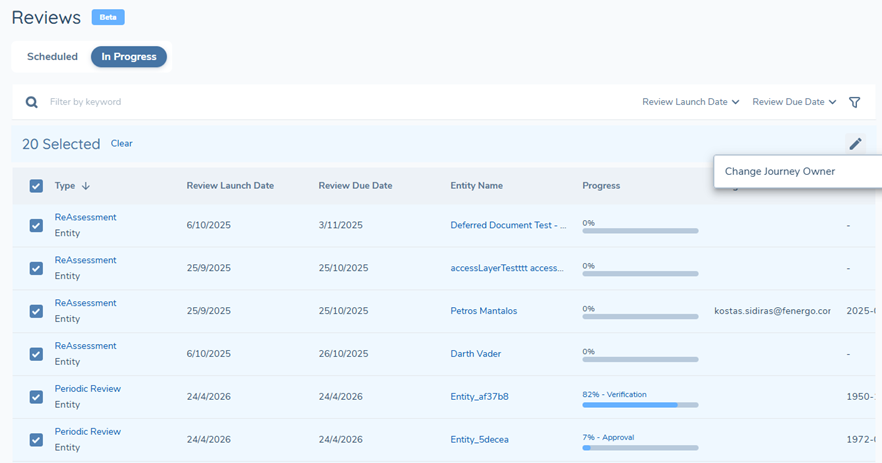
Configurable columns - the review grid on both the scheduled & in progress tabs have configurable columns, meaning you can choose what data is displayed. Some columns are mandatory and are not subject to change or removal, these include:
- Scheduled - Type, Review Launch Date, Review Due Date, Entity Name.
- In Progress - Type, Review Launch Date, Review Due Date, Entity Name, Progress.
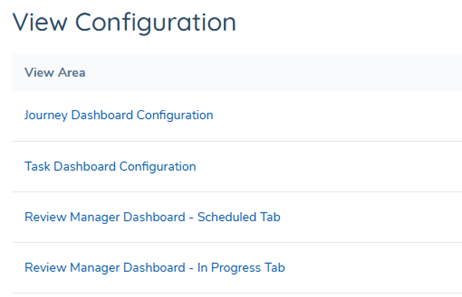
To update the columns go to the 'View Configuration' in the 'Tenant' section under management. Select the 'Review Manager Dashboard - Scheduled Tab' or the 'Review Manager Dashboard - In Progress Tab'
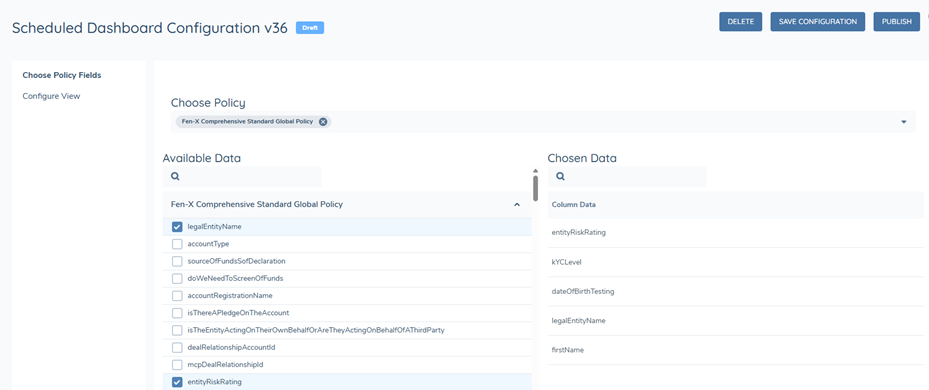
Select the latest version and on the 'Choose Policy Fields' tab, on the left had side you can select which policy fields you want to appear as columns in the grid. There is a maximum of 5 fields in addition to the aforementioned mandatory columns.
Once you select the fields visit the 'Configure' view tab to select the order of appearance as well as the fields you want to use for filtering.
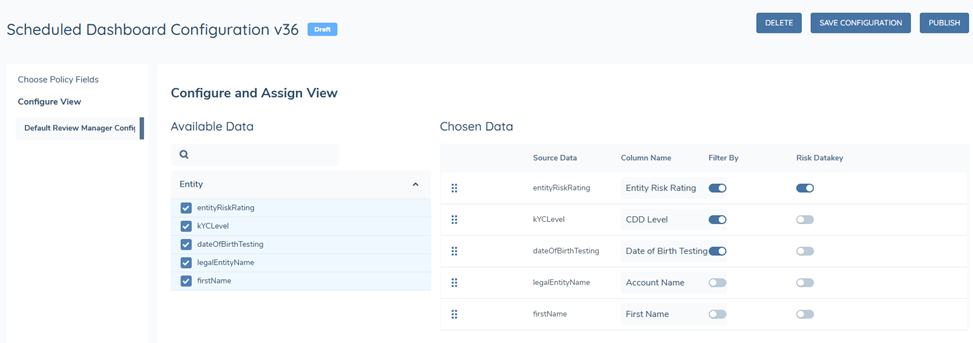
NOTE To ensure the data populates in the newly configured columns on your review dashboard, configure the views prior to having the dashboard enabled.
Permissions - Review Manager Dashboard
Additional permissions required to access & configure the dashboard are as follows:
- Review Manager Access
- Provides users with access to the dashboard from the left hand navigation
- Review Manager Configuration Access
- Provides access to the view configuration for the dashboard (where you configure the columns)
- Review Manager Configuration Edit
- Provides edit rights to the view configuration for the dashboard (where you configure the columns)
Access Layers
The review journeys will inherit the access layers from the entity.
Turning on the Review Manager Dashboard
Please speak to your client partner, customer success manager or project team to enable the Review Manager Dashboard.
FAQ
Can I use this feature with Journey Schedules?
Yes, we have introduced system logic that will ensure a smooth and semaless transition from using Journey Schedules to the Review Domain and Review Journey Scheduling rules, allowing you to leverage all of the exciting new features the review domain has to offer. We don't recommend configuring any Journey Schedules if using Review Journey Scheduling. Customers who are not live yet (in production) can replace rules configured in Journey Schedules with Entity Scoping Rules in Review Journey Scheduling. Any customer using our Product feature can use Review Journey Scheduling to schedule Product Reviews.
A Journey Instance wasn't created for a Scheduled Review?
The Scheduled Review will launch journeys of the specified Review Type (Journey Type) and the entity will launch a Journey Instances for all Journey Schemas with qualifying scoping conditions (from 0 to many).
In the unlikely event that the specified 'Journey Type' doesn't result in any successfully launched journeys (i.e. the entity doesn't meet Journey Schema scoping conditions), the Scheduled Review will be updated to 'Failed' status.
Why are multiple journeys launched for this review?
The Scheduled Review will launch journeys of the specified Review Type (Journey Type) and the entity will launch a Journey Instances for all Journey Schemas with qualifying scoping conditions (from 0 to many).
Why aren't Product Reviews are being scheduled?
The entity needs to satisfy the conditions of an Entity Scoping rule that includes 'Product' in the Additional Reviews for Matching Entities field. If an Entity hasn't satisfied an Entity Scoping rule that triggers assessment of Product Scoping rules, then no product reviews will be scheduled, even if there are products that qualify for Product Scoping rules.
We centralise Entity Scoping so that configurators don't need to repeat Entity Scoping conditions in every Product Scoping rule.
I can't see any products in the Manage Products task of a Product Review Journey
The Manage Products task will present only products that are in-scope for the review (i.e. those that met the scoping conditions of the source Scoping rule). There must be at least 1 in-scope product for the journey to launch, so if there are no visible products, there may be a conflict with a "Product Scoping Rule" configured to apply to the Manage Products task in this Journey (refer to 'Filter Products Depending on Journey' section of the Product Enablement Configuration Guide).
How can I remove a Scheduled Review?
It is possible to use Review command APIs to delete a scheduled review. Otherwise they will persist until being launched or set to offboarded status.